If you’ve been shopping for web design lately, you’ve probably noticed a new phrase showing up everywhere: AI web design agency. Sometimes it means an agency using better tools. Sometimes it’s a fancy label for a template factory. And sometimes it’s a genuinely faster, more measurable way to ship high-performing sites.
Here’s the thing. “AI” is not the product. A great website is the product. You still need strategy, positioning, UX, conversion thinking, technical SEO, and serious QA. The best agencies use AI to remove busywork, accelerate iteration, and standardize quality, not to replace craft.
In this guide, I’ll break down what an AI web design agency actually is, what deliverables you should expect, how pricing usually works in 2026, and a practical framework to compare options. If you’re trying to decide between an agency, an AI website builder, or building in-house, you’ll leave with a clear answer.
What is an AI web design agency?
An AI web design agency is a web design team that uses AI throughout the workflow to speed up production and improve consistency. That can include AI-assisted research, content drafting, design system generation, image generation, component-based building, automated QA checks, and AI-supported iteration after launch.
The key difference is not whether they use ChatGPT or Figma plugins. It’s whether AI is integrated into a repeatable delivery system that improves outcomes.
“AI-assisted” vs “AI-built” vs traditional web design
Most offers fall into one of three buckets.
- AI-assisted agency delivery
- Humans lead strategy, UX, information architecture, and QA.
- AI supports research, copy drafts, variations, and production tasks.
- You get speed without losing accountability.
- AI-built website offer
- The promise is often “instant website in minutes.”
- You may get a quick first draft, but the gaps show up in brand consistency, conversions, SEO, and edge cases.
- Great for simple needs, risky for high-stakes sites.
- Traditional agency delivery
- Strong craft, but timelines can be longer due to manual steps.
- Variation across designers is common.
- Updates after launch often require tickets and delays.
The best model in 2026 is usually AI-assisted plus a standardized system, where humans own the hard decisions and AI speeds up the execution.
What deliverables you should receive
When you hire an agency, you are not buying “pages.” You’re buying a system that should make your marketing easier for the next 12 to 24 months.
A solid AI-enabled agency should deliver:
- Discovery and strategy docs: target customer, positioning, messaging hierarchy, conversion goals
- Information architecture: sitemap, page roles, navigation plan
- Design system: typography, spacing scale, components, section library
- Copy and content plan: page-by-page outlines, CTAs, proof points, FAQs
- Build: responsive pages, forms, integrations, CMS blocks if needed
- SEO basics: metadata, indexability, redirects, sitemap, structured data where relevant
- Performance plan: image optimization, loading strategy, Core Web Vitals targets
- Analytics: GA4, conversion events, pixels, consent where required
- Launch checklist and QA report
- Ownership package: source assets, documentation, admin access, export options
If they cannot explain these deliverables clearly, you are not looking at an “AI web design company.” You are looking at a production shop with a buzzword.
Common use cases and industries for AI web design services
AI web design services are not one-size-fits-all. Where they shine is where you need speed, consistency, and a repeatable system.
Local services, professional services, ecommerce, and SaaS
Common winners:
- Local services (HVAC, dental, home services): landing pages, service pages, lead capture, local SEO structure
- Professional services (law, accounting, consulting): credibility design, proof, case studies, conversion funnels
- Ecommerce: faster merchandising pages, content scaling, category and collection structures
- SaaS: rapid landing page iteration, product-led growth pages, onboarding and activation flows
A smart agency will show you examples by business model, not just “pretty websites.” You want to see how they handle:
- proof and trust signals
- conversion patterns for your industry
- page speed under real conditions
- SEO structure and content depth
Landing pages vs full websites
A lot of frustration comes from hiring the wrong scope.
- If you are testing a new offer, a landing page sprint can be the right move.
- If you are changing positioning, launching new product lines, or rebuilding SEO foundations, you likely need a full website.
A good AI website design agency will help you decide scope based on business goals, not what fills their calendar.
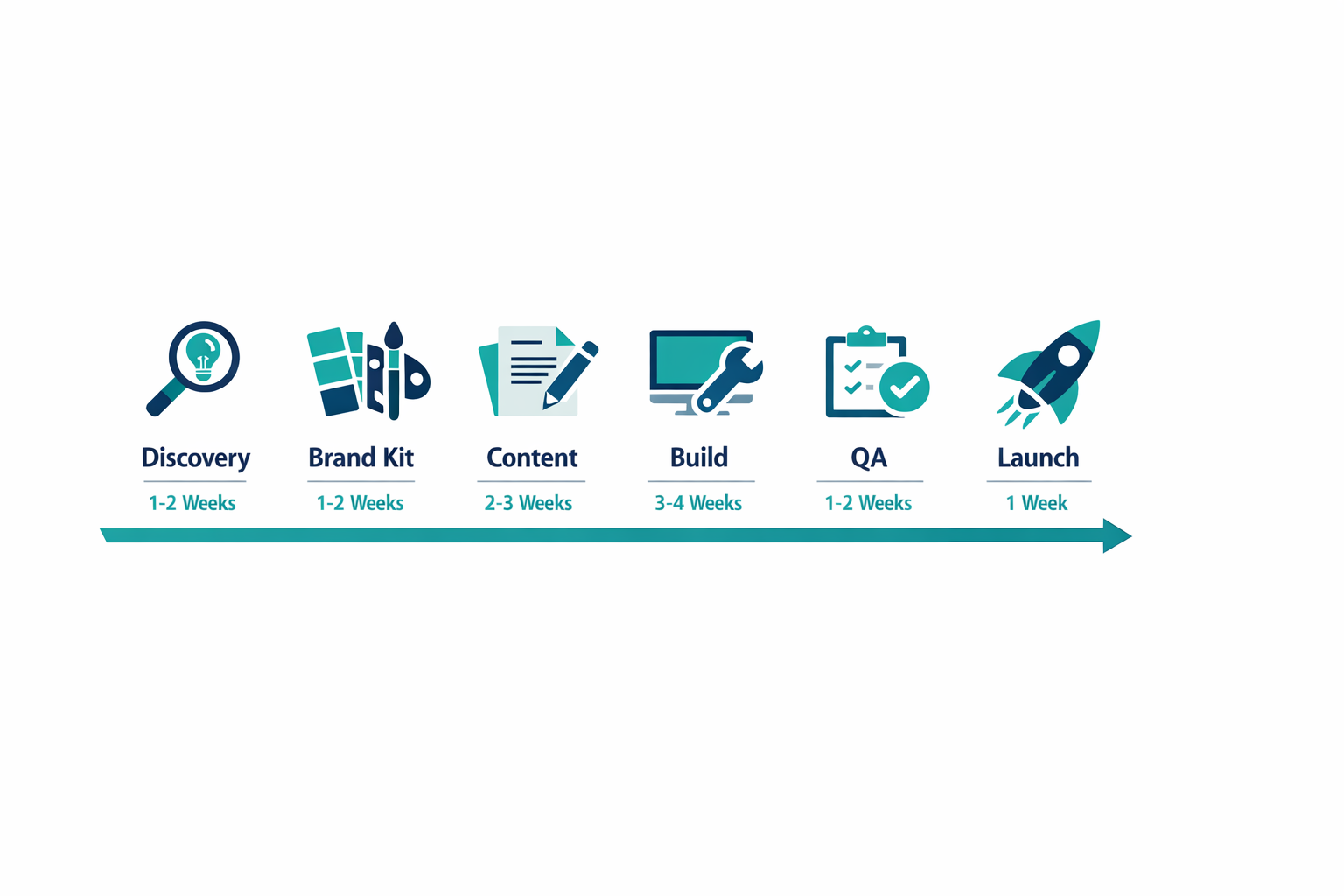
AI web design agency: a detailed delivery timeline
If you want to compare agencies fairly, you need a shared reference point. That reference point is the delivery timeline: what happens week by week, what you approve, and what you should receive at the end.
Here is a realistic, decision-friendly timeline for an AI web design agency in 2026. The names vary, but the deliverables should look familiar.
Phase 1 (Days 1 to 5): Discovery, goals, and constraints
What you do: stakeholder call, share existing assets, define success metrics.
What the agency should produce:
- A short brief that captures your audience, offer, and primary conversion action
- A competitive scan with 5 to 10 examples, plus what to copy and what to avoid
- A performance and SEO baseline (current CWV, rankings, top pages) if this is a redesign
- A clear scope map: which pages are in v1, which are in v2
Phase 2 (Days 6 to 10): Information architecture and wireframes
What you do: approve the sitemap and a simple wireframe for the key pages.
What the agency should produce:
- Sitemap with page purpose and target keyword per page
- Navigation plan and internal linking logic
- Wireframes for homepage and 1 to 2 key templates (service, product, or landing)
Phase 3 (Days 11 to 15): Messaging hierarchy and copy drafts
AI can accelerate copy drafts, but approval still has to be human.
What you do: validate claims, proof, compliance, and tone.
What the agency should produce:
- Page-by-page outlines (H1, H2s, CTAs, FAQs)
- Copy draft v1 with 2 to 3 headline options per key section
- A proof plan: where testimonials, logos, case studies, and numbers will go
Phase 4 (Days 16 to 22): Visual design and component library
What you do: approve look and feel and confirm that it matches your market.
What the agency should produce:
- Brand kit or refreshed brand kit (type, color, spacing)
- Component set (buttons, cards, forms, pricing blocks, testimonial blocks)
- Section library for fast page assembly
Phase 5 (Days 23 to 30): Build, integrations, and responsive QA
This is where a strong system shows. The best teams build fast without breaking fundamentals.
What you do: review staging, test forms, confirm tracking events.
What the agency should produce:
- Staging site with mobile-first layouts and accessibility basics
- Integrations: CRM, email, booking, payments, live chat as scoped
- Tracking plan implemented: GA4 events, pixels, consent banner where needed
Phase 6 (Days 31 to 35): Performance, security, and launch
What you do: final approvals and content sign-off.
What the agency should produce:
- Redirect map (if redesign) and indexability checks
- Performance pass with target ranges for Core Web Vitals
- Security baseline (forms, spam prevention, basic hardening)
- Launch checklist and rollback plan
If an agency cannot show you a timeline like this, they are not running a mature delivery system. They are winging it, with or without AI.
The typical process: how an AI website design agency works
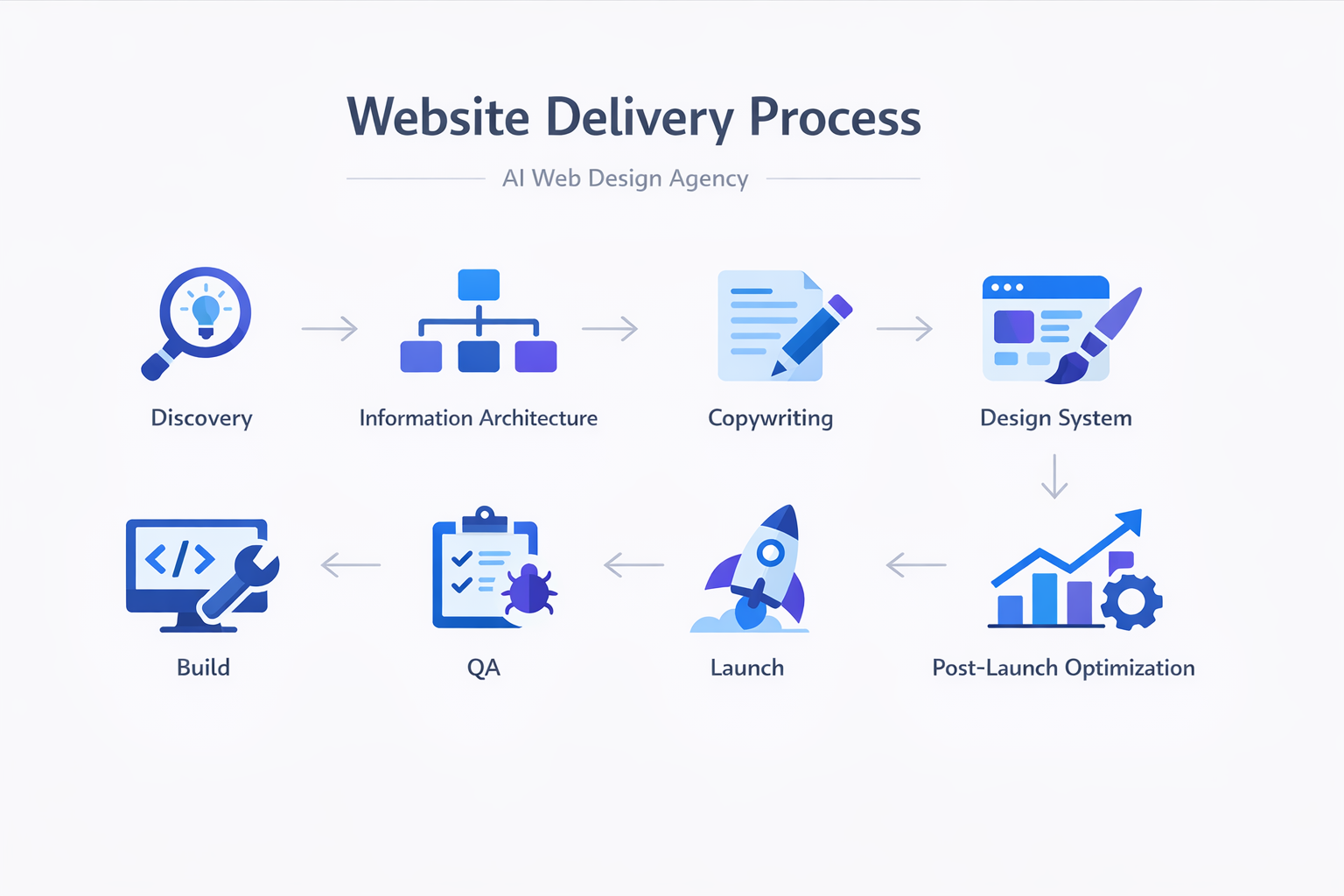
A fast agency is not the one that skips steps. It’s the one that removes friction from steps you still need.
Below is the process you should expect, and what “good” looks like at each stage.
Discovery and positioning
Discovery should feel like strategy, not a form.
You want answers to:
- Who are we targeting, and what do they care about most?
- What is the primary conversion goal on each page?
- What objections need to be handled before someone books a call or buys?
- What competitors are doing, and how do we differentiate?
A practical deliverable is a one-page messaging hierarchy:
- headline promise
- supporting proof
- three primary benefits
- top objections and responses
- CTA strategy
If an agency jumps straight into “pick a template,” that’s a red flag.
Brand kit and design system
The fastest way to build a consistent site is to build a small set of reusable parts.
A modern AI-enabled workflow often includes:
- a brand kit (colors, type, style rules)
- a component library (buttons, cards, grids, testimonials)
- a section library (hero variants, pricing blocks, FAQ patterns)
This is where AI can help generate variants quickly. Humans should still validate accessibility, hierarchy, and brand fit.
Content production and approvals
Content is where timelines get destroyed.
A good agency uses AI to produce structured first drafts fast, then routes them through a tight approval loop. That loop should include:
- page outline approval
- headline and CTA approval
- final copy review
For SEO, you should also see:
- target keyword per page
- internal linking plan
- FAQs mapped to objections
If approvals are vague, your launch date is going to slide.
Build, QA, and launch
The build phase should be boring. That’s a compliment.
It should include:
- responsive checks
- cross-browser checks
- form tests
- tracking tests
- 404 and redirect tests
- accessibility basics
Google’s documentation on creating helpful, people-first content is a good baseline for what the site should aim for: Google Search Central guidance.
For performance targets and real-world metrics, web.dev Core Web Vitals is the reference most teams align to.
Real-world mini scenarios (with assumptions)
Pricing conversations get easier when you can picture the work. Here are three realistic scenarios you can use to sanity-check a proposal. These are not promises. They are ranges based on common agency scopes in 2026.
Scenario 1: SaaS landing page sprint (1 to 3 pages)
Situation: You are launching a new feature or offer and you need a fast page that converts.
Typical scope:
- Messaging hierarchy workshop
- One landing page template plus a thank-you page
- Basic SEO hygiene (metadata, indexability)
- GA4 events for form submit or demo booking
Timeline: 5 to 10 business days.
Budget range: $1.5k to $6k, depending on strategy depth and revision rounds.
What good looks like: a page you can A/B test, with clear CTAs and a plan for iteration.
Scenario 2: Local service business rebuild (10 to 20 pages)
Situation: You need leads. Your current site is slow, thin, or not ranking locally.
Typical scope:
- Sitemap rebuild (service pages, location pages, FAQs)
- Copy refresh with proof points and objection handling
- Local SEO basics (NAP consistency guidance, schema where relevant)
- Call tracking or form tracking
Timeline: 3 to 6 weeks.
Budget range: $4k to $15k.
What good looks like: faster load times, clearer service pages, and analytics that tie leads to pages.
Scenario 3: Ecommerce optimization (template plus collections)
Situation: Your store works, but conversions and merchandising are inconsistent, and pages are slow on mobile.
Typical scope:
- Homepage and collection template optimization
- Product page UX improvements (reviews, shipping clarity, trust)
- Performance work (image strategy, script control)
- Analytics for add-to-cart, checkout start, purchase
Timeline: 4 to 8 weeks.
Budget range: $8k to $25k+, especially if custom apps and integrations are involved.
What good looks like: measurable lift in conversion rate, not just a prettier theme.
When an agency shares scenarios like this upfront, they usually have strong process maturity. When they refuse, they are often hiding uncertainty behind “custom quote” language.
Pricing: what AI changes (and what it doesn’t)

Let’s be honest. AI changed the cost of production. It did not change the cost of thinking.
In 2026, AI website design services pricing usually shifts in two ways:
- Agencies can ship faster, so timelines compress.
- Agencies can maintain more sites per team, so subscription models become more common.
But the work that drives outcomes is still human-led: positioning, UX decisions, proof strategy, QA, and iteration.
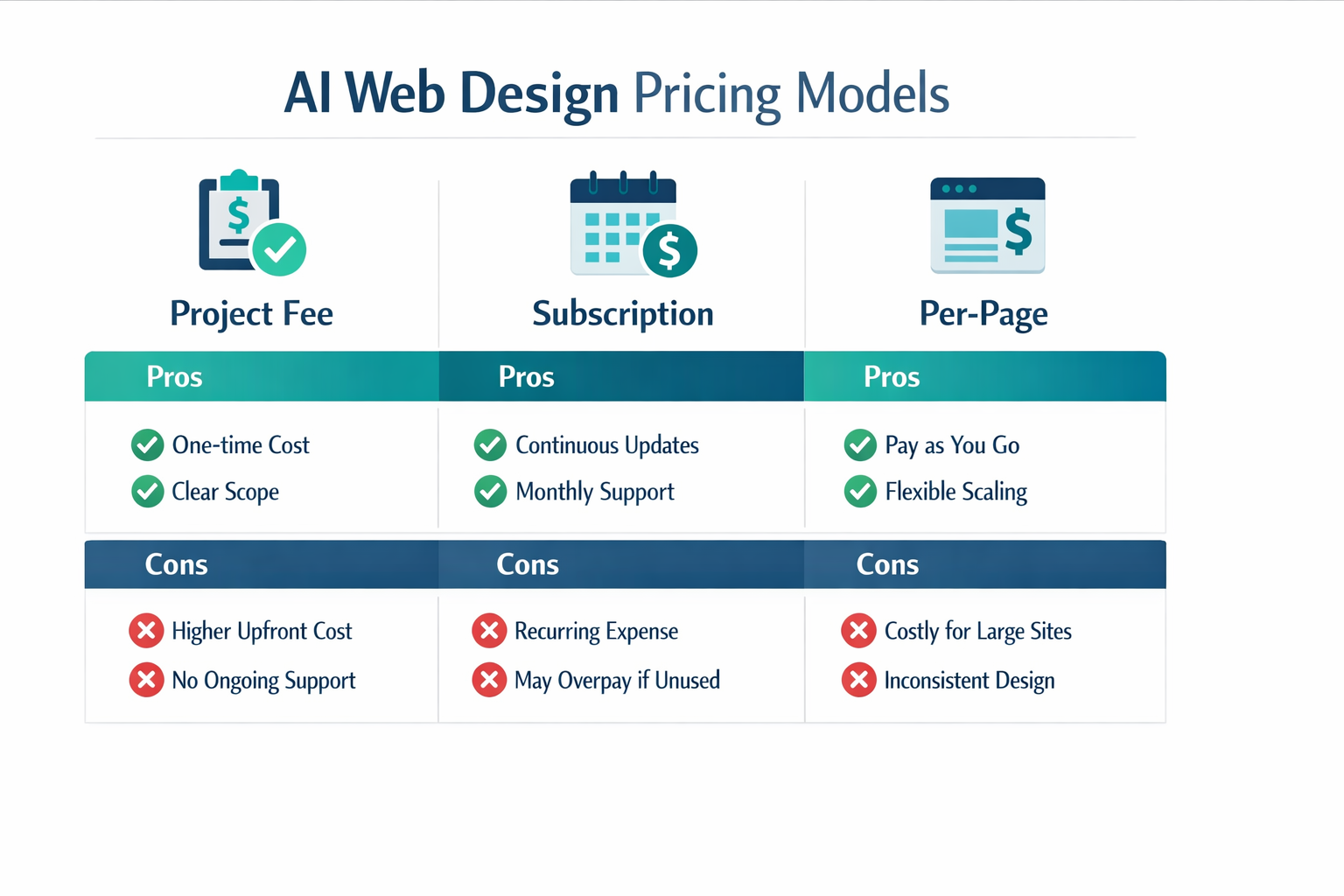
Pricing models: project, subscription, per-page
Common models:
- Project fee
- Best for: full builds, rebrands, major launches
- Watch for: change-order traps, unclear scope
- Subscription
- Best for: ongoing landing pages, updates, SEO content, multi-site brands
- Watch for: vague deliverables, long lock-ins without ownership clarity
- Per-page pricing
- Best for: clear content sites with predictable structures
- Watch for: per-page incentives that encourage bloated sites, not better sites
What affects price: pages, integrations, copy, SEO, localization
When quotes vary wildly, it’s usually because of these factors:
- Page count and templates: 5 bespoke pages is different from 25 templated pages
- Copywriting: good conversion copy is a skill, not a checkbox
- SEO depth: technical SEO and content structure take real time
- Integrations: CRM, booking, ecommerce, memberships, custom forms
- Localization: multiple languages adds complexity (and QA)
- Governance: roles, approvals, and multi-stakeholder review cycles
A fair comparison is to normalize quotes against the same scope. Ask every agency to deliver:
- a sitemap with page count
- a list of integrations
- who writes the copy
- what SEO is included
- how revisions work
How to compare quotes fairly
Use a simple “apples-to-apples” checklist.
Scope clarity
- Do you have a written sitemap?
- Are page templates defined?
- Are copy responsibilities explicit?
Quality controls
- Is there a QA checklist?
- Are CWV targets mentioned?
- Is SEO included beyond meta titles?
Ownership
- Who owns the domain, site, and content?
- Can you export the site?
- Is there lock-in?
If the quote is cheap because it excludes thinking, QA, and ownership, it will become expensive later.
Tooling stack: what an AI web design agency should use
A polished site is the output. The system behind it is the real value. One of the fastest ways to tell whether you are dealing with a real AI web design agency or just a team using a few prompts is to look at their stack and how they use it.
This is not about brand names. It is about coverage. A serious team has answers for design collaboration, build quality, SEO hygiene, performance monitoring, accessibility, analytics, and security.
Design and collaboration (Figma and a component mindset)
In 2026, most high-performing teams run design in a tool like Figma because it makes feedback, handoff, and component libraries painless.
What to ask:
- Do you design with a reusable component library, or is every page custom one-off work?
- How do you capture feedback, and how many revision rounds are included?
- Do you create a section library so new pages do not require redesign?
What you should receive:
- A lightweight design system (type scale, colors, spacing)
- A component set (buttons, cards, forms, nav, pricing blocks)
- A small set of page templates that can scale
Build platform (speed, ownership, and editor experience)
Some agencies build on Webflow, WordPress, Shopify, or a custom framework. Others build on modern AI-enabled platforms that standardize quality and make maintenance easier.
Here is the non-negotiable part: you should know how you will update the site after launch.
What to ask:
- Who owns the account, domain, and hosting?
- Can we export or migrate if we leave?
- What does editing content look like for our team?
If you are looking for a faster, standardized workflow, an AI website builder can be a strong foundation, especially if you want ongoing updates without tickets. You can see how that works on lindo.ai and the AI website builder page.
QA and performance (Core Web Vitals in real life)
Every agency will claim they care about speed. Fewer can show the budget and the measurement.
What to ask:
- What is your performance budget for mobile (LCP, INP, CLS targets)?
- Do you test on real devices and throttled connections?
- What do you do about third-party scripts and tag bloat?
A good starting point for best practices is Google’s guidance on Core Web Vitals and the broader web.dev performance docs.
Accessibility (not optional anymore)
Accessibility is not a “nice to have”. It is a quality baseline, and in many markets it is increasingly tied to procurement and legal risk.
What to ask:
- Do you run automated checks, and do you do manual keyboard testing?
- How do you handle color contrast, focus states, and form errors?
You do not need perfection on day one, but you do need a plan and a habit.
SEO tooling and workflow
SEO is part of the build, not a post-launch add-on.
What to ask:
- Who writes metadata, and who reviews it?
- Do you ship a redirect map for redesigns?
- Do you have a checklist for indexability and structured data?
For fundamentals, point them to Google Search Central. A serious team should already be using it.
Security basics (forms, spam, and update hygiene)
A marketing site is still software. Forms get attacked, logins get brute forced, and plugins get outdated.
What to ask:
- How do you protect forms against spam and abuse?
- What is your update policy for plugins and dependencies?
- Do you follow a baseline like the OWASP Top 10?
Great websites are built twice: once in design, and once in QA. The agency that invests in QA will look slower on paper, but it will be faster in the real world.
SEO and performance considerations (don’t let “AI” distract you)
The fastest way to waste money on a website is to launch something that looks good but can’t be found, loads slowly, or tracks nothing.
Technical SEO checklist for an AI web design company
This is the minimum baseline you should expect:
- Indexability: robots.txt, meta robots, canonical tags
- XML sitemap and clean URL structure
- 301 redirects if you are migrating
- Title tags and meta descriptions written for intent
- H1 and heading hierarchy that matches the page job
- Internal linking between key pages
- Schema markup where appropriate (Organization, FAQ, LocalBusiness)
For technical SEO fundamentals, Google Search Central is still the most reliable source.
Core Web Vitals targets
Agencies love to say “fast.” Ask what that means.
Common targets aligned with Google guidance:
- LCP (Largest Contentful Paint): aim for 2.5s or less
- INP (Interaction to Next Paint): aim for 200ms or less
- CLS (Cumulative Layout Shift): aim for 0.1 or less
Reference: Core Web Vitals.
Tracking and analytics setup
Your site should not launch without:
- GA4 installed
- conversion events configured (form submit, booking, checkout)
- pixel integrations if you run ads
- basic consent management where legally required
If an agency says “we can add tracking later,” you’ll lose baseline data that’s hard to recover.
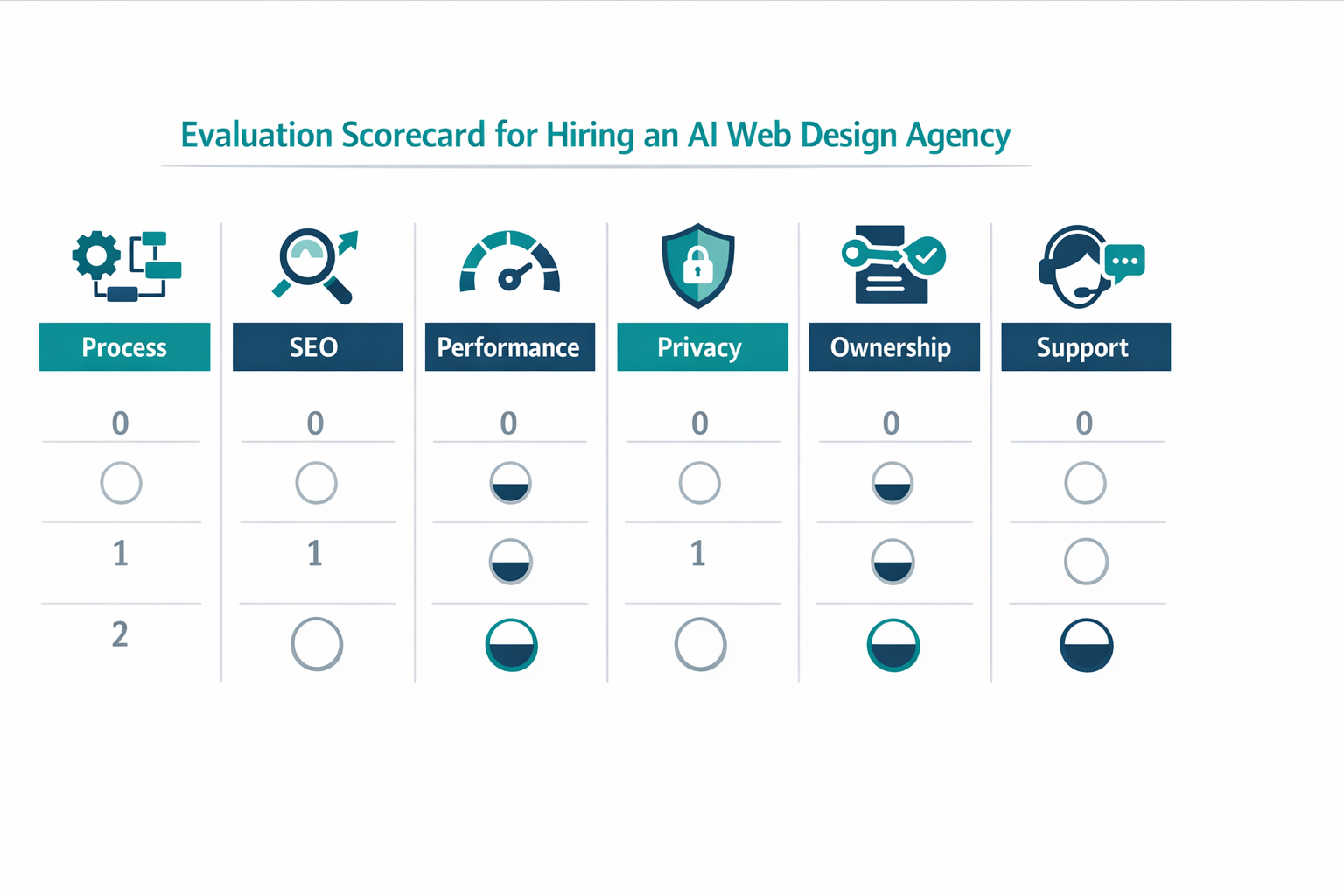
How to evaluate a web design agency using AI
This is the section most competitor posts skip. They talk about AI. They don’t tell you how to choose.
Questions to ask (tools, workflow, ownership, data privacy)
Ask them to show you the checklist they run on every launch. A serious AI web design agency has a repeatable QA system, not a vibe.
Ask these directly in your first call.
Tools and workflow
- What tools do you use for design, content, and QA?
- Where is AI used, and where is human review mandatory?
- How do you keep brand consistency across pages?
Ownership and access
- Who owns the design files, copy, and site after launch?
- Will I get admin access?
- Can I export the site if I leave?
Privacy and security
- Do you train models on client data?
- How is client data handled (forms, CRM integrations)?
- What is your security baseline?
For security basics, even a lightweight checklist aligned with OWASP Top 10 is a sign the agency takes risk seriously.
Red flags that matter
A few red flags should immediately slow you down:
- Vague “AI magic” with no process and no QA
- No ownership clarity (you can’t export, you can’t get admin access)
- No performance targets or “speed is included” without metrics
- No SEO plan beyond meta titles
- No content approval system
- Portfolio that looks good but has no proof (no outcomes, no numbers, no before/after)
Portfolio review checklist
When you review a portfolio, don’t just look at visuals. Test the site like a buyer.
- Can you understand the offer in 5 seconds?
- Is there a clear primary CTA?
- Is the proof strong (logos, case studies, testimonials)?
- Does the site load fast on mobile?
- Are forms easy to use?
If you want a deeper UX perspective, Nielsen Norman Group has years of research on usability patterns that still apply, with or without AI.
Agency vs DIY AI website builder
| Option | Typical timeline | Typical cost range (2026) | Best for | Main trade-off |
|---|---|---|---|---|
| AI web design agency | 3 to 6 weeks | $4k to $25k+ | Growth-focused sites where conversion, SEO, and brand matter | You must align on scope and approve quickly, otherwise speed disappears |
| Traditional agency | 6 to 12+ weeks | $8k to $60k+ | Complex custom builds and large org processes | Slower iteration, more manual work, and more cost tied to labor hours |
| DIY AI website builder | 1 to 5 days | $20 to $200/mo | Early-stage projects, small sites, and fast tests | You own strategy, copy, QA, SEO, and ongoing maintenance |
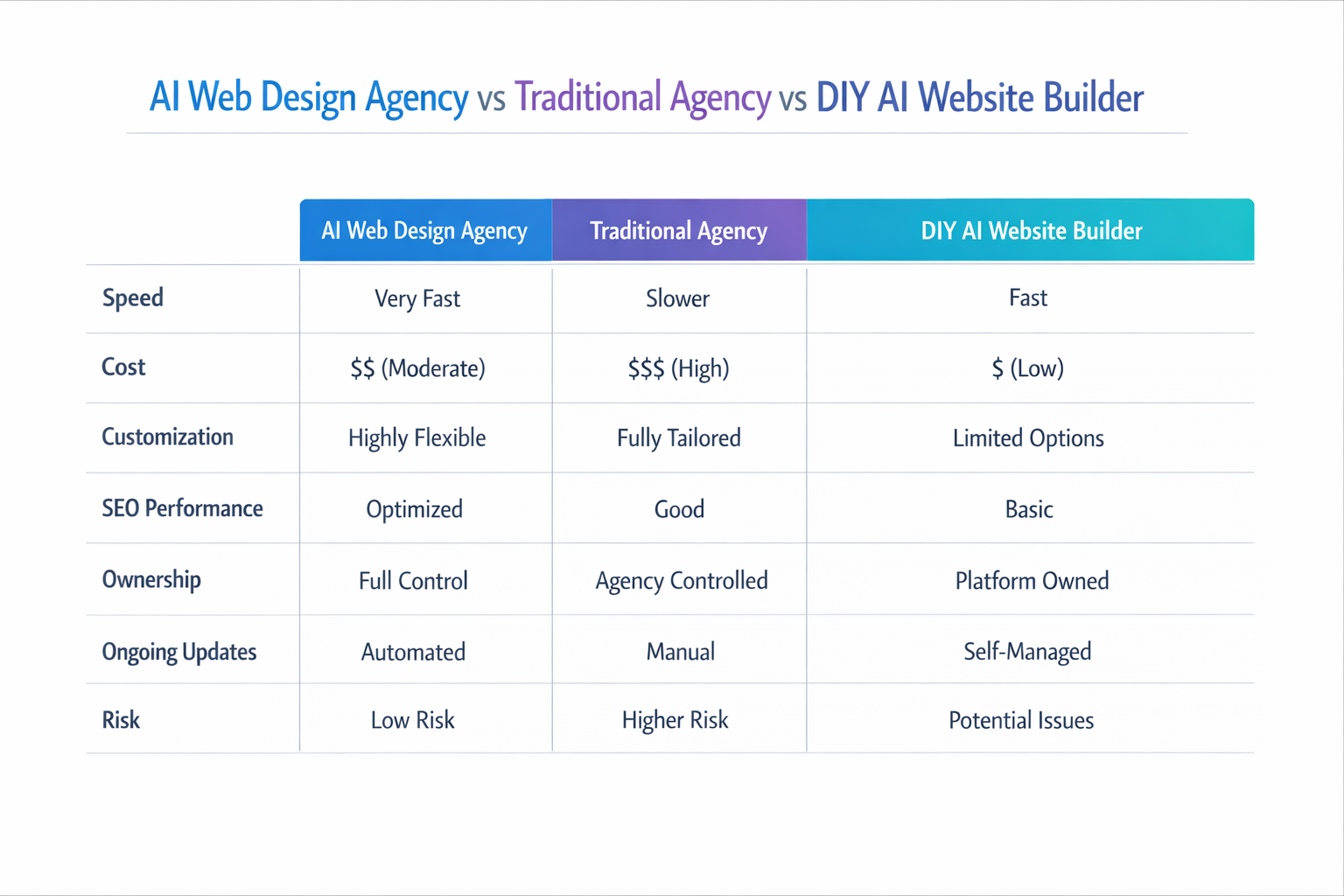
This is the decision most teams face in 2026: hire an AI web design agency, use an AI website builder, or do both.
When DIY wins
DIY is a great choice when:
- you need a simple site quickly
- you have clear messaging already
- you can write decent copy
- you can maintain the site yourself
If you’re exploring an AI builder route, start by understanding what “builder” really means: templates, hosting, SEO controls, performance, and collaboration.
When an agency wins
An agency is usually worth it when:
- positioning is unclear and needs strategy
- conversion rates matter (ads, high-ticket offers)
- SEO is a growth channel, not a checkbox
- multiple stakeholders need governance
- you need custom integrations
The hybrid model (my favorite)
A hybrid model looks like this:
- Agency sets positioning, design system, and site structure
- Agency builds the first version and establishes quality standards
- Your team updates content and launches pages using the system
- Agency stays available for higher-level iterations
This is how you get the best of both worlds: speed and control.
Why lindoai fits agencies (and clients who want speed without chaos)
If you want agency-level outcomes with a more standardized system, you want tooling that supports:
- fast production without losing brand consistency
- multi-client workflows
- scalable website management after launch
Start at the platform overview: lindo.ai. Explore the product approach: AI website builder. If you are an agency building under your own brand, see: white label website builder.
A website is not a one-time project. The best results come from a system you can keep improving without rebuilding from scratch.
Conclusion
Hiring an AI web design agency can be a smart move in 2026, but only if the agency pairs AI speed with human-led strategy and QA. Focus on deliverables, ownership, SEO and performance targets, and a clear process. If those pieces are solid, AI becomes a multiplier, not a risk.
See how lindo.ai ships and manages sitesFAQ
What is an AI web design agency?
An AI web design agency is a team that uses AI across research, content, design, and production to deliver websites faster and more consistently. The best agencies still rely on humans for strategy, UX decisions, and QA. AI supports execution, iteration, and scaling.
How much does an AI web design agency cost?
Costs vary based on scope, copywriting, SEO depth, and integrations. In practice, most pricing falls into project fees, subscriptions, or per-page models. The right question is not “what’s the cheapest,” it’s “what scope and quality controls are included for that price.”
Is AI web design good for SEO?
It can be, if the agency treats SEO as a system. That includes technical SEO basics, strong information architecture, intent-driven copy, and performance targets like Core Web Vitals. If “AI” is used to produce thin pages without QA, SEO usually suffers.
How long does it take to build a site with AI?
AI can accelerate drafts and reduce production time, but timelines still depend on approvals, copy review, and integrations. A common range for a full small business site is a few weeks, while a landing page sprint can be much faster. Ask for a timeline with milestones and deliverables.
Should I hire an agency or use an AI website builder?
If you have clear messaging and need a straightforward site, a builder can be the fastest option. If you need strategy, conversion thinking, SEO foundations, or complex integrations, an agency usually delivers better outcomes. Many teams choose a hybrid approach where an agency sets the system and the client runs updates.