AI Website Builder
How to Create a Website with AI for Free (2026 Guide)
• • 4 min read
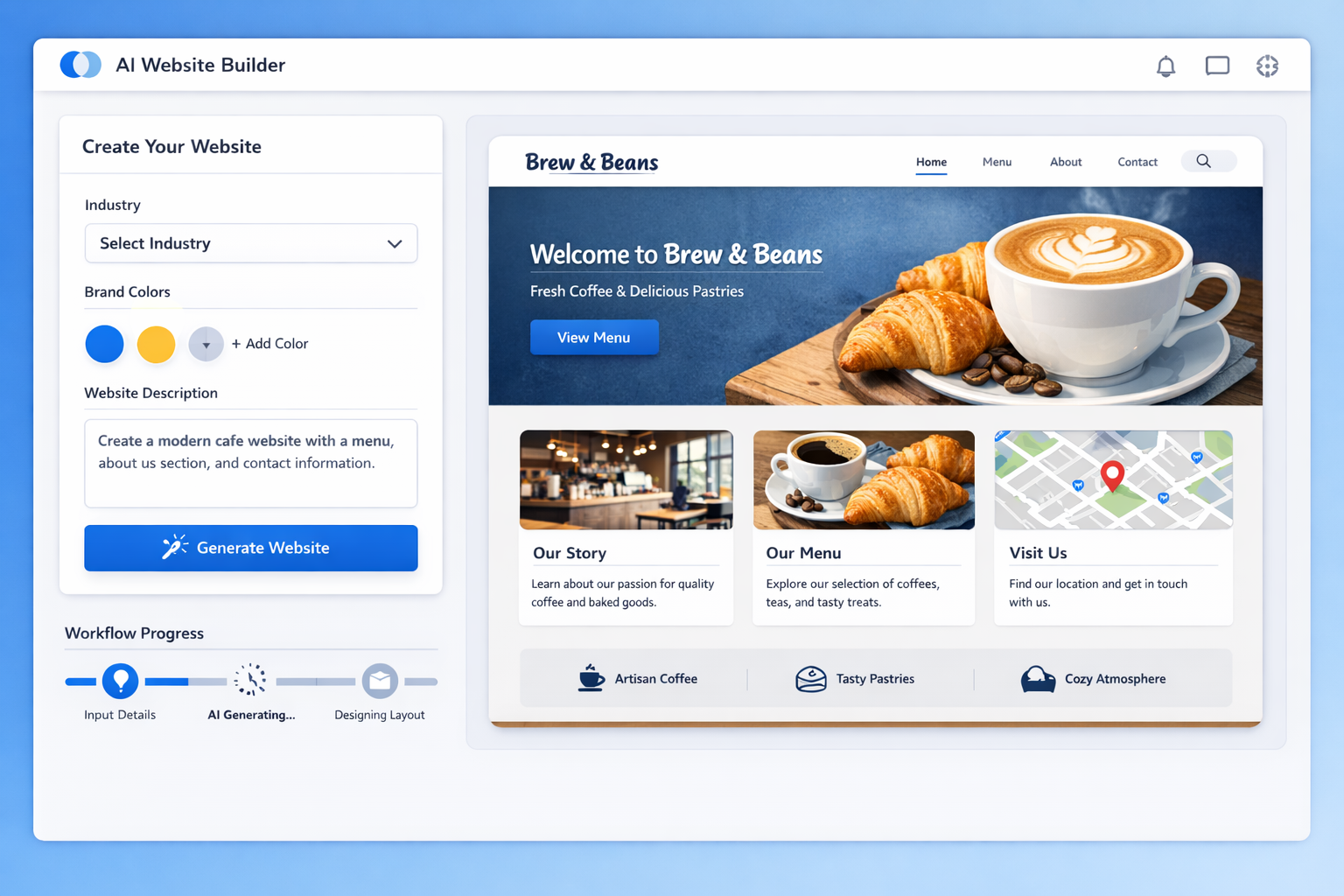
A complete, honest guide to building a professional website with AI for free: what free plans really include, step-by-step instructions, and when to upgrade.
Let's be honest about what usually happens when someone searches for a free website builder. They find a dozen tools promising "free forever," sign up, and then hit a paywall the moment they want a custom domain, or worse, they end up with a site plastered in the builder's branding and ads.
That's the old way. The new way, building a website with AI, has changed the economics of getting online. AI tools can now generate a complete, professional-looking site from a simple prompt, and the best part is that several of them, including lindoai, offer genuinely useful free plans.
This guide walks you through exactly how to create a website with AI for free, what "free" really means, which tools are worth your time, and when it makes sense to upgrade. By the end, you'll have a live website without spending a cent, and you'll know precisely what you'd gain by paying.
Short answer: yes. Longer answer: it depends on what you mean by "free," and being clear about that upfront saves you a lot of frustration.
Every free plan comes with trade-offs, and AI website builders are no exception. The typical free tier includes the AI generation tools, a limited number of pages, hosting on the platform's subdomain, and access to basic templates. What it usually excludes is a custom domain, advanced SEO controls, e-commerce features, and sometimes the builder's own branding on your site.
That doesn't mean free plans are useless. For a personal project, a portfolio, a side business, or a test of an idea, a free AI-built site is genuinely sufficient. The key is going in with clear eyes about what you get and what you don't.
Here's a realistic picture of a typical free plan:
yoursite.builder.comCompare that to what a paid plan unlocks: your own domain, no branding, more pages, e-commerce, better SEO tools, and priority support. The free plan gets you online and looking professional. The paid plan turns your site into a serious business asset.
The three limitations you'll actually hit are the subdomain, the branding, and the feature caps. Here's how to handle each:
Subdomain: A subdomain is fine for testing and for personal projects. If you need a professional address, domains cost about $10 to $15 per year, and most builders let you connect your own domain even on a low-tier paid plan.
Branding: Some free builders put their logo or a small "built with" badge on your site. If that bothers you, look for platforms that keep free sites clean, or plan to upgrade when the site starts generating real business.
Feature caps: Page limits and missing e-commerce are the common caps. Work around them by keeping your free site focused: one clear purpose, a handful of pages, and a contact form. That's all most small businesses actually need to start.
Let's talk about the costs people don't mention. The obvious costs are zero: no subscription, no designer, no developer. But there are three hidden costs to every free website.
Your time. Free builders still require you to write the prompt, review the copy, pick images, and customize the design. Budget a few focused hours, and you'll get a much better result than rushing it.
Your domain. If you want a professional address, that's $10 to $15 per year. It's not the builder charging you; it's the cost of domain registration itself, which everyone pays.
Your upgrade path. Eventually you'll likely want e-commerce, advanced SEO, or your own branding. Plan for that as a future step rather than pretending you'll never need it.
None of these are reasons to avoid free builders. They're just the honest full picture, so you can decide with your eyes open.
The honest truth: a free AI website is the perfect starting point, not a permanent home. Build free, prove your idea works, and upgrade when the site starts paying for itself.
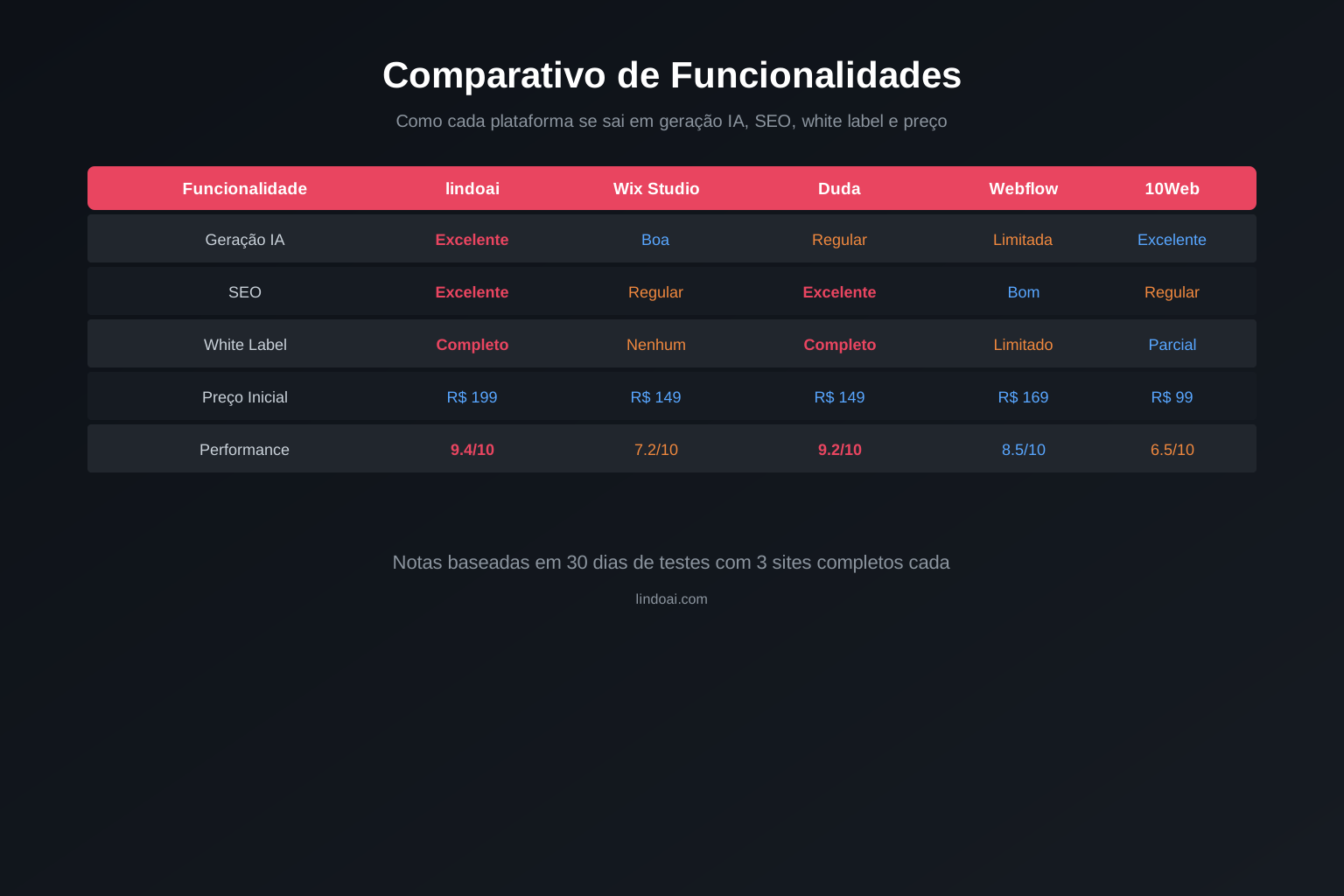
Not all free plans are created equal. Here's what to look for and how the main options stack up.
A good free plan gives you real, usable functionality, not just a teaser. The AI generation should work fully, the resulting site should be genuinely professional, and you shouldn't feel like you're being held hostage by paywalls at every step.
The three things I evaluate first: Does the AI output quality hold up? Is the free tier actually usable for a real project? And how aggressive is the upgrade pressure? The best tools feel generous on the free tier because they know a good experience converts users into paying customers.
Traditional free builders are templates with a free sticker on them. You still do most of the work: choosing a template, replacing text, adjusting layouts, sourcing images. The builder is just a container.
AI builders change the equation because generation is the product. A free user gets the same generation engine as a paid user; the limits are on scale, not quality. That means even the cheapest free plan produces a genuinely professional starting point, which is why AI builders have become the default recommendation for budget-conscious site owners.
Before you commit to any free builder, read its privacy policy. Free platforms monetize somehow, and for some that means using your data or showing you ads. Look for transparent policies and platforms that make money from subscriptions rather than data. PCMag's reviews of free website builders are a good independent starting point for spotting the trustworthy ones.
| Feature | lindoai (Free) | Wix AI | 10Web | Dorik |
|---|---|---|---|---|
| AI site generation | Yes | Yes | Yes | Yes |
| Free hosting | Yes | Yes | Yes | Yes |
| Custom domain on free | No | No | No | No |
| Free site branding | Clean | Wix ads on free | 10Web badge | Clean |
| E-commerce on free | No | No | No | No |
| Best for | AI-first, clean sites | General use | WordPress users | Simple sites |
lindoai stands out for keeping free sites clean and for making AI generation the centerpiece of the experience. The pricing page shows exactly what the free plan includes versus paid tiers, with no hidden surprises.
Ready to build? Here's the process, step by step.
Head to your chosen builder and sign up. Most platforms, including lindoai, let you start with just an email address or a Google account. No credit card is required for the free plan, which is the first thing to check: if a "free" plan asks for payment details upfront, walk away.
Take a minute to look around the dashboard after you're in. You'll usually find the AI generator front and center, plus templates, site management, and settings. Familiarity with the layout saves time later.
You'll build a better site in one focused session than in five distracted ones. Before you open the builder, gather:
Having these ready means you won't stop mid-build to hunt for files, and the AI will produce sharper results when it has real details to work with.
Most AI builders offer two paths: pick a template and customize, or let the AI generate everything from a prompt. For a free site, the AI generation path is usually faster and produces a more cohesive result.
If you do pick a template, choose one close to your final goal: a service business template for a service business, a portfolio template for a portfolio. The closer the starting point, the less work the customization.
Your dashboard is mission control. From here you can create sites, edit them, publish, and manage your account. Spend a few minutes clicking through before you start generating, so you know where everything lives when you're in the flow.
This is where the magic happens. The quality of your prompt determines the quality of your site, so let's get this right.
A great prompt is specific. Instead of "make me a website for my business," write something like: "A professional website for a family-run Italian restaurant in Chicago, with a warm, welcoming feel. Include sections for our menu, reservations, our story, and customer reviews. We specialize in handmade pasta and wood-fired pizza."
The AI uses your prompt to make hundreds of decisions: structure, copy, tone, colors, imagery. The more context you give it, the better those decisions are. Include your business type, your audience, your location, and the feeling you want visitors to have.
Three things every good prompt covers:
If you have brand colors or a logo, mention them. If you know which sites you admire, describe what you like about them. The prompt is your design brief, so treat it like one.
For a freelance photographer: "A clean, minimalist portfolio site for a wedding and portrait photographer in Austin, Texas. Elegant, warm, and personal. Pages: home, portfolio gallery, about, pricing, contact. Emphasize natural light and candid moments."
For a local gym: "A high-energy website for a 24/7 fitness gym serving busy professionals. Bold colors, motivational tone. Pages: home, classes, membership pricing, trainers, contact. Include a free trial offer section."
For a consulting business: "A trustworthy, corporate-feeling website for a management consulting firm specializing in small business growth. Professional blue and navy palette. Pages: home, services, case studies, about, contact. Position the firm as an expert partner."
The AI gives you a strong draft. Now make it yours.
Read every word the AI wrote and edit it to sound like you. AI copy is competent but generic, and visitors can tell. Replace vague claims with specifics: real numbers, real services, real history.
Pay special attention to your headline and your "about" section. Those two pieces of copy do more to build trust than anything else on the site.
A quick editing framework: for every sentence the AI wrote, ask yourself three questions. Is it true? Is it specific? Is it in my voice? If the answer to any is no, rewrite it. This 10-minute pass transforms generic AI copy into something that sounds like a real business.
Almost every AI builder lets you restyle the generated design. Match the colors to your brand, pick readable fonts, and adjust the layout where it doesn't fit your content.
Keep it simple. A clean design with good spacing and a consistent palette looks professional. Overloading a page with colors, fonts, and effects is the fastest way to make it look amateur.
Stick to two or three colors from your brand, one or two font families, and consistent button styles. That restraint is what makes a site feel designed rather than decorated. When you're tempted to add another color or effect, remember that the goal is clarity, not busy-ness.
Use high-quality images; they're the difference between a professional site and a placeholder. Free libraries like Unsplash and Pexels have millions of quality photos, and most builders let you search and insert them directly.
For a business site, real photos beat stock every time: your actual storefront, your actual team, your actual work. If you don't have real photos yet, well-chosen stock is an acceptable stand-in.
A website isn't a landing page. Make sure you have the pages visitors expect.
The core four. Your home page introduces what you do and leads visitors toward action. Your about page builds trust with your story. Your services page lays out what you offer, ideally with prices or at least a clear description. Your contact page makes it easy to reach you.
Missing any of these makes a site feel incomplete, and visitors notice.
If you're unsure what pages you need, think about what a visitor wants at each stage: first they need to understand you (home), then trust you (about), then see what you offer (services), then reach you (contact). That journey is the skeleton of nearly every good small business site.
A blog is the cheapest way to keep your site fresh and attract search traffic. Even a few posts a month about your industry positions you as knowledgeable and gives Google a reason to keep indexing your site.
A portfolio does the same job for visual work. If you're a designer, photographer, or creator, your work is your best salesperson. Make it front and center.
You don't need to commit to a content calendar on day one. Start with two or three solid pieces: a service explainer, a case study, or an answer to a common customer question. That's enough to make the section feel alive, and you can add more as time allows.
A contact form captures leads without exposing your email to spam. Most free builders include a basic form; connect it to your email so you actually receive the messages.
Link your social profiles too. Visitors who like what they see will check you out elsewhere, and consistent links across platforms build credibility.
You've built it. Now put it on the internet.
Every free plan includes hosting on the builder's subdomain. Publishing is usually one click: you hit "publish" and your site goes live at something like yourname.builder.com.
Share that link with confidence. For personal projects, portfolios, and early-stage businesses, a subdomain is perfectly acceptable while you validate your idea.
A custom domain matters when you want to look established. yourbusiness.com signals professionalism; yourbusiness.builder.com signals "still figuring it out." Domains are cheap, and the upgrade is worth it the moment your site represents real business.
Most builders let you connect a domain you've bought elsewhere, or buy one through them. Either way, the process takes minutes and immediately elevates your site's credibility.
Before you hit publish, run the checklist: click every link, test the contact form, check the mobile view, and read the copy one more time for typos. A site that works flawlessly on launch makes a much better impression than one with broken links.
Then publish and share it everywhere: your social profiles, your email signature, your business cards, your Google Business profile. A new website only works if people know it exists, and the launch is the perfect moment to tell everyone.
Once you're live, connect free analytics like Google Analytics or use the builder's built-in stats. Watch three numbers in the first month: visitors, where they come from, and what they do on your site.
That data tells you what to improve: which pages people actually visit, where they drop off, and which content resonates. Even a simple free site benefits enormously from knowing what's working, because it turns guesswork into direction.

Free doesn't have to mean cheap-looking. These tips close most of the gap between a free site and a designer-built one.
Consistent, high-quality imagery is the single biggest visual upgrade you can make. Pick photos with a similar style and tone, avoid the obvious "stock photo" look, and always use images that relate to your actual business.
A useful rule: every image on your site should earn its place. If a photo doesn't show your product, your work, your team, or your space, ask yourself whether it's helping. Decorative images add visual rhythm, but too many of them dilute your message.
Write like you talk, not like a brochure. Short sentences, concrete details, and a clear offer. Tell visitors what you do, who it's for, and why they should care, all within the first screen of your home page.
The most effective copywriting trick for a small site: write as if you're explaining your business to a smart friend over coffee. That tone is warm, clear, and instantly more trustworthy than corporate boilerplate.
When in doubt, simplify. One message per page, plenty of white space, a consistent color palette, and clear calls to action. A simple site done well beats a busy site every time.
Before you publish, do a final pass and remove anything that doesn't serve a purpose: extra pages, redundant sections, decorative clutter. Every element that remains should be pulling its weight, and the result will look dramatically more professional.
Building free is smart, but a few common mistakes keep people stuck in "free forever" limbo or produce sites that never get results. Here's what to avoid.
The most common failure is a site without a job. Before you build, decide what the site should do: generate leads, show a portfolio, sell a product, or establish credibility. Every page and every word should serve that purpose. A site that tries to do everything ends up doing nothing.
AI-generated copy is a draft, not a finished product. Sites that read like a robot wrote them lose visitors fast. The fix is simple: rewrite the key sections in your own voice. You don't need to touch every sentence, but the headline, the offer, and the about page should sound unmistakably human.
A large share of your visitors will arrive on a phone. If your free site looks broken or cramped on mobile, they'll leave. Every builder generates responsive pages, but verify: scroll through the mobile view, check that buttons are tappable, and confirm text isn't cut off.
A site launched and forgotten is a dead asset. Search engines favor fresh content, and visitors trust businesses that look active. Add a blog post, update your services, refresh your photos, and review your analytics. Even an hour a month keeps your site alive and working.
The difference between a free site that works and one that doesn't is rarely the tool. It's the effort put into purpose, voice, and upkeep. Tools got cheap; attention is the scarce resource now.
Upgrading isn't failure; it's growth. Here's how to know when it's time.
If your free plan shows the builder's branding, that's the first upgrade trigger. Your site is your storefront; it shouldn't carry someone else's logo. The moment you're proud of your site and want it to represent you fully, remove the branding.
A custom domain and proper SEO tools are the practical reasons to upgrade. If your site is generating business or you're actively trying to rank in search, both pay for themselves quickly.
Selling products or services online requires a paid tier on virtually every platform. If your business is ready to take orders, this is the upgrade that turns your website into a revenue channel.
Most successful sites follow a similar arc. Month one: build free, publish, and share. Months two and three: add content, measure traffic, and see what resonates. Month four and beyond: once you have proof the site matters, upgrade to a custom domain and the features that support growth.
There's no rule that says you must upgrade, and many personal projects run happily on free plans forever. The trigger is value: the moment your site is generating inquiries, sales, or credibility worth more than the plan costs, the upgrade pays for itself.
The upgrade decision is simple: when your free site starts doing its job, invest in it. A paid plan costs less than a single hour of a web designer's time, and it turns your site into a tool that works for you.
Yes. Platforms like lindoai offer genuinely free plans that include AI site generation, hosting, and publishing. The free tier has limitations, mainly a subdomain address and capped features, but you can build and launch a professional-looking site without paying anything.
Almost never. Custom domains are the standard upgrade on every major builder, free or paid, because they cost the platform real money. Domains themselves are cheap, about $10 to $15 per year, and most platforms let you connect one on a low-tier paid plan.
The typical limitations are a subdomain address, builder branding on some platforms, limited pages, and no e-commerce. Advanced SEO features are often locked too. None of these stop you from launching a solid site; they just define the ceiling of the free tier.
Yes, and that's exactly how the model is designed. Your site and content carry over when you upgrade, and you unlock the additional features immediately. Most platforms make the switch seamless, and you can usually start with a free plan and upgrade when your site starts delivering value.
Reasonably, with caveats. Free tiers usually include basic SEO essentials like meta titles and mobile responsiveness. What they often lack is advanced control: custom slugs, structured data, and deep analytics. Google's PageSpeed Insights is a great free tool for checking how well your site performs, regardless of which plan you're on.
Here's the bottom line: you can absolutely create a professional website with AI for free, and this guide gives you everything you need to do it. Sign up, write a detailed prompt, customize the result, add your essential pages, and publish. The whole process takes an afternoon, and it costs nothing.
Start free, launch your site, and see what it does for you. When it starts working, when visitors arrive and inquiries come in, that's the moment to invest in a custom domain and the features that turn a good site into a growth engine.
Ready to build? Start with lindoai's free plan and generate your first site in minutes. When you're ready for more, our pricing page shows exactly what upgrading unlocks.