You do not need another shiny tool that promises “one click websites” and then leaves your team cleaning up the mess for weeks.
If you are an agency, a white label AI website builder only matters if it actually compresses your delivery cycle without breaking brand control, SEO, and client governance.
This guide is built for commercial investigation. You are evaluating platforms. You need a clear checklist, the right vendor questions, and a practical way to score options.
We will cover what “white label AI website builder” really means, which AI workflows are worth paying for, the must-have capabilities beyond hype, SEO and performance requirements, multi-client governance, pricing models, and a 10 minute demo script you can use to compare vendors.
Internal links you may want as you read:
- The platform overview: lindo.ai
- If you serve multiple clients: lindo.ai for agencies
- Pricing and plans: lindo.ai pricing
What “white label AI website builder” really means
A lot of vendors use the term “white label” loosely. Some mean “you can add your logo to a client report.” Others mean “your clients never see the vendor name anywhere.” Those are very different offers.
A true white label AI website builder is not just a site builder with AI prompts. It is an agency delivery system that you can brand as your own.
White label requirements (brand, domain, portal)
At minimum, a white label setup should let you control:
- Branding: your logo, colors, typography, and language across the admin and client-facing experience.
- Domain: a custom domain for the portal and, ideally, the editor, for example
portal.youragency.com. - Client portal: a clean space where clients can view progress, approve changes, and manage billing or requests if you choose.
- Email and notifications: messages should come from your domain, not the vendor’s.
Then there are “agency-grade” features that separate a real white label platform from a reskinned tool:
- Reusable templates and components you can standardize across accounts.
- Multi-client management (search, grouping, permissions, bulk actions).
- Governance and auditability so you can operate like a business, not a freelancer.
White label is not a logo swap. It is an operating model. If the platform cannot support your internal workflow and client approvals, it will create more work than it saves.
AI-assisted vs AI-autonomous (set expectations)
There is also a major difference between AI-assisted and AI-autonomous.
- AI-assisted means the AI helps generate drafts: page structure, section ideas, copy starting points, image suggestions, SEO metadata suggestions, translations. Your team still shapes the final output.
- AI-autonomous implies the AI can publish a production-ready site with minimal human review.
In 2026, the most reliable agencies operate in an AI-assisted model. They use AI to compress time to first draft and reduce revision cycles, while keeping editorial control.
If a vendor sells “fully autonomous websites,” ask how they prevent generic copy, wrong claims, legal issues, accessibility problems, and performance regressions. If the answer is vague, you have your answer.
Agency workflows AI should accelerate (use cases)
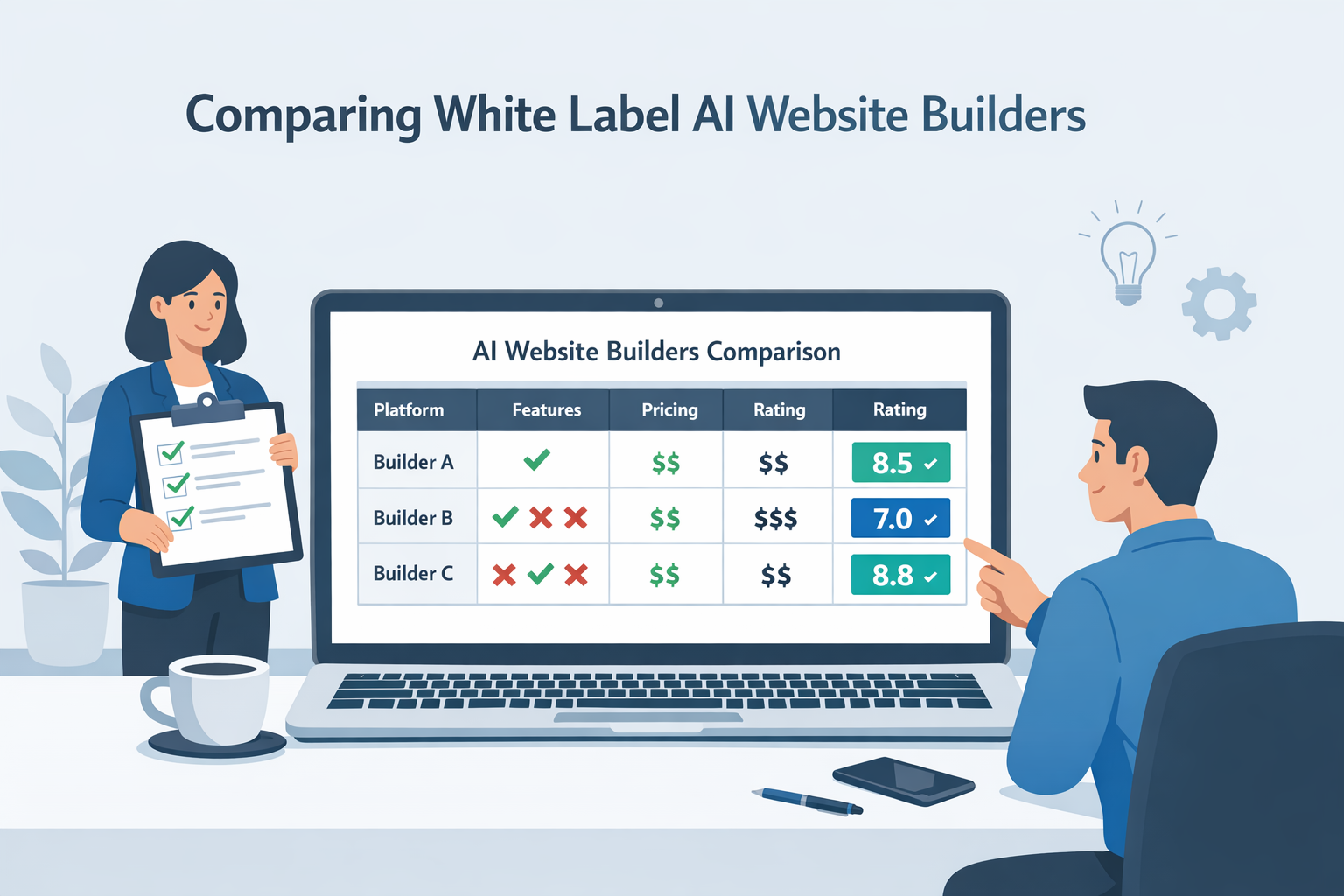
When you evaluate a white label AI website builder, focus on measurable workflow improvements. Not “AI features,” but “time saved per site.”
A practical goal for many agencies is to cut the time to a client-ready first draft from days to hours, and to reduce revision cycles by making changes faster and safer.
First drafts: site structure, copy, images
The best AI acceleration happens before a designer opens Figma or a developer touches a theme.
Look for AI that can:
- Generate a sensible information architecture from a brief, not just a random set of pages.
- Draft page-level copy that is aligned to a positioning angle, not generic “we provide quality service” filler.
- Suggest section layouts with clear hierarchy: hero, proof, offer, process, FAQ, CTA.
- Produce image direction and placeholders so you can move quickly, even if the final photography comes later.
If you want a simple benchmark: for a standard 5 page business site, AI should deliver a coherent first draft that your team can polish in a single working session.
Iterations: client revisions at scale
Client revisions are where time goes to die.
A white label AI website builder should make revisions faster through:
- Inline editing that feels like a modern editor, not a clunky CMS.
- Page-level regeneration where you can rework a section or page without destroying the entire site.
- Style controls that keep typography and spacing consistent.
- Brand voice controls so client edits do not drift into a different tone.
The goal is to handle the most common revision types quickly:
- “Can you rewrite the hero to be more premium?”
- “We want a shorter About page.”
- “Swap this section order and add a testimonial block.”
- “Make it more local for Austin.”
AI can help, but only if it is constrained properly.
Maintenance: ongoing updates, new pages
A strong platform also helps with “boring” agency work, which is where agencies earn recurring revenue:
- regenerating meta descriptions across pages after a repositioning
- updating opening hours or policy text site-wide
- creating new landing pages for ads without breaking the style system
- refreshing seasonal offers without breaking design consistency
- generating localized landing pages at scale with human review
If you do this manually across 50+ client sites, you already know how expensive it is. AI plus governance can turn this into a repeatable process.
If maintenance is part of your offer, evaluate whether the platform supports safe updates and governance, because ongoing work increases risk.
Must-have AI capabilities (beyond hype)
Many platforms claim AI. Few deliver agency-grade control.
To make this concrete, you want three layers of control: (1) brand constraints, (2) content constraints, and (3) safe editing and release controls. When any of these are missing, AI output becomes unpredictable, and unpredictability is what kills agency margins.
Here is what to look for if you want predictable results.
Brand voice and style controls
Without brand controls, AI output trends toward generic.
Strong platforms let you define:
- Brand voice (tone, reading level, words to avoid, banned claims)
- Value proposition and positioning angle
- Style system (fonts, colors, spacing, components)
- Industry context (what matters, what to emphasize)
This matters because agencies sell consistency.
If your agency builds 20 sites a month, you need the AI to output drafts that match your standards. Otherwise you are paying for text that your team has to rewrite from scratch.
A quick test: ask the vendor to generate two different sites for two different industries and show how the controls prevent both from sounding the same.
Page-level editing control and rollback
The ability to edit and safely revert is non-negotiable.
Ask for:
- Section-level edits: regenerate a hero or a pricing section without rewriting the entire page.
- Version history: see changes over time.
- Rollback: restore a previous version in one click.
- Diffing: compare versions, especially for copy.
In multi-client environments, mistakes happen. Rollback turns a mistake into a five minute fix instead of a two hour rebuild.
AI should make it faster to ship, but it also increases the speed of mistakes. Versioning and rollback protect your margins.
Multi-language support and localization
If you serve multilingual markets, you need more than translation.
Look for:
- Page-level language variants.
- Locale-specific formatting (currency, date formats, spelling).
- Control over local keywords and headings.
- A review workflow so your team can approve localized content.
Also ask how the platform handles duplicate content risks and hreflang, because multilingual SEO is not a checkbox.
SEO and performance requirements for AI-generated sites
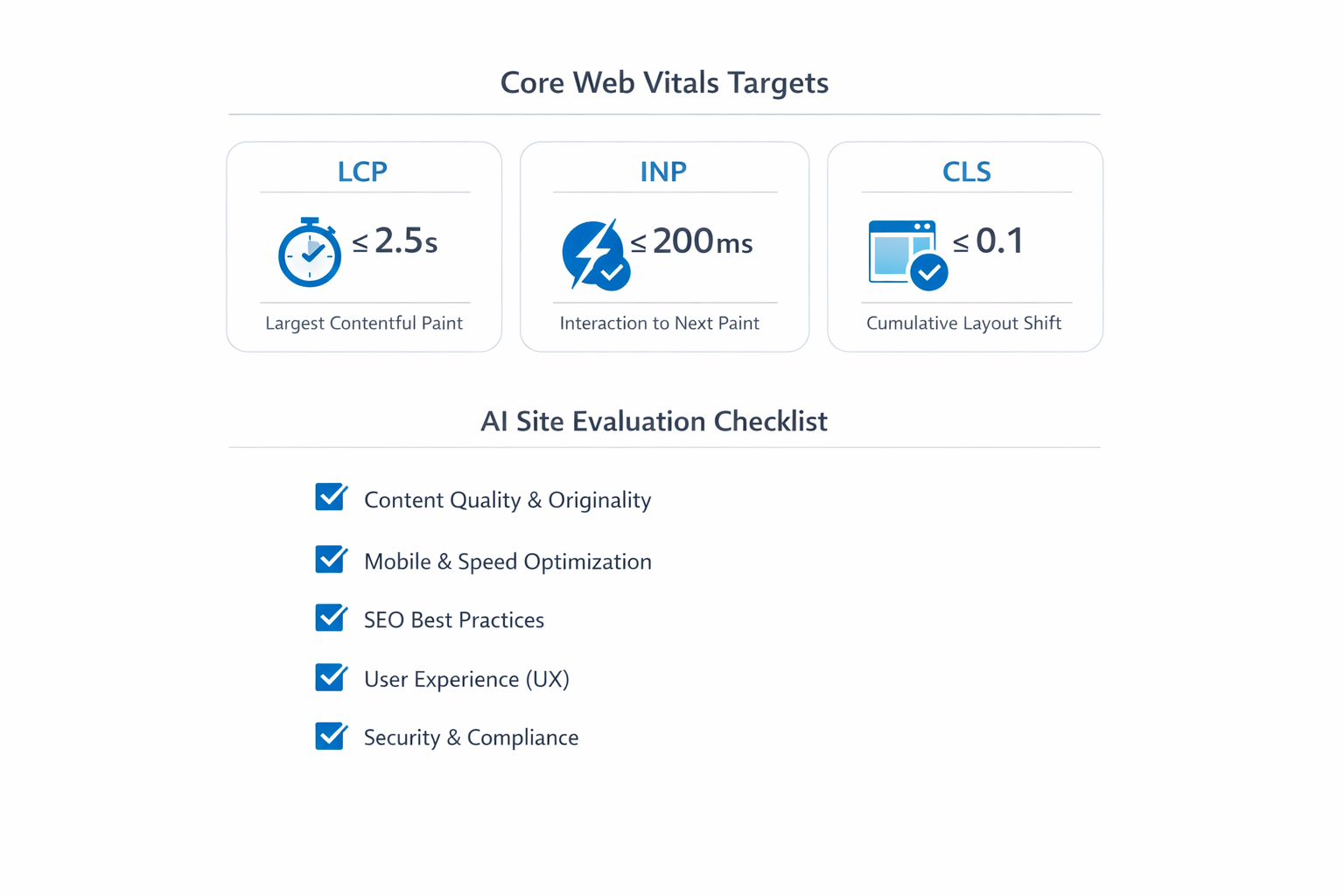
AI can produce fast drafts. SEO and performance determine whether those drafts can rank and convert.
You are evaluating a platform. That means you need to think like an SEO lead and a technical lead.
Clean HTML, metadata control, schema
A site can look beautiful and still be a technical SEO nightmare.
Minimum requirements:
Agency tip: ask the vendor to walk through editing these settings live on a real page. If the SEO controls are hidden behind “advanced” tabs or cannot be customized per page, you will feel it during launch week.
- Ability to edit title tags, meta descriptions, and social share metadata.
- Control over H1/H2 structure and clean semantic markup.
- Editable URLs and slugs.
- Proper canonical tags.
- Schema support (at least basic types like Organization, LocalBusiness, FAQPage where relevant).
If the vendor cannot explain how their HTML is structured, ask for an example page source.
If you want your AI-generated sites to rank, build a simple editorial rule: every key page needs at least one piece of proof that only that business can claim. A real number, a real case study, a real guarantee policy, a real team story. That is what makes the content “helpful,” and it is also what makes it convert.
For SEO guidance on quality and helpful content, reference Google Search Central: Google Search Central documentation.
Here is the business reason to care. On web.dev, Rakuten 24 reported that optimizing Core Web Vitals improved conversion rate by 33.13% and revenue per visitor by 53.37% in an A/B test. That is not “nice to have,” that is a margin multiplier for your clients and a differentiator for your agency. See the case study: Rakuten 24 Core Web Vitals case study.
Core Web Vitals and performance basics
Your client does not care what generated the site. They care that it loads fast.
Ask how the platform handles:
- Image optimization (WebP or AVIF, responsive sizes)
- Lazy loading for below-the-fold assets
- CDN delivery and caching
- Minimizing render-blocking scripts
A reliable baseline is that the platform should be able to achieve strong Core Web Vitals with sane content. If they cannot show performance results, you will spend your time fighting the system.
For performance best practices, web.dev is a solid reference: web.dev performance.
Content uniqueness and quality assurance
AI raises a new risk: “content that looks fine but says nothing.”
To protect quality, you need:
- Plagiarism and duplication checks or clear guidance for avoiding duplication.
- Strong editorial controls, not just “regenerate.”
- A workflow for fact-checking and compliance.
Google’s guidance makes it clear that quality matters more than how content is produced. What matters is whether it is helpful and original.
In practical terms, you should build an internal QA checklist:
- Does the homepage clearly state what the business does in the first 5 seconds?
- Are claims specific and provable?
- Are testimonials real and compliant?
- Are there clear calls to action?
Governance for multi-client environments
This is the part many “AI builders” ignore.
As an agency, you are not building one site. You are building and managing dozens or hundreds.
Governance is what keeps your team efficient and keeps clients from breaking things.
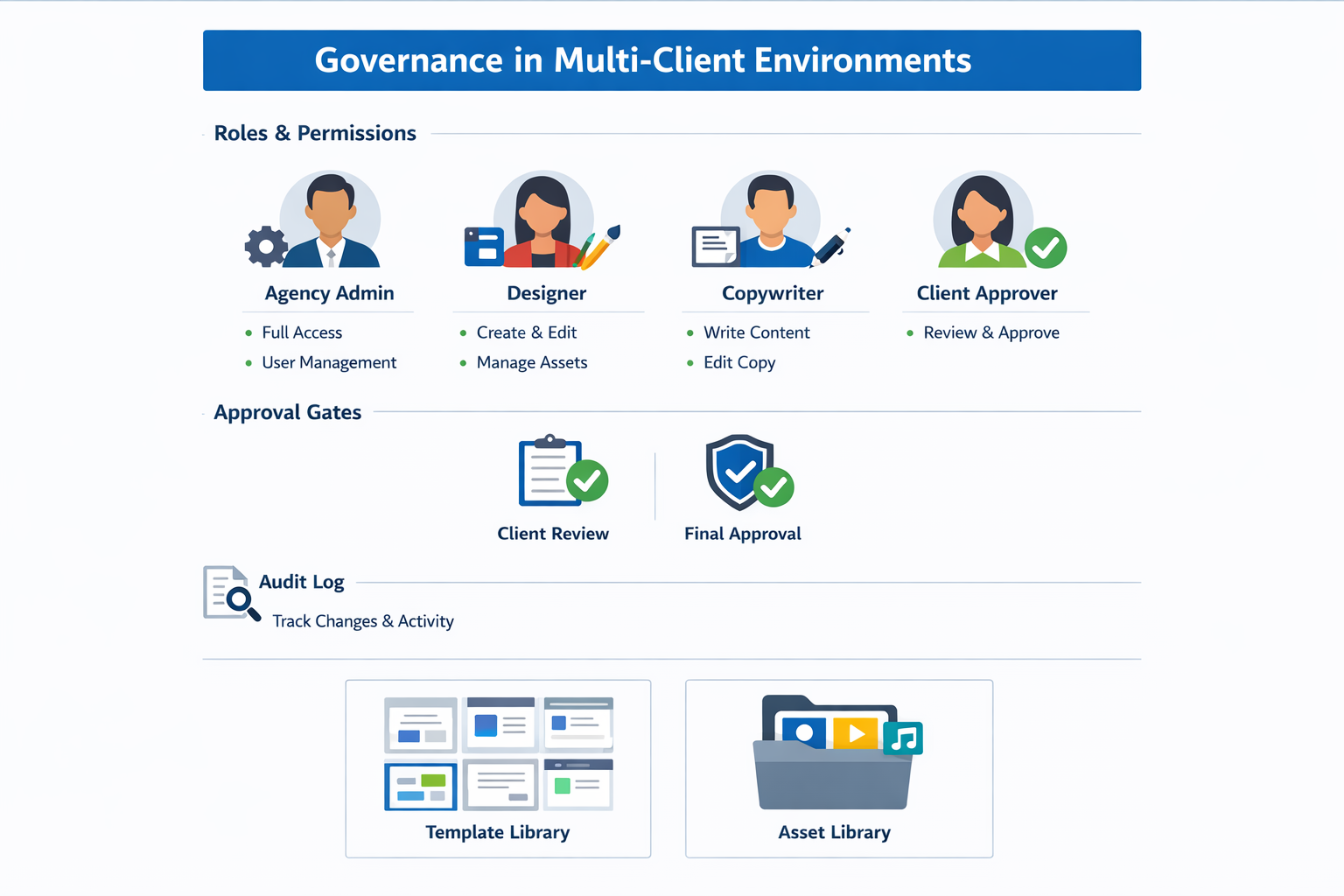
Roles, permissions, approvals, audit logs
Your platform should support at least:
- Agency admin: full control, billing, templates, permissions.
- Editors: can edit content and pages.
- Designers: can adjust styles and layout.
- Client approvers: can comment and approve, but not break the site.
For approvals, look for:
- Staging vs production
- Approval checkpoints
- Commenting and tasking
- Activity logs
If you are in regulated industries or you support enterprise clients, audit logs become critical.
Security also matters. You do not need a full audit to shortlist a platform, but you should ask about basics, and you can reference OWASP principles for web application security: OWASP Top 10.
Asset libraries and templates
Agencies win by reuse.
A strong white label AI website builder should let you maintain:
- Template libraries by niche
- Reusable blocks (hero variants, testimonial sections, pricing)
- Brand assets (logos, icon sets, patterns)
- Copy components (disclaimer text, CTAs)
If every project starts from scratch, you are not scaling.
Editing experience: the difference between fast and fragile
Most agencies do not lose time on the first draft. They lose time on the second and third round of edits. That is why the editor experience matters more than the AI headline feature.
What “good editing control” looks like in practice
Use these real-world scenarios to test editing:
- Replace a service name across a site without breaking headings or links.
- Swap the order of sections on a page and keep spacing consistent.
- Update a pricing table while keeping mobile layout intact.
- Add a new location to a multi-location page without duplicating content.
If your team cannot do these quickly, you will be stuck in manual layout fixes.
Content models: blocks, components, and the cost of rigidity
Builders usually fall into two models:
- Freeform editors that feel flexible but can become inconsistent.
- Component-based editors that enforce consistency but can feel rigid.
For agencies, component-based is usually better, as long as you can create and manage your own component library. The goal is to make “the right thing” the easiest thing.
Export, portability, and platform lock-in
Even if you love a platform, you should understand lock-in risk. Ask:
- Can I export content and assets in a usable format?
- What happens if a client wants to leave?
- Can I move a site to another plan or another workspace?
A vendor does not need to support full HTML export to be a good choice, but they should have a clear story for client ownership, backups, and continuity.
SEO and performance requirements for AI-generated sites (technical baseline)
AI can speed up drafts, but it can also ship junk if the platform does not enforce technical hygiene.
If you want a simple north star, Google recommends site owners achieve good Core Web Vitals. The current Core Web Vitals targets are LCP within 2.5 seconds, INP under 200 milliseconds, and CLS at 0.1 or less. See Understanding Core Web Vitals and Google search results and the Web Vitals overview.
The agency SEO baseline (what you should be able to control)
When you evaluate a white label AI website builder, your team should be able to set and edit, without hacks:
- Meta title and meta description per page
- H1 and heading structure (no locked layouts that force multiple H1s)
- Clean URLs and redirects (especially if you migrate from WordPress or another builder)
- Indexing controls (noindex, canonical tags, robots.txt or equivalent)
- Structured data support where it matters (LocalBusiness, FAQ, Article, Product)
- Image optimization (proper sizing, lazy-loading, modern formats)
If the platform says “the AI handles SEO,” push back.
You are not buying “SEO.” You are buying control.
The fastest way to lose trust is to promise SEO improvements while the platform locks basic metadata, URL control, or redirects. Your clients will blame you, not the vendor.
The performance baseline (what you should be able to verify)
AI-generated pages can be lightweight, but only if the builder keeps the output simple and fast.
On your demo call, ask the vendor to run PageSpeed Insights on a sample site and explain what is happening. Then confirm you can influence the drivers:
- HTML output: Does the site ship clean, minimal markup or a heavy JavaScript app for every page?
- Fonts: Can you self-host or at least limit font weights? Are fonts preloaded correctly?
- Third-party scripts: Can you control tags and avoid bloating the site with chat widgets and trackers?
- Caching and CDN: Is caching configurable? Is the edge network solid?
If you want an agency-friendly SOP, use this quick check:
- Test the home page and one interior page in PageSpeed Insights.
- Confirm the Core Web Vitals field data is “good” when available.
- Check that images are properly sized and not shipping 2,000px assets into 400px slots.
- Verify that you can add redirects and control canonical tags.
Security and governance: the minimum bar
White label does not just mean branding, it also means you are responsible for client risk.
At minimum, your platform should support:
- Role-based access control (admin, editor, client reviewer) with least privilege
- Audit logs for changes (who changed what, when)
- Separation between client accounts so one client cannot see another
- Secure defaults for forms and integrations
Use the OWASP Top 10 as a baseline for the kinds of risks you are trying to prevent. See OWASP Top Ten Web Application Security Risks.
Pricing models (and how to price your offer)
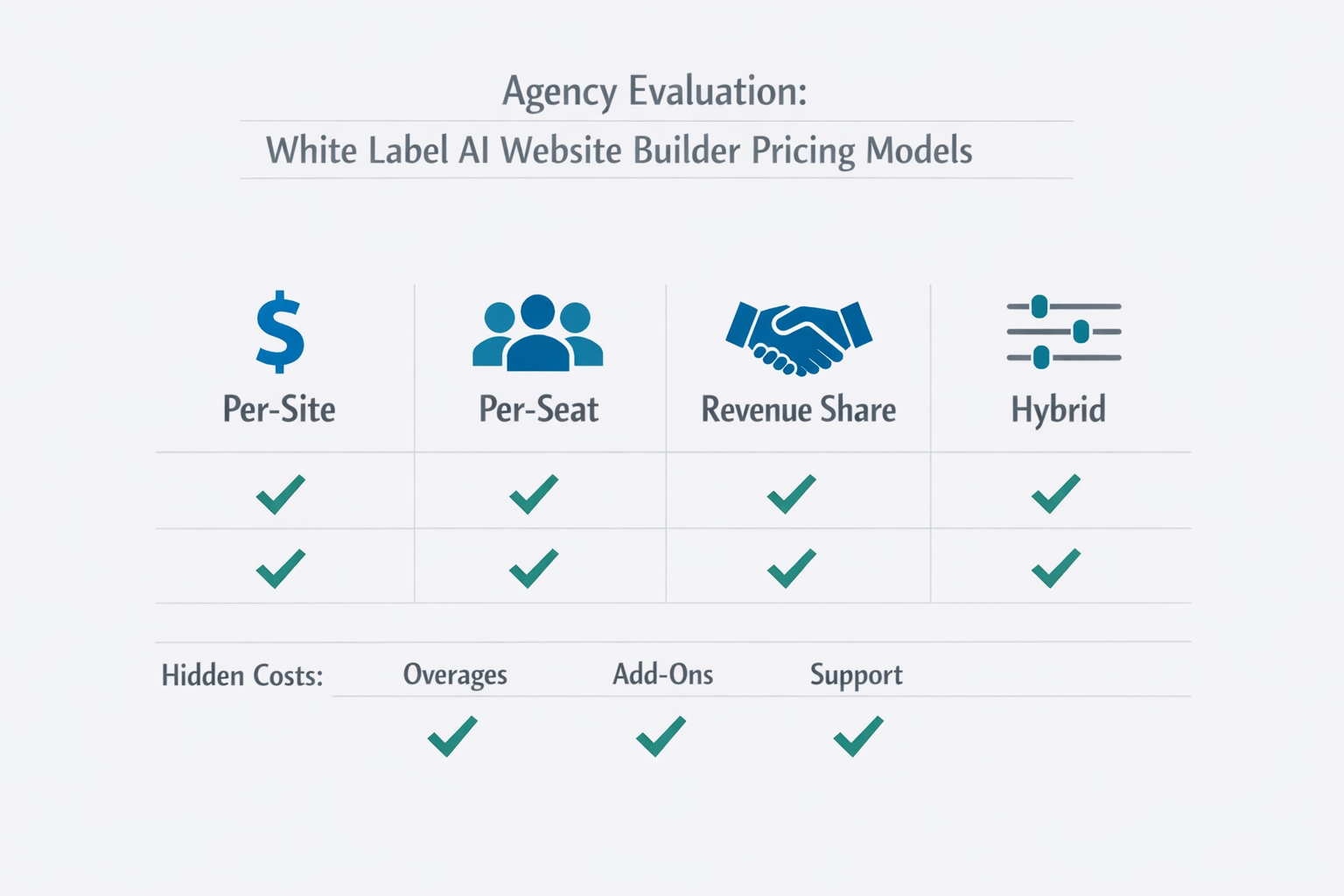
Agency takeaway: if your vendor pricing model makes your costs unpredictable, your margins will be unpredictable too. Before you commit, write down (1) your monthly fixed cost, (2) your cost per additional client, (3) your worst-case overage scenario, and (4) your exit plan.
Pricing is where agencies get burned.
Vendors use different models:
- Per site: a flat fee per published site.
- Per seat: pay for each user.
- Per usage: AI credits or generation limits.
- Hybrid: a base platform fee plus AI usage.
Your job is to understand your cost structure so you can price profitably.
Per-site, per-seat, usage: how AI is billed
Ask these questions early:
A realistic planning range for many agencies is 20 to 80 “meaningful generations” per standard site when you include first draft plus revisions. If a vendor bills per generation, you need to translate that into a cost per client site and a cost per month.
A simple way to model it:
- First draft: 10 to 20 generations (structure, key pages, metadata)
- Revisions: 10 to 40 generations (hero rewrites, section swaps, FAQs, local variants)
- New pages during maintenance: 5 to 15 generations per month
Your numbers will vary, but the point is that “credits” are not abstract. They are a line item in your margin.
- What counts as an AI “generation”? A page, a section, a prompt?
- Are there limits per month?
- Do unused credits roll over?
- Is there a fair use policy?
- Are images included or billed separately?
Hidden pricing complexity is a risk.
A practical way to model your cost is to estimate:
- Average sites per month
- Average generations per site (first draft + revisions)
- Average image generations per site
- Number of team members
If the vendor cannot provide a clear billing example, expect surprise invoices.
Packaging: starter, growth, premium, maintenance
If you sell websites, you are not selling “pages.” You are selling outcomes.
Here is a simple packaging model many agencies use. Notice that AI is not mentioned in the package name. Clients buy clarity, speed, and results, not tooling.
You can also add explicit deliverables that protect scope:
- number of revision rounds
- timeline for approvals
- content inputs required from the client
- what is included in SEO setup
- Starter: 1 language, 5 pages, basic SEO, launch in 7 to 10 days.
- Growth: strategy workshop, conversion copy, blog setup, tracking, launch in 2 to 4 weeks.
- Premium: custom components, advanced SEO, multi-location pages, launch plus A/B testing.
- Maintenance: monthly updates, new pages, reporting, ongoing optimization.
AI can increase your margins by reducing labor hours. But you should not race to the bottom.
Instead, use AI to deliver faster, with higher consistency.
Integrations that matter for agencies (and what to test)
A website builder does not live alone. Agencies need it to connect to the rest of the stack.
Analytics and tracking
At minimum, you should be able to add and manage Google Analytics and conversion tracking cleanly, ideally per site and per environment. Ask how the platform handles:
- tag injection without breaking performance
- cookie consent and privacy scripts
- separate tracking for staging vs production
CRM and lead capture
Lead capture is where the money is. Test form integrations for reliability. If you cannot connect forms to a CRM or an automation tool, your client will blame you, not the vendor.
Payments and bookings
For service businesses, bookings matter. For some niches, payments matter. You want a platform that supports the embed patterns you need, and does not collapse performance with heavy scripts.
Content and asset workflows
Ask whether you can maintain a shared asset library and push approved blocks across sites. That is how you keep brand consistency at scale.
Vendor questions and a live demo script
Listicles will not help you pick the right platform. A demo script will.
Below are 15 questions to ask sales, and a 10 minute flow you can use to compare vendors.
15 questions to ask sales
- What does “white label” include exactly (portal, editor, emails, domain)?
- Can I use a custom domain for the full experience?
- How do you handle multi-client management at scale?
- What roles and permissions exist?
- Is there staging vs production?
- Is there version history and rollback?
- Can I regenerate a section without rewriting a whole page?
- How do brand voice controls work?
- Can I lock style systems so clients cannot break design consistency?
- What SEO controls are available (metadata, schema, redirects, canonicals)?
- How do you optimize images and performance?
- How do you prevent generic content and duplication?
- How is AI usage billed, and what are the limits?
- What support do agencies get (SLA, onboarding, training)?
- What is your roadmap for agencies over the next 12 months?
10-minute demo flow for evaluation
Use the same flow for every vendor. That is how you compare fairly.
Minute 0 to 2: Create a project from a brief
- Provide a short brief: industry, location, offer, tone.
- Ask the platform to generate the initial site draft.
Minute 2 to 4: Control the brand
- Change the brand colors and typography.
- Ask the AI to adjust the tone to “premium and direct.”
- See whether the draft stays consistent.
Minute 4 to 6: Edit safely
- Regenerate one hero section.
- Undo and rollback.
- Confirm version history exists.
Minute 6 to 8: SEO and performance check
- Edit title tag and meta description.
- Check headings.
- Ask for schema support.
- Ask how images are optimized.
Minute 8 to 10: Governance
- Invite a “client approver.”
- Show how approvals work.
- Show activity logs.
If a vendor cannot complete this in a live demo, they are not ready for agency scale.
A simple scorecard you can use to shortlist platforms
Mini-case: using the scorecard to reject a vendor (in one call)
Here is a realistic example of how this plays out.
You are evaluating two vendors for a 30 client rollout. In the demo, Vendor A generates a decent draft, but their “white label” stops at a login logo. Client invite emails come from the vendor domain, there is no custom portal domain, and there is no staging approval step. When you ask for rollback, the rep says, “You can manually undo.”
On the scorecard, they score 2/5 on White label, 2/5 on Editing safety, and 2/5 on Governance. You also notice pricing is seat-based plus AI credits, and the rep cannot show a concrete monthly cost example for your team size. That is another 2/5 for Pricing clarity.
Vendor B is not perfect, but they show a branded portal on your domain, role-based approvals, version history with restore, and page-level regeneration. They can explain exactly what counts as a generation and give you a sample invoice for 20 sites.
You do not need a “better AI.” You need a safer operating system. The scorecard gives you permission to walk away from Vendor A, even if their marketing demo looked slick.
Here is a practical way to score options. Use a 1 to 5 scale.
| Category | What to score | 1 (weak) | 3 (ok) | 5 (excellent) |
|---|---|---|---|---|
| White label | Branding, domain, portal | Logo only | Portal branded | Full experience white labeled |
| AI draft quality | Structure and copy quality | Generic | Good baseline | Strong, niche-aware |
| Control | Style, voice, constraints | Few controls | Some controls | Deep controls + lockable |
| Editing safety | Versioning, rollback | None | Basic | Robust + diffing |
| SEO | Metadata, schema, URLs | Limited | Standard | Advanced + clean HTML |
| Performance | Images, CDN, scripts | Slow | Acceptable | CWV-focused |
| Governance | Roles, approvals, logs | Minimal | Adequate | Enterprise-grade |
| Pricing clarity | Billing model transparency | Confusing | Understandable | Predictable, simple |
Print this and use it. The best platform is the one that scores high on control, governance, and predictable costs.
How lindo.ai supports agency white label AI workflows
If your goal is to deliver more sites without hiring a bigger team, you need a platform designed for agencies.
With lindo.ai, agencies can build AI-powered websites for clients and keep delivery consistent across projects.
What to evaluate in a lindo.ai demo:
If you are comparing multiple tools, use the same brief and the same success criteria every time. That is how you avoid being swayed by a polished interface. The questions in this guide apply to any vendor, including us.
- Speed from brief to first draft
- Editing control across pages
- Reuse through templates and standard components
- A workflow that fits how agencies actually deliver
If you want to explore options for your agency, start here: lindo.ai.
Visual references (workflow and governance)
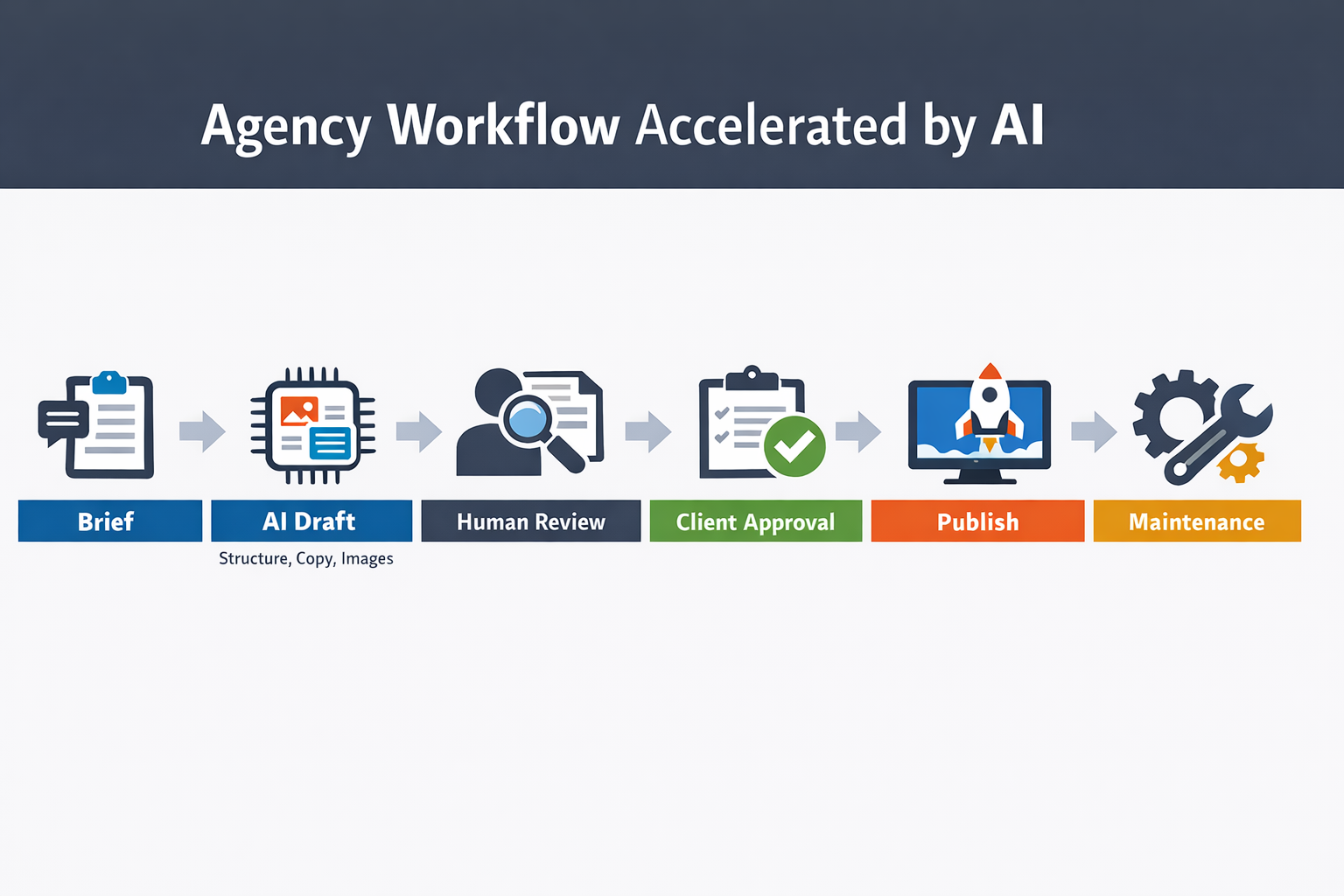
Red flags and deal-breakers (what to avoid)
Some platforms look great in a marketing demo and fail in real delivery.
Here are red flags I would treat as deal-breakers for most agencies.
The platform is “white label” only on the login screen
If you can add your logo but the editor still shows the vendor name, client emails come from the vendor domain, or the portal URL cannot be branded, then you are not white labeling. You are reselling.
That might still be acceptable for a small offer, but it is not what most agencies mean when they say “white label.”
AI that cannot be constrained
If the AI cannot follow rules like “never mention we are the vendor,” “never claim guarantees,” “use this exact CTA,” and “avoid these words,” you will spend your time rewriting.
Ask the vendor to show how constraints are set and enforced. If the answer is “our AI learns over time,” that is not a control system.
No realistic path to content originality
Originality is not just “no plagiarism.” It is specificity. If the AI always outputs generic claims and generic feature lists, you will not rank and you will not convert.
A good platform helps you inject unique proof like case studies, numbers, differentiators, local details, and real service packages, and it keeps those elements consistent across the site.
Weak SEO controls and locked technical decisions
If you cannot control redirects, canonicals, metadata, and URL structure, you will eventually hit a wall. Clients will ask: can we change this URL, why is this page not indexed, can we add FAQ schema.
If your answer has to be “we cannot because the platform does not allow it,” you will lose trust.
No staging and no approvals
If changes go directly to production with no review flow, you are one accidental edit away from a public mistake. Staging and approvals are also how you keep clients from breaking layouts.
Pricing that makes your margins unpredictable
Usage-based AI billing can be fair, but only if it is transparent. If you cannot reliably estimate monthly costs per client, you cannot price your own packages confidently.
Implementation playbook: how to roll out a white label AI builder in an agency
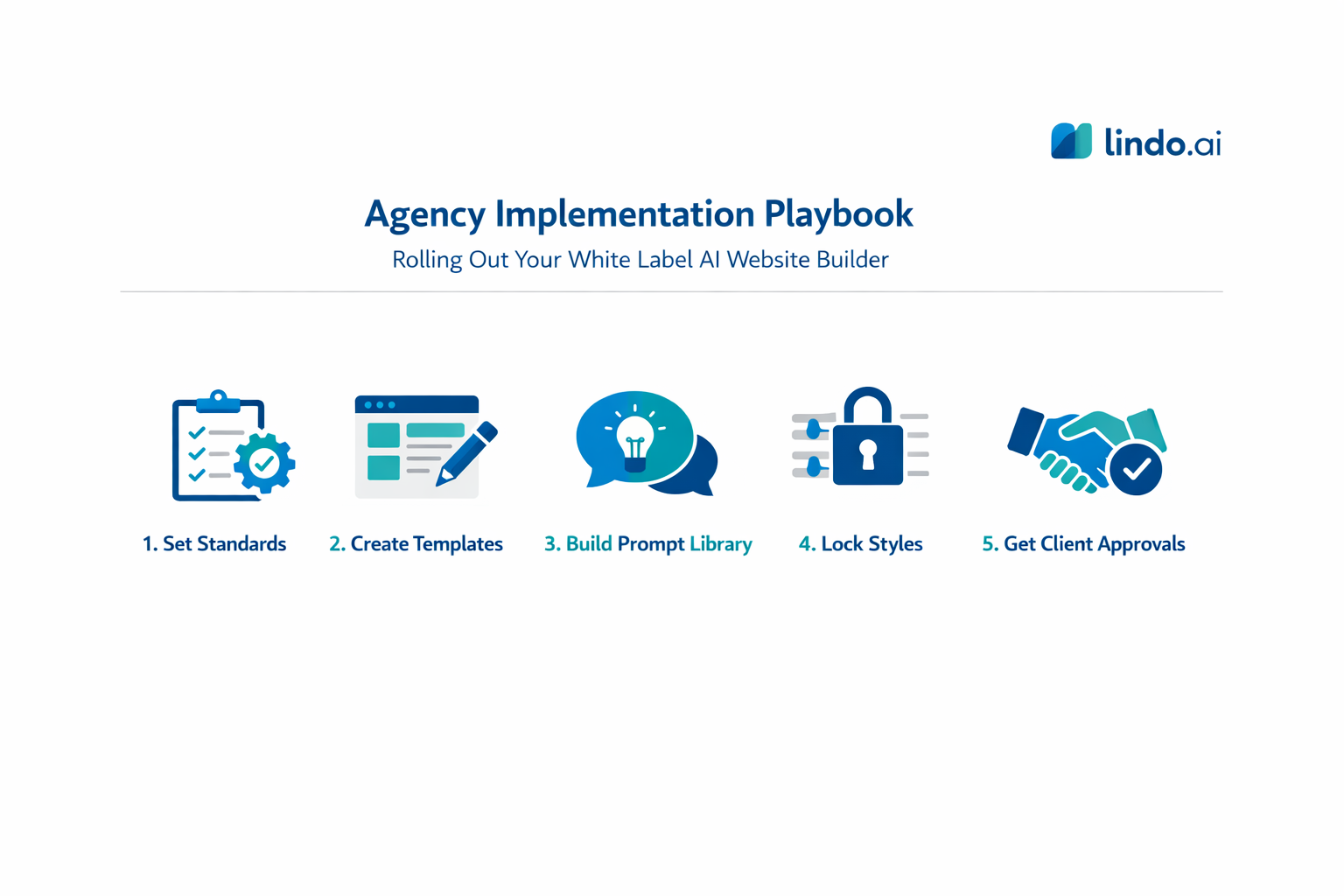
Buying a platform is the easy part. Operationalizing it is where most teams stumble.
Step 1: Define your delivery standards
Write down what “good” looks like: a minimum page set, minimum conversion elements, minimum SEO setup, and performance expectations. This becomes your QA checklist.
Step 2: Build templates by niche (start with 2 to 3)
Pick the niches you sell the most and create a standard page set, reusable blocks, a voice and style preset, and an asset checklist. The second site in a niche should take less time than the first.
Step 3: Create a prompt library your team actually uses
A prompt library is a set of repeatable instructions aligned with your templates. Example prompts: generate 3 premium hero options mentioning {service} and {city} and avoiding hype; write a 6-step process section with each step under 25 words; draft a 6-question FAQ including pricing, timeline, and client inputs.
Step 4: Lock what should be locked
Lock typography scale, spacing system, component styles, and brand colors. Let the team customize inside a safe framework.
Step 5: Train clients on approvals
Set expectations that clients comment and approve at milestones, and the agency controls edits. This reduces revision churn.
Must-have controls checklist: lock the style system, enforce roles and permissions, require staging approvals, keep version history, and define a “proof rule” for every key page (a real number, case study, or guarantee).
The best agencies treat AI as a process upgrade, not a marketing gimmick. The value is in standardization and speed, not in “the AI wrote it.”
Technical checklist (quick audit) for AI-generated sites
HTML and accessibility
- One H1 per page, logical H2s
- Descriptive alt text
- Labeled forms
- Real buttons and links
Indexing and crawl
- Sitemap and robots.txt available
- Noindex for staging
- Canonicals correct
Redirects and URLs
- 301 redirects supported
- Slugs editable
- Consistent trailing slash behavior
Performance
- Responsive, compressed images
- Lazy loading below the fold
- Minimized CSS and JS
- Manageable third-party scripts
Security and governance
- Role-based access control
- Audit logs
- Two-factor authentication supported or planned
FAQ
Are AI-generated websites good for SEO?
They can be, if the platform outputs clean HTML and gives you control over metadata, headings, URLs, and performance. The bigger issue is content quality. AI drafts must be reviewed so they become specific, original, and useful, not generic.
What makes an AI website builder truly white label?
Real white label means your clients do not see the vendor brand across the portal, editor, emails, and domain. It also means the platform supports agency operations: templates, multi-client governance, roles, and approvals.
How should agencies price AI website builds?
Do not price based on “AI did it.” Price based on the outcome and the speed you can deliver. Use vendor costs as your margin floor, then package strategy, copy quality, SEO, and maintenance as the real value.
What features prevent generic AI output?
Brand voice controls, reusable templates, and constrained regeneration are the big ones. You want AI that generates within your framework, plus editing tools and approvals that make quality easy to enforce.