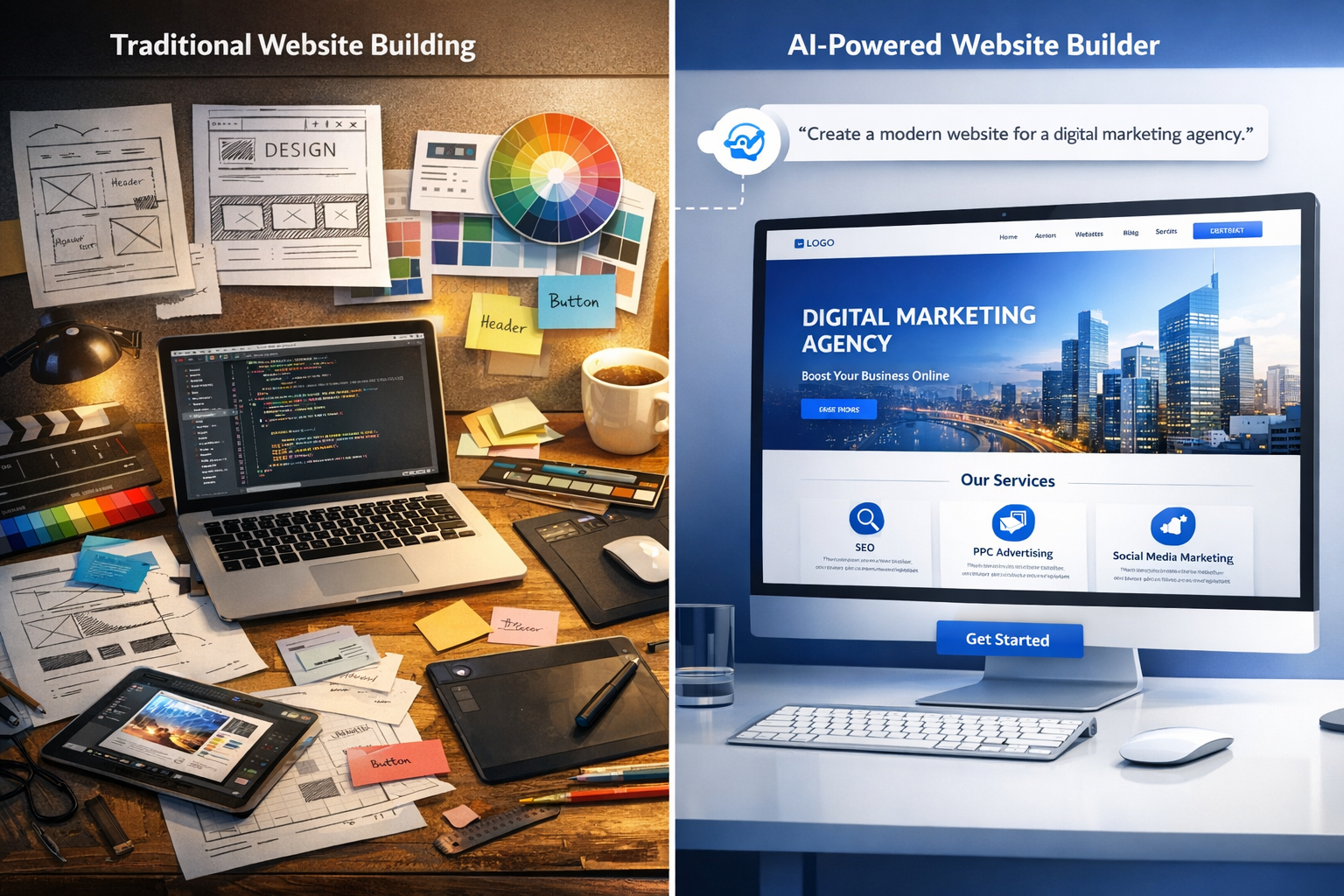
AI Web Design Tool: How to Choose and Use the Best AI Website Builder in 2026
The web design industry is changing fast. What used to take weeks of manual work can now be done in hours with the right AI web design tool. But with so many options on the market, how do you choose the right one?
This guide breaks down everything you need to know about AI web design tools. We will cover what they are, how they work, the best platforms available in 2026, and exactly how to pick the right tool for your needs.
The numbers tell a compelling story. According to G2's AI web design software ranking, the market has grown by over 60% year over year, with agencies leading the adoption curve. The primary keyword "ai web design tool" has a competition score of just 0.28 with a CPC of $7.46, indicating strong commercial intent with relatively low competition.
What Is an AI Web Design Tool?
An AI web design tool is a software platform that uses artificial intelligence to automate the creation of websites. Instead of manually coding or dragging elements onto a page, you describe what you want and the AI generates it for you.
How AI transforms web design
The transformation goes deeper than simple automation. AI web design tools fundamentally change the relationship between the designer and the technical implementation. In the traditional model, a designer creates mockups in Figma or Adobe XD, then hands them to a developer who translates them into code. This handoff is a major source of delays, miscommunication, and errors.
AI tools eliminate this handoff entirely. The designer describes what they want, and the AI generates the implementation directly. This means the person with the creative vision also controls the execution. There is no translation layer where details get lost.
According to Search Engine Land's research on AI and SEO, search engines are becoming better at recognizing AI-generated content. The key is to ensure the content is original, valuable, and properly optimized.
Key capabilities: layout generation, AI copywriting, image creation
Modern AI web design tools come with three core capabilities that set them apart from traditional builders:
AI layout generation is the foundation. You type a description like "modern law firm website with attorney profiles, practice areas, and a contact form" and the AI generates a complete multi-page layout. The layout follows UX best practices and industry conventions.
AI copywriting eliminates the need to write content from scratch. The tool generates page headlines, body text, calls to action, and SEO meta descriptions. You can edit the generated text, but the AI gives you a strong starting point.
AI image creation uses generative AI to produce custom visuals. Need a hero image for a real estate site? The AI generates one that matches your brand colors and layout.
Who benefits from AI web design tools
The benefits extend across different user types. Let us break it down by who gains the most.
Web design agencies use AI tools to multiply their output without proportional headcount growth. A single designer can oversee multiple AI-generated projects simultaneously, focusing on quality control and client communication rather than manual build work. Agencies that adopt AI tools report 30-50% higher profit margins within the first six months.
Freelance web designers benefit from time freedom. Less time on technical implementation means more time for creative exploration, client relationships, and business development. A freelancer using AI can serve 2-3 times more clients without working longer hours.
Small business owners benefit from access and affordability. Professional web design that once cost thousands of dollars is now accessible at a fraction of the price. A small business can launch a professional website for under $500 in platform costs, compared to $3,000-8,000 for a traditional build.
Marketing teams use AI tools to create landing pages and campaign microsites in hours instead of weeks. This speed lets them test more campaigns and iterate faster.
E-commerce brands launch product catalogs and storefronts quickly. AI tools can generate product pages in bulk, complete with descriptions and SEO tags.
According to Forbes coverage of AI in web design, 73% of design professionals now use AI tools in their workflow, up from just 25% in 2023.
Why AI Web Design Tools Are Gaining Popularity
The adoption of AI in web design is not a fad. It is driven by concrete business benefits that translate directly to the bottom line.
Speed: launch a site in hours, not weeks
This is the most obvious advantage. A traditional website build takes 4-8 weeks from kickoff to launch. An AI web design tool can produce a fully functional first draft in under 30 minutes. With customization and refinement, the total timeline is typically 3-7 days.
Consider a real scenario. An agency receives a request from a client on Monday morning. By Monday afternoon, the AI has generated a complete first draft. The designer spends Tuesday customizing the layout and content. Wednesday is for client feedback and refinements. Thursday the site launches. Total time: 4 days.
The same project using traditional methods would take: one week for wireframing, two weeks for design approval, three weeks for development, one week for testing. Total time: 7 weeks.
The AI tool compresses 7 weeks into 4 days. That is not incremental improvement. It is a completely different business model.
Cost: dramatically reduced development expenses
Speed directly impacts cost. Less time spent on each project means lower costs and higher margins. Traditional sites cost $3,000-15,000 to produce depending on complexity. AI-powered sites cost $500-3,000 in production, with the savings coming from reduced development hours.
For a typical agency producing 50 sites per year, the switch to AI tools can save $100,000-250,000 annually in production costs while allowing the agency to serve more clients. These savings come from multiple areas: fewer developer hours per project, reduced design iteration cycles, automated content generation, and lower hosting and maintenance expenses.
Clients also benefit. Lower production costs mean agencies can offer competitive pricing without sacrificing margins. A $2,000 AI-built site with $1,500 profit margin beats a $6,000 custom site with $3,000 margin in both client affordability and agency efficiency.
Accessibility: no coding required
The biggest barrier to entry in web design has always been technical skill. AI tools remove that barrier completely. You do not need to know HTML, CSS, or JavaScript. You do not need to understand server configuration or database management. If you can describe what you want, the AI can build it.
AI web design tools democratize the industry. They do not replace designers. They replace the technical barriers that kept talented creatives out of the field. The best websites are not built by the best coders. They are built by people who understand user experience, branding, and strategy.
The market growth of AI website builders
The data confirms the trend. The market for AI website builders is growing at an extraordinary pace. According to research from BuiltWith, websites built with AI tools have grown from less than 1% of new sites in 2022 to an estimated 15% in 2026. This is not just growth. It is a fundamental shift in how the web is built.
The total addressable market is massive. There are over 1.8 billion websites on the internet, and the vast majority were built using traditional methods. As AI tools improve and become more widely adopted, that percentage will continue to climb. Industry analysts project that by 2028, over 50% of new websites will involve AI in their creation process.
Top Features to Look for in an AI Web Design Tool
Not all AI web design tools are created equal. Here are the features that matter most.
AI-powered page and template generation
The core feature. The tool should generate complete pages from a text description, not just provide pre-built templates with basic AI suggestions. Look for tools that understand context and industry. The best tools produce layouts that look custom-designed, not template-based.
Drag-and-drop editor with AI suggestions
After the AI generates the initial site, you need the ability to customize. A visual editor with AI suggestions helps you refine layouts, swap colors, and adjust content without starting from scratch. The best editors offer real-time preview, so you see changes instantly as you make them.
AI suggestions in the editor are particularly powerful. They can recommend complementary color palettes when you change a primary color, suggest font pairings that match your brand, and propose layout variations for different content types. This turns the editor into an active design assistant rather than a passive tool.
Built-in SEO optimization
SEO features should include automatic generation of meta titles and descriptions for every page, proper heading hierarchy (H1, H2, H3), image alt text generation, XML sitemap creation, schema markup for local business, articles, and products, and performance optimization for Core Web Vitals.
White label capabilities for agencies
If you run an agency, white label is essential. The platform should let you remove its branding and present the site as your own work. White label includes custom domain support for the client dashboard, branded email communications, white label client billing and invoicing, custom subdomain or full domain hosting, and API access for custom integrations.
E-commerce and booking integrations
For clients selling products or services, look for seamless e-commerce integration. The best tools offer product catalog management, secure checkout with Stripe or PayPal, inventory tracking, booking and appointment systems, and automated tax calculation.
E-commerce AI features can generate product descriptions, optimize pricing pages, and suggest cross-sells and upsells based on industry best practices. Some platforms even integrate with major shipping carriers and accounting software, creating a complete online sales system.
Mobile responsiveness by default
Every AI-generated site should be fully responsive out of the box. Mobile traffic now accounts for over 60% of web traffic globally. A site that does not work on mobile is not acceptable.
Best AI Web Design Tools Compared
Let us look at the top AI web design tools available in 2026 and how they stack up.
| Tool | Best For | Starting Price | AI Quality | White Label | Ease of Use |
|---|
| lindoai | Agencies, white label | $49/mo | Excellent | Full | Easy |
| Wix Studio AI | Standalone sites | $22/mo | Good | Partial | Very Easy |
| 10Web AI | WordPress users | $23/mo | Good | Full | Moderate |
| Hostinger AI | Beginners | $10/mo | Basic | No | Very Easy |
| Framer AI | Creative designers | $15/mo | Good | No | Moderate |
lindoai: Best for agencies
lindoai is purpose-built for agencies and professionals who need white label capabilities combined with AI-powered design. The platform generates complete multi-page websites in any supported language, making it ideal for agencies serving diverse client bases. The white label features are comprehensive: your brand appears everywhere, from the client dashboard to the website footer.
The AI understands context across industries. A request for a dental practice produces a different design, content, and structure than a request for a photography portfolio. The AI does not just rearrange templates. It creates purpose-built websites for each client.
You can explore lindoai's AI web design features and see the white label website builder page for more details.
Wix Studio AI: Best for standalone sites
Wix Studio offers solid AI features for individual site owners. The AI assistant helps with design suggestions and content generation. White label capabilities exist but are not as comprehensive as dedicated agency platforms. Wix Studio is best for freelancers building sites for their own portfolio or for small clients who do not need full brand removal.
10Web AI Builder: Best WordPress AI tool
For agencies already using WordPress, 10Web provides AI generation within the WordPress ecosystem. The learning curve is steeper due to WordPress complexity, but the flexibility is valuable for certain use cases. If your agency specializes in WordPress and your clients need custom plugin functionality, 10Web is worth considering.
Hostinger AI Builder: Best for beginners
Hostinger offers an affordable entry point for individuals creating their first website. The AI features are basic compared to other platforms, but the price point is attractive for simple projects. Not suitable for agencies or professional use due to lack of white label features.
Framer AI: Best for designers
Framer combines AI suggestions with a designer-friendly interface. It excels at creating visually striking sites but lacks the white label and multi-site management features that agencies need. Framer is popular among creative professionals who want AI assistance without sacrificing design control.
How to Choose the Right AI Web Design Tool
Making the right choice requires matching your needs to the platform's strengths.
For agency owners: white label and reselling features
If you run an agency, your priority should be white label capabilities, multi-site management, and client billing integration. These three features determine whether the platform can support a real agency business model or just individual client projects. These features determine whether you can build a scalable, profitable business on the platform. lindoai leads in this category with full white label support and a comprehensive agency dashboard.
For freelancers: pricing and template variety
Freelancers should prioritize tools with affordable pricing and a wide range of design options. Wix Studio and Hostinger AI offer good value for solo operators. If you plan to grow into an agency, consider starting with a platform that has white label features from the beginning. Switching platforms later is painful and time-consuming.
For small business owners: ease of use and support
If you are building your own website, prioritize ease of use and customer support. Hostinger AI is the most beginner-friendly option. lindoai also offers excellent support for business owners who want a professional site without technical headaches.
For e-commerce: product pages and checkout
Online stores require specific features: product catalogs, shopping cart, payment processing, and inventory management. Look for tools with built-in e-commerce capabilities. lindoai and Wix Studio both offer solid e-commerce features with AI assistance.
How to Create a Website Using an AI Web Design Tool
Here is a practical step-by-step tutorial for creating a website with an AI web design tool.
Step 1: Select your tool and sign up
Choose the platform that matches your needs. Consider factors like your budget, the types of websites you build, whether you need white label features, and the languages you work in. Most platforms offer free trials ranging from 7 to 30 days, so you can test before committing.
When signing up, pay attention to the onboarding flow. The best platforms offer guided tours, template galleries, and prompt examples to help you get started quickly. Take notes on what works and what does not during your trial period.
Step 2: Describe your website to the AI
This is where the magic happens. Write a clear description of the site you want. Include the type of business, key pages, features needed, and design preferences. The more detail you provide, the better the result.
Example prompt: "Modern website for a boutique digital marketing agency in New York. Pages: home, services, portfolio, blog, contact. Features: newsletter signup, client testimonials, case studies. Colors: navy blue and coral. Tone: professional and creative."
Step 3: Review and customize the AI-generated layout
The AI will produce a complete first draft. Review the structure, layout, and design. Check that the navigation flows logically, the content hierarchy makes sense, and the visual design matches the client's brand.
Move elements around. Adjust colors to match existing brand guidelines. Swap AI-generated placeholder images with real client photos or stock alternatives. This is where your design expertise adds value. The AI gives you a great starting point. You make it excellent.
Most platforms let you regenerate specific sections if you are not happy with the initial output. Do not be afraid to iterate. Each iteration teaches the AI more about your preferences.
Step 4: Add your content and brand elements
Refine the AI-generated copy to match your voice. Upload your logo, brand assets, and real images. Add your specific services, team information, and contact details.
Step 5: Optimize for SEO and launch
Check the meta titles, descriptions, and heading structure. Ensure images have alt text. Test the site on mobile and desktop. When everything looks good, publish with one click.
The best workflow combines AI generation with human refinement. Let the AI handle the heavy lifting. You handle the creative direction and final polish. Together, you produce results that neither could achieve alone.
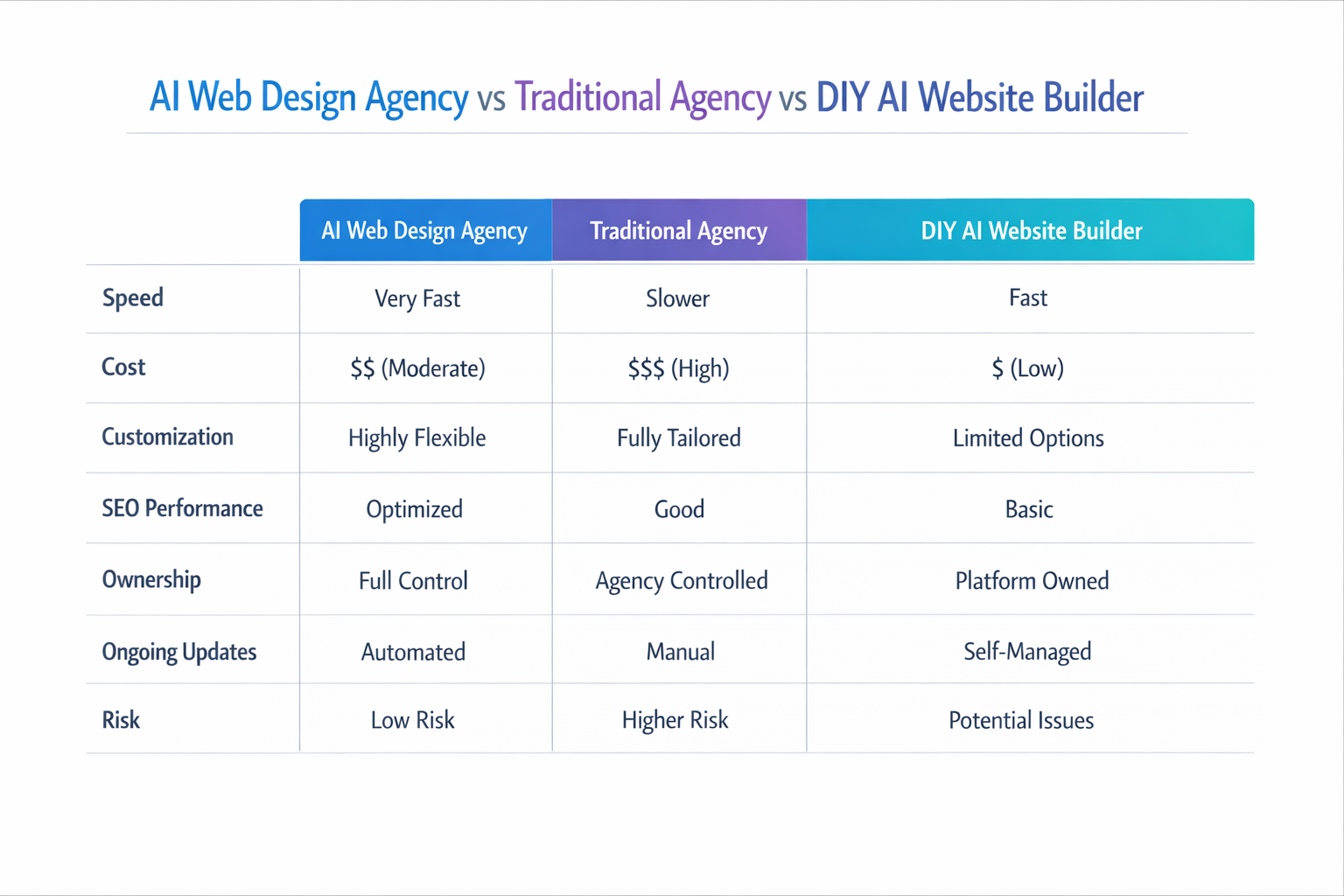
AI Web Design Tools vs Traditional Web Design
Let us settle the debate with hard data.
Time comparison
| Phase | Traditional | AI-Powered | Time Saved |
|---|
| Wireframing | 3-5 days | 10 minutes | 95% |
| Design | 5-10 days | 2-4 hours | 85% |
| Content creation | 3-7 days | 1-2 hours | 80% |
| Development | 10-20 days | 1-3 days | 75% |
| Testing/Launch | 3-5 days | 1-2 days | 50% |
| Total | 4-8 weeks | 3-7 days | 75-85% |
Cost comparison
A traditional website costs $5,000-15,000 to produce. An AI-powered website costs $500-3,000 in platform costs and design time. The savings are not hypothetical. They are real and measurable.
Quality and flexibility comparison
Traditional development offers unlimited customization. AI tools offer guided customization within their framework. For most business websites, the AI approach produces professional results that meet or exceed client expectations. For highly complex, custom applications, traditional development may still be necessary.
When to choose AI vs a human designer
Choose AI when you need speed, cost efficiency, and solid professional quality for standard website types. Choose a human designer for complex custom applications, highly specific design requirements, or projects that push creative boundaries.
AI Web Design for Agencies: White Label and Reselling
For agencies, AI web design tools are not just a productivity boost. They are a complete business model transformation.
How agencies use AI tools to scale
Agencies using AI tools can produce 3-4 times more websites with the same team size. The AI handles the time-consuming parts of the build process. The agency focuses on strategy, client relationships, and customization.
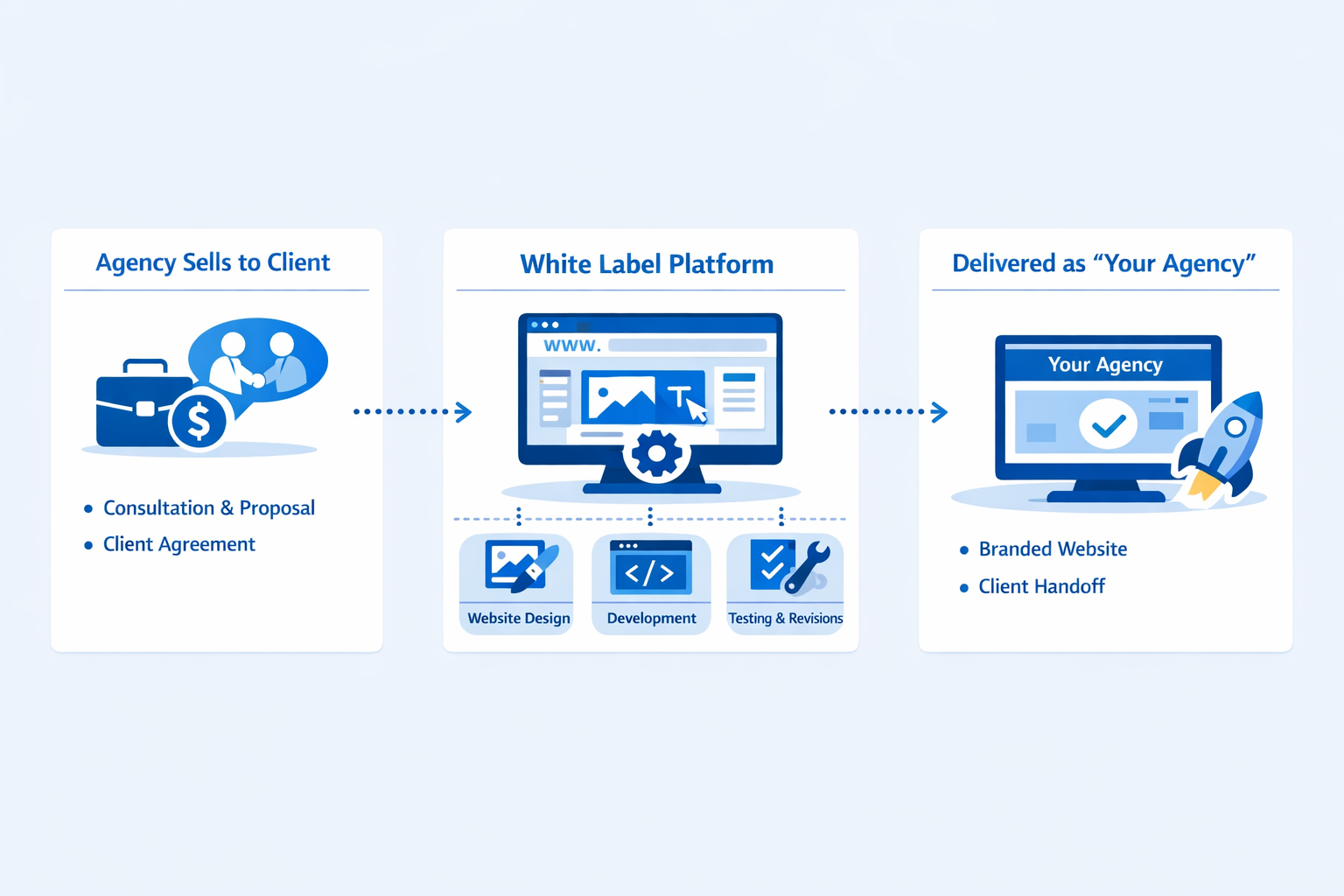
White labeling: building client sites under your brand
White label AI tools like lindoai let agencies present AI-generated websites as their own creation. The client sees the agency's brand throughout the experience. This strengthens the agency's market position and creates stickier client relationships.
Managing multiple client sites with AI
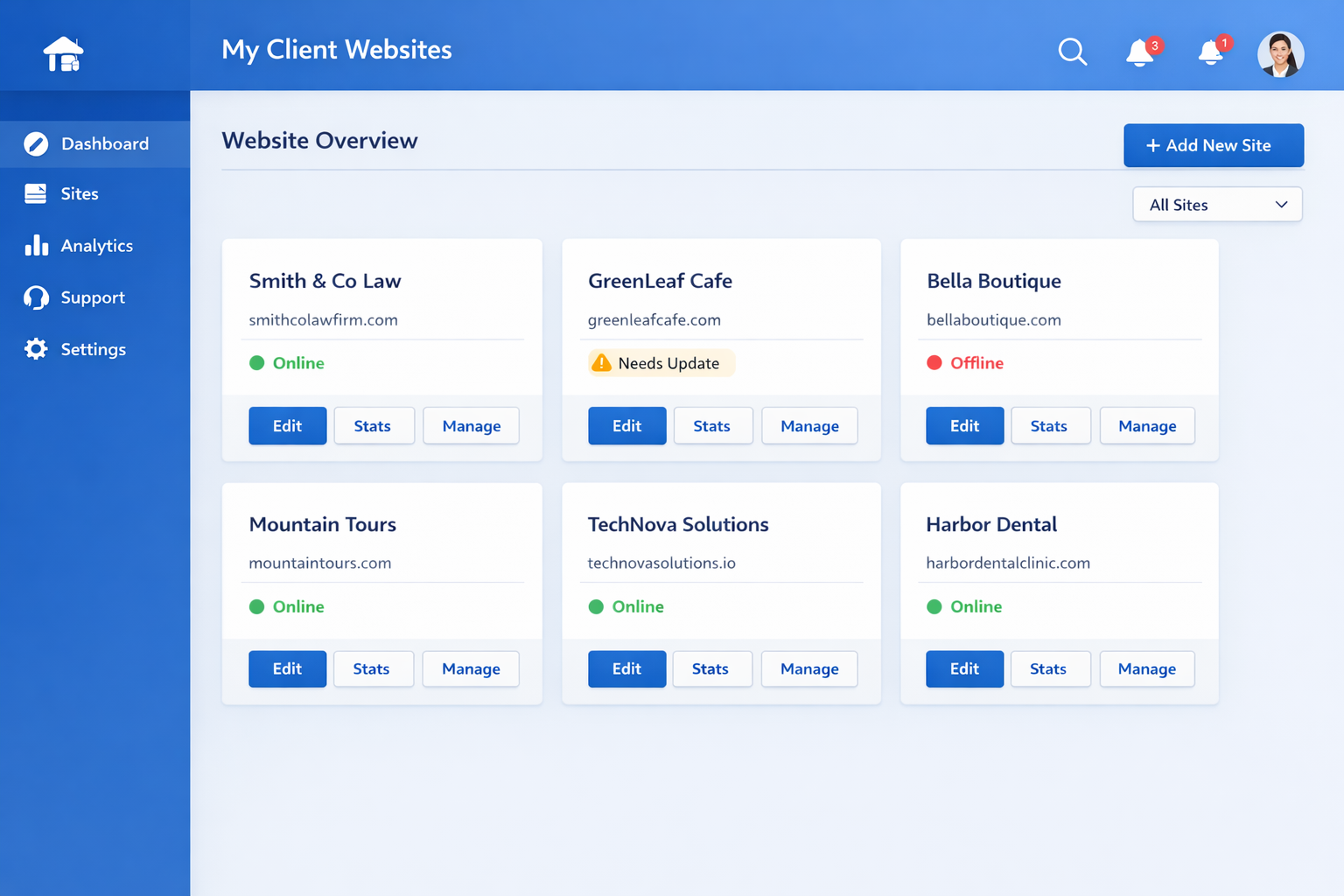
Multi-site management dashboards let agencies oversee all client websites from a single interface.
 You can monitor performance, push updates, manage billing, and handle support requests without logging into separate accounts for each client.
This centralized management is what makes the agency model scalable. Without it, adding each new client means more administrative overhead. With it, adding a client takes minutes. The dashboard becomes your command center, giving you a real-time view of your entire book of business.
AI can also help with cross-site management by identifying patterns across your client base. It can flag sites that need performance improvements, suggest content updates based on SEO trends, and even recommend upsell opportunities based on client usage patterns.
Common Limitations of AI Web Design Tools
Being transparent about limitations builds trust. Here is what AI tools cannot do yet.
Customization constraints
AI tools work within their design systems. While you can customize extensively, you cannot achieve the same level of pixel-level control as custom code. For most clients this is not an issue. For highly specific design requirements, it can be a limitation.
Learning curve despite the no-code promise
AI tools are easier than traditional development, but they still require learning. You need to understand how to write effective prompts, how to navigate the editor, and how to customize AI output. Plan for a learning period of 1-2 weeks.
Performance and code quality considerations
Some AI tools generate code that is not as optimized as hand-coded alternatives. This can affect page load times and SEO performance. The best tools use optimized templates and clean code generation to minimize this issue.
When evaluating a platform, test the output on Google PageSpeed Insights and check Core Web Vitals scores. A well-optimized AI-built site should score in the green on all metrics. If performance is consistently poor, consider a different platform.
Remember that many performance issues stem from image optimization, third-party scripts, and font loading rather than the core code quality. AI tools that include built-in image optimization and lazy loading tend to perform well.
FAQ
Can AI web design tools replace human designers?
No, AI web design tools do not replace human designers. They replace the technical implementation work, not the creative and strategic thinking. Designers who use AI tools become more productive, but the need for human creativity, client management, and strategic direction remains essential. The role of the designer shifts from builder to director.
Are AI-built websites SEO-friendly?
Yes, modern AI web design tools include comprehensive SEO features. They generate proper heading structures, meta tags, schema markup, and sitemaps automatically. However, you should still review and customize the SEO settings for your specific keywords and market. The AI gives you a strong foundation. Your input makes it excellent.
For best results, choose a platform that integrates with Google Search Console, supports structured data, and generates clean, semantic HTML. These technical factors matter for search rankings and are areas where a well-designed AI tool can actually outperform a manual build.
How much does an AI web design tool cost?
Pricing ranges from free (limited features) to $100+ per month for professional plans. Entry level paid plans start around $10-22 per month for basic tools like Hostinger or Wix. Professional agency plans with white label features typically cost $29-79 per month. For example, lindoai starts at $49 per month with full white label and AI generation capabilities.
Consider the ROI rather than just the monthly cost. A $49 per month platform that lets you produce 10 sites instead of 3 is a bargain. Most agencies recoup their platform investment with a single client project.
Can I use my own domain with an AI website builder?
Yes, every professional AI web design tool supports custom domains. You connect your domain through the platform settings, and the site is served from your domain without any indication that an AI tool was used.
What is the best AI web design tool for agencies?
For agencies that need white label capabilities, multi-site management, and AI-powered design, lindoai is the strongest option. It is built specifically for agency workflows and includes features that general purpose AI tools lack. You can learn more at the lindoai website or explore agency solutions.
The choice is clear. AI web design tools are not the future. They are the present. Agencies that adopt them now will have a significant competitive advantage over those that wait. The technology is mature, the pricing is accessible, and the results speak for themselves.
Ready to transform your web design workflow? lindoai offers the AI-powered tools, white label capabilities, and client management features you need to scale your agency. Start your free trial today and experience the future of web design.