If you run a web agency, you’ve felt this tension: clients want faster delivery and lower budgets, but they still expect premium design, clean copy, and SEO that actually works.
An AI website builder changes the math. Not because it “replaces” designers, but because it removes the slowest part of most projects: starting from nothing, repeating the same setup, and rebuilding the same pages for the tenth time.
In this guide, I’ll show you exactly how agencies use an AI website builder for agencies to deliver client sites faster, what features matter in real production, how the workflow works end to end, and how to choose a platform without getting trapped by hype.
Along the way, we’ll reference market and industry trends, then tie everything back to what agencies actually care about: margin, capacity, and retention.
The goal is not to “use AI.” The goal is to ship more great client sites per month with less chaos.
If you do this right, you do not just get faster builds. You get a tighter process, clearer packages, and a more scalable agency model that can handle growth without burning out your team.
What Is an AI Website Builder?
An AI website builder is a website creation platform that uses artificial intelligence to speed up tasks like:
- Generating site structure (pages, navigation, section order)
- Proposing layouts for common sections (hero, services, testimonials, FAQs)
- Drafting content you can refine (headlines, service descriptions, CTAs)
- Suggesting design systems (fonts, colors, spacing) that look consistent
In other words, it helps you build websites with AI by producing a high-quality first draft, then letting your team apply professional judgment to make it client-ready.
How AI changes the web design process
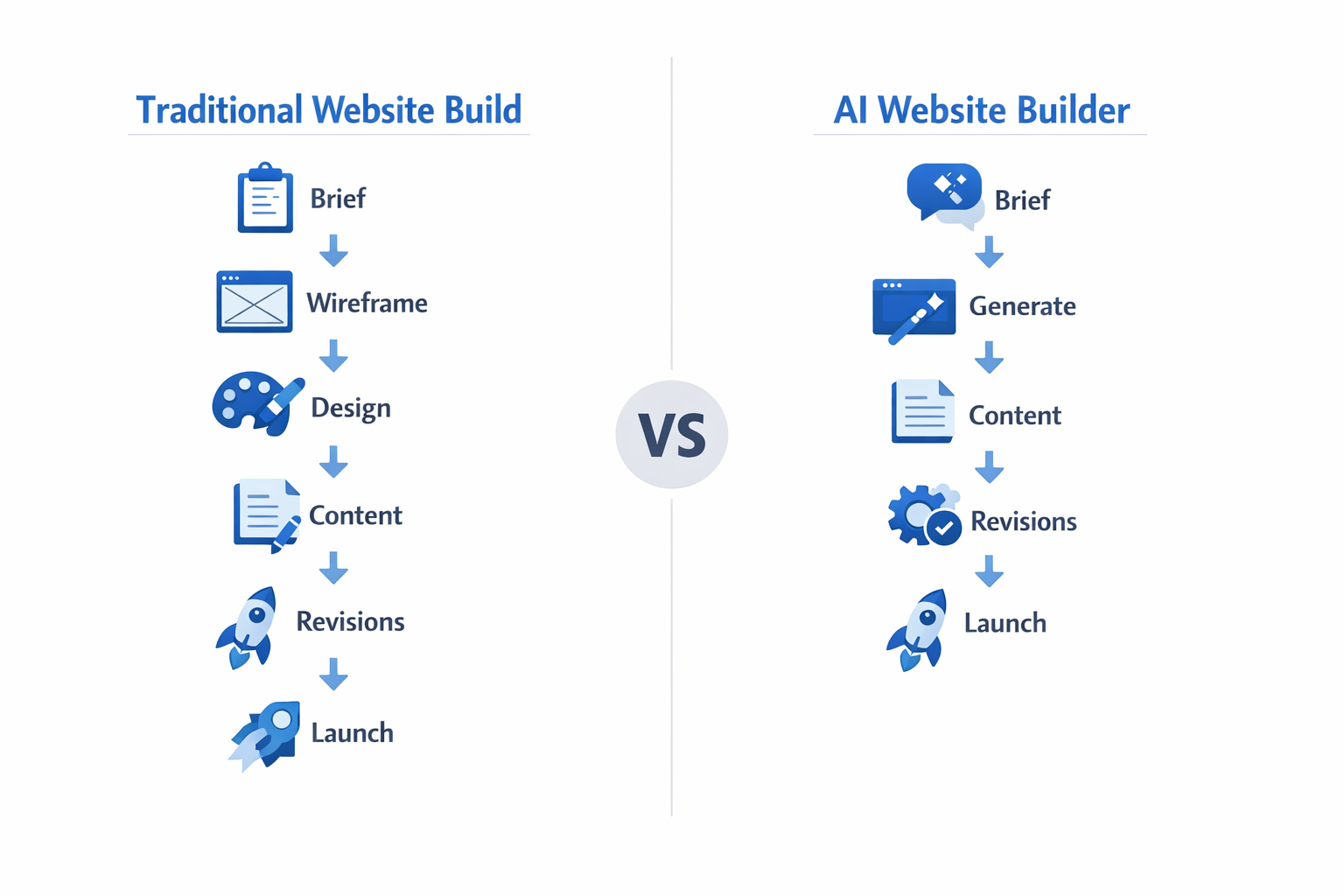
Traditional site builds often follow a pattern:
- Discovery and brief
- Wireframes and structure
- Design mockups
- Content creation or content wrangling
- Build and QA
- Revisions
- Launch
AI compresses the early stages by generating a usable foundation quickly.
Instead of spending days on a blank canvas, you start from a structured draft and spend your time on higher-value work:
- Brand polish
- Conversion-focused messaging
- SEO strategy
- Quality control
That is why agencies adopting an AI web design tool often report a shift from “production work” to “creative direction and strategy.”
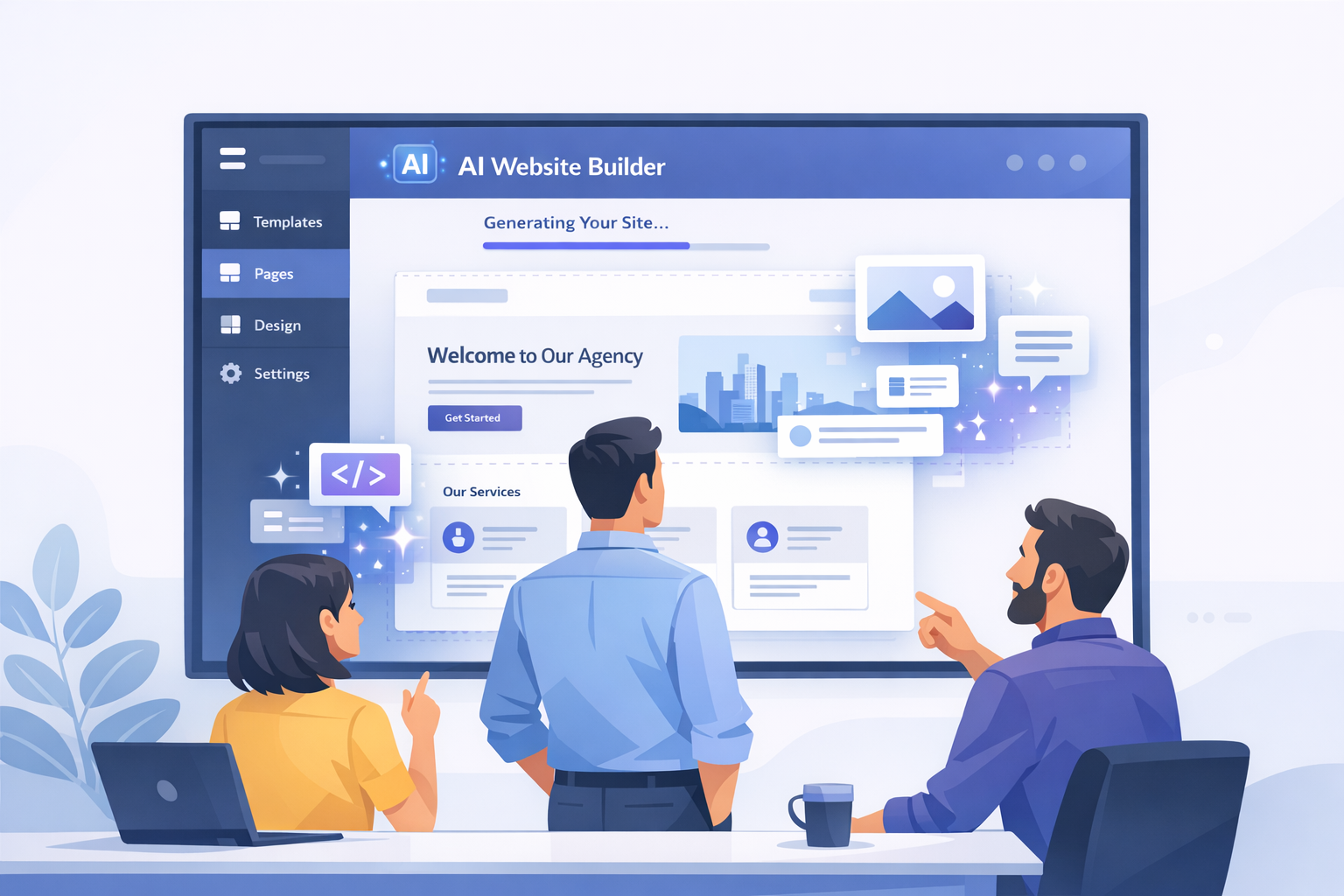
AI website builder vs traditional website builders
A traditional builder gives you a canvas, templates, and manual components. You still do most of the structure and content work yourself.
An AI-powered website builder adds automation and generation to reduce time-to-first-draft.
Here’s a simple comparison.
| Capability | Traditional website builder | AI powered website builder |
|---|---|---|
| Starting point | Template or blank page | AI-generated draft from prompts/brief |
| Content | Client-provided or manual copywriting | Draft copy suggestions and variations |
| Layout | Manual section building | Layout suggestions per industry/goal |
| Iteration | Slower, more manual | Faster testing and variations |
| Best use | One-off custom builds | Repeatable agency production at scale |
The best approach for agencies is often hybrid: AI for acceleration, and human expertise for quality, positioning, and results.
What an AI website builder is not
A quick warning, because this is where agencies get disappointed.
An AI website builder is not:
- A magic button that produces a finished, branded site with zero edits
- A replacement for strategy, messaging, conversion thinking, or SEO planning
- A safe source of factual claims about a client’s business, pricing, or compliance
It is closer to a high-speed production assistant. It accelerates drafts, variations, and structure, but your team still owns quality.
The three “outputs” agencies should expect
When you evaluate an AI powered website builder, focus on the three outputs that actually save time:
- Structure: pages, navigation, section order, and information hierarchy
- Design system: consistent fonts, colors, spacing, and components
- Copy drafts: headlines, service blurbs, CTAs, and FAQs that you refine
If the tool only does copy, it may help your marketing team, but it will not transform delivery.
Example: how AI drafts a local service business site
Imagine a plumbing company in Austin.
A good AI builder should produce a draft that includes:
- Home with a clear value prop and service area
- Services page with 6–10 service blocks
- Reviews/testimonials section
- Emergency call CTA
- Contact page with map, hours, and form
That is not the final site, but it is a strong foundation you can polish fast.
Why Agencies Are Adopting AI Website Builders
The demand for web services keeps growing, but client expectations are rising faster than agency capacity.
Mordor Intelligence projects the web design market will reach $92.06B by 2030, which signals opportunity, but also more competition and more pressure to deliver efficiently.
Source: Mordor Intelligence Web Design Market
Here’s what AI builders do for agencies in practice.
Speed and efficiency gains
AI helps agencies deliver a strong first draft quickly. This matters because:
- Fast first drafts build client trust
- Faster drafts shorten revision cycles
- Faster delivery improves cash flow
Practical metric to track: time to first draft.
If your agency can reduce time-to-first-draft from 3–5 days to 1 day, you change your monthly capacity without hiring.
Consistent quality across projects
Consistency is hard when you scale. Different designers, different copywriters, different clients, different expectations.
A good AI powered website builder supports consistency through:
- Templates
- Reusable sections
- Brand presets
- Repeatable page structures
This reduces “reinventing the wheel,” and it makes QA easier.
Scaling without proportional hiring
Traditional agencies scale linearly: more clients require more designers, more PMs, more QA.
AI does not remove the need for people, but it reduces the amount of manual labor per project. That means the same team can handle more builds.
Web Professionals Global describes the industry as being in a transformative phase with growing emphasis on AI-assisted workflows.
Source: Web Professionals Global 2025 industry report
The most profitable agencies are not the ones with the biggest teams. They’re the ones with the strongest systems.
The “revision spiral” problem
Most agencies do not lose time in the initial build. They lose time in revision cycles.
AI builders help reduce revision spirals because they make it easy to:
- Generate multiple layout variations for the same page
- Create alternative headlines and CTAs quickly
- Duplicate a page and test a different structure
Instead of arguing about a blank canvas, you give the client options. Options accelerate decisions.
Faster delivery changes your sales model
When you can deliver a first draft in 24 hours, you can sell differently:
- Shorter timelines become a premium differentiator
- You can package fixed-price “website in X days” offers
- You can justify monthly retainers because the build is only the beginning
In other words, AI does not just speed up production. It improves the story you sell.
Key Features of a Good AI Website Builder
Not all tools marketed as “AI” are useful for agencies. Some only generate text. Some only create generic templates. Some produce drafts that look impressive but collapse under real client work.
Here are the features that matter if you’re choosing an AI website builder for agencies.
AI-powered layout and content generation
This is the core promise: produce a strong first draft.
Look for:
- Page structure generation based on business type and goals
- Section generation for common conversion blocks
- Multiple variations (so you can present options to clients)
- Content drafts that are editable and guided, not locked
Agency tip: your team should treat AI output as a starting draft. You still need brand voice, legal review when relevant, and accuracy checks.
Template systems and reusable components
Speed comes from reuse.
Your platform should support:
- Industry templates
- Reusable blocks (testimonials, pricing, FAQs)
- Saved brand presets
- Fast duplication across client sites
This is how you go from “we can build 5 sites a month” to “we can build 20.”
Client management and collaboration
If the platform does not support agency operations, the AI part will not save you.
Look for:
- Multiple client workspaces
- Roles and permissions
- Approval workflow before publishing
- Easy feedback collection
SEO tools built in
Clients do not just want a site. They want a site that performs.
An AI website builder should support:
- Meta titles and descriptions
- H1/H2 structure
- Clean URLs
- Mobile performance basics
- Fast hosting and reliable uptime
If you sell SEO services, this is non-negotiable.
Brand controls and design consistency
For agencies, brand control is everything. If the AI generates a site but you cannot enforce a consistent design system, you will spend your time “fixing the AI.”
Look for:
- Global styles (typography scale, spacing system)
- Component-level controls (buttons, cards, forms)
- Saved brand presets you can reuse across client sites
Guardrails and quality controls
When you scale AI-assisted delivery, guardrails matter.
Helpful capabilities include:
- Version history and rollback
- Staging vs production environments
- Approval workflows
- Content review states (draft, review, approved)
The best agency tools reduce the risk of publishing mistakes.
White label and reseller support (if that is your model)
If you want to resell websites under your own brand, validate:
- Custom domain for the portal
- Branding removal and depth
- Multi-client management and roles
You can explore white label options here: white label website builder
How AI Website Builders Actually Work (Step by Step)
Let’s break down a realistic workflow agencies can use.
Input and brief
The output quality depends on input quality.
A strong brief includes:
- Business type and niche
- Services and differentiators
- Target customer and location
- Brand tone (formal, friendly, premium, etc.)
- Primary conversion goal (calls, bookings, demo requests)
Actionable tip: turn your onboarding questionnaire into an AI-friendly brief. Short, structured answers beat long, messy paragraphs.
AI generation phase
The platform generates:
- Site pages and navigation
- Section layout and hierarchy
- Draft copy
- Initial visual style
Your goal as an agency is to generate a first draft that is 70 to 80 percent complete.
Human refinement
This is where agencies win.
Refinement includes:
- Brand alignment (fonts, colors, spacing)
- Message clarity and differentiation
- SEO improvements
- Conversion optimization (CTAs, proof, positioning)
- Image and asset improvements
AI can generate structure, but humans create trust.
Publishing and handoff
A professional AI workflow includes:
- QA checklist
- Mobile review
- SEO metadata check
- Performance check
- Client training or managed plan offer
The handoff is also a sales moment: maintenance, landing pages, SEO.
How to run a “two-pass” production workflow
A practical agency workflow is two-pass:
Pass 1: AI speed draft
- Generate the full site draft quickly
- Do only structural edits
- Confirm the story and CTA flow
Pass 2: Human polish
- Brand refinement and spacing
- Replace placeholder content
- Add proof (reviews, logos, case studies)
- Final SEO pass
This keeps your team from getting stuck in perfection too early.
What to standardize vs what to customize
Standardize:
- Page structure for your niche
- Reusable blocks (FAQs, testimonial layouts, CTAs)
- SEO checklists
Customize:
- Hero messaging and differentiation
- Visual brand identity
- Specific service details and compliance language
This balance is how you scale without creating generic sites.
AI Website Builder vs Hiring More Designers
Agencies often ask: should we buy tools or hire people?
The answer is usually “both,” but in a specific order.
Cost comparison
Hiring adds fixed monthly cost. Tools add predictable platform costs.
A practical approach:
- Use an AI builder to increase capacity first
- Then hire when demand is stable and process is proven
That reduces risk because you are not hiring into chaos.
Quality and consistency
More designers can increase output, but only if your process is clear.
Without templates, QA standards, and a consistent workflow, adding people increases variability.
An AI website builder acts like a standardization layer:
- Same components
- Same baseline structure
- Same publishing process
That makes scaling smoother.
When you still need custom development
AI builders are great for:
- Marketing sites
- Local service sites
- Landing pages
- Basic ecommerce
You still need custom development for:
- Complex web apps
- Advanced integrations
- Unique product experiences
- Heavy compliance requirements
The agency that wins is the agency that knows when to standardize and when to custom-build.
A simple “capacity math” example
Let’s make it concrete.
If your current process takes 40 hours per client site and your team has 160 production hours per month, you can deliver 4 sites.
If an AI builder reduces average production time to 28 hours per site, the same team can deliver 5–6 sites.
That is a 25–50% capacity increase without adding headcount.
Where hiring still matters
Even with AI, you will eventually hire for:
- Project management and client communication
- QA and performance checks
- Specialized services like SEO, CRO, and copywriting
AI reduces repetitive work. It does not eliminate the need for a professional delivery team.
When to invest in AI first (a decision rule)
If you have inconsistent delivery, unclear templates, and no standardized QA process, hiring more people usually makes the problem worse.
A simple decision rule:
- If you are turning down work because production is too slow, adopt AI and templates first.
- If you are turning down work because project management and communication are overloaded, hire or outsource PM capacity.
- If you are turning down work because you cannot deliver specialized outcomes (SEO, CRO, copy), hire specialists or partner.
This is how you avoid scaling the wrong bottleneck.
How to Choose the Right AI Website Builder for Your Agency
This is where many agencies get trapped by demos.
A demo site can look great in 10 minutes. The real question is whether the platform works under real client pressure.
Evaluation criteria
Use criteria that map to agency reality:
- How fast can we deliver a first draft?
- Can we reuse templates and brand presets?
- Can we manage multiple clients cleanly?
- Does it support SEO basics and performance?
- Can we white label if we want to?
Questions to ask during a demo
Ask questions that reveal the truth:
- What does the client login experience look like?
- Can we duplicate a site and swap branding quickly?
- How do approvals work before publishing?
- How do we control SEO metadata at scale?
- What happens if we want to export or migrate?
Red flags to watch for
Watch for:
- AI output that cannot be edited cleanly
- Vendor branding that cannot be removed
- Weak client management
- No clear support SLA
- Pricing that destroys margins at scale
If a platform makes your workflow more complex, the AI is not worth it.
What to test in a 60-minute trial
If you only have one hour to evaluate a platform, do this:
- Generate a site from a short brief
- Customize global styles and save a brand preset
- Edit the homepage story and CTA
- Update SEO metadata
- Preview on mobile
- Publish to a live URL
- Duplicate the site and swap branding
If any of these steps is painful, that pain will repeat with every client.
A scoring checklist (quick and useful)
Score each category 0–2:
- Draft quality (structure + layout)
- Brand control (global styles + components)
- Reuse (templates + blocks)
- Client ops (roles + approvals)
- SEO and performance
- Pricing at scale
Pick the platform with the highest total score, not the prettiest demo.
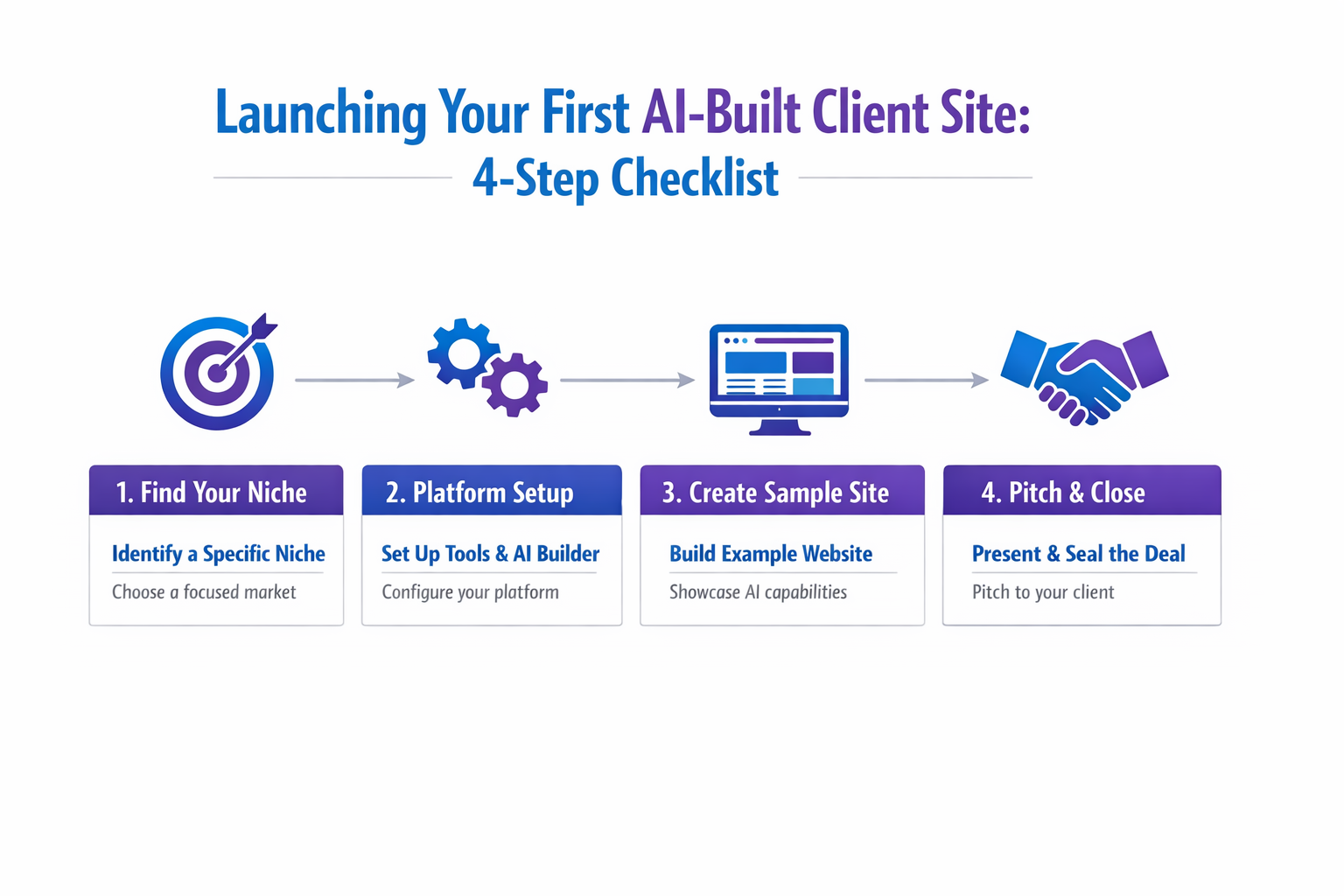
Getting Started: Your First AI-Built Client Site
The fastest way to adopt AI is to run a controlled pilot.
Step 1: Pick a niche
Pick a niche where structure is repeatable:
- Plumbers
- Dentists
- Gyms
- Coaches
This makes templates and AI outputs more consistent.
Step 2: Set up your platform
Before you onboard clients:
- Build 1–2 niche templates
- Save brand presets
- Create an onboarding checklist
Step 3: Build a sample site
Create a demo site that looks real.
It should include:
- A clear homepage narrative
- Services page
- Proof (testimonials, logos, reviews)
- Strong CTA
This is your sales asset.
Step 4: Pitch and close
Pitch an outcome:
- Faster site launch
- Better conversion
- SEO-ready structure
Then sell a monthly plan.
A 30-day rollout plan for agencies
If you want to adopt AI without disrupting your agency, use a 30-day rollout.
Week 1: Build internal assets
- One niche template
- A block library (CTA, testimonials, FAQs)
- An onboarding questionnaire
Week 2: Produce a demo site
- Build one “sample client” site
- Document your process
- Create a QA checklist
Week 3: Sell pilot projects
- Outreach to 25 niche businesses
- Partner outreach to 5 marketers
- Close 1–3 pilot clients
Week 4: Refine and systemize
- Track time to first draft
- Track revision cycles
- Convert lessons into templates and checklists
Your goal is not perfect automation. It is repeatable delivery.
The Agency AI Website Build Checklist (Before You Publish)
If you want AI speed without sloppy launches, use this pre-publish checklist. Print it or turn it into a Notion template.
Brand and UX
- Fonts, colors, spacing match the client brand
- Buttons and CTAs are consistent and clear
- Mobile layout checked on real devices
Content quality
- Homepage value proposition is specific (not generic)
- Service pages include proof and clear CTAs
- No placeholder text or “lorem ipsum” remains
SEO basics
- Meta title and description set for every core page
- One H1 per page, headings are structured
- Internal links added to key pages
- Images have descriptive alt text
Performance and reliability
- Images are optimized and properly sized
- Core pages load quickly on mobile
- SSL is enabled, forms tested
Client handoff
- Client knows how to request changes
- Maintenance plan offered and documented
- Analytics installed and verified
The checklist is what turns AI-generated drafts into professional agency deliverables.
Pricing and Packaging: How Agencies Monetize AI Speed
AI makes delivery faster. That only matters if you price in a way that captures the value.
Here are three packaging models that work well for agencies using an AI powered website builder.
Model 1: Fixed timeline offer (fast launch)
This is a simple, high-converting offer for small businesses.
- Deliver a first draft in 24–48 hours
- Launch in 7–10 business days
- Include a clear revision limit and approval process
Why it sells: speed is tangible, and it reduces client anxiety.
Model 2: Build + care plan (recurring revenue)
A care plan is where many agencies win long-term.
Include:
- Hosting and security
- Monthly content updates (defined scope)
- Performance checks
- Quarterly reporting
Then offer add-ons:
- SEO pages
- Landing pages
- Conversion testing
This model turns your agency from “a project vendor” into an ongoing partner.
Model 3: Niche subscription (reseller style)
If you serve a narrow niche (for example, gyms), you can sell a subscription that includes:
- A niche template set
- Monthly updates
- Seasonal landing pages
- Reputation and review widgets
This is essentially productized web design. AI helps you produce the initial site and ongoing pages quickly.
Setting pricing with margin in mind
A practical pricing approach:
- Estimate your average production hours per site with AI.
- Multiply by your internal blended hourly cost.
- Add platform costs per site.
- Add support buffer.
- Price for outcome, not hours.
If AI saves you 10–15 hours per site, do not automatically lower your prices. Keep prices stable and increase margin, or keep margin stable and add more value (SEO setup, analytics, better copy).
Clients pay for outcomes. Your job is to use AI to deliver those outcomes faster and more consistently.
Agency Workflow Templates (That Make AI Output 10x More Useful)
Most agencies do not fail with AI because the tool is weak. They fail because their inputs are inconsistent.
If you give the AI a different brief every time, you get a different output every time. That is fine for experiments, but it is terrible for scalable delivery.
This section gives you copy/paste templates you can use with any AI website builder.
Template 1: Client brief (short but structured)
Use this for onboarding forms or kickoff calls.
- Business name:
- Industry and niche:
- Location/service area:
- Primary offer (top 3 services):
- Differentiators (why choose you):
- Target customer:
- Brand tone (choose one): friendly, premium, technical, playful
- Primary conversion goal: calls, bookings, demo requests, quote form
- Proof assets available: reviews, testimonials, before/after, logos
When you collect this consistently, AI drafts become predictable.
Template 2: Homepage story framework
If you want AI to generate a homepage that converts, you need a structure.
Ask the AI to follow:
- Hero: clear outcome + location + CTA
- Problem: what the customer is worried about
- Solution: your approach and process
- Services: a simple grid
- Proof: reviews, metrics, case study
- FAQ: objections and answers
- CTA: repeat the primary action
This keeps pages from turning into generic brochure content.
Template 3: SEO page brief (per service)
If you sell local SEO, you need consistent service pages.
For each service page, define:
- Primary keyword (example: emergency plumber austin)
- Secondary keywords (3–5 variations)
- Service area mentions (2–3 key locations)
- Proof point (review snippet, certification, years in business)
- CTA (call now, book online, request quote)
Then generate the page draft, and refine it with human edits.
AI speeds up production, but templates create repeatability. Repeatability is what scales an agency.
Common Mistakes Agencies Make With AI Website Builders (and How to Avoid Them)
AI can speed you up, but it can also create new failure modes. Here are the mistakes I see most often when agencies adopt an AI website builder.
Mistake 1: Treating AI drafts as final deliverables
AI drafts are designed to be fast, not perfect.
If you publish without refinement, you risk:
- Generic messaging that looks like every competitor
- Inaccurate claims (especially around services, pricing, and compliance)
- Thin SEO pages that do not rank
Fix: bake a “human polish pass” into every project. Make it a checklist, not a suggestion.
Mistake 2: Not standardizing inputs
When briefs are inconsistent, outputs are inconsistent.
Fix: use the onboarding templates from this guide and force structured answers.
Mistake 3: Overpromising speed to clients
Yes, you can move faster, but you still depend on client feedback and approvals.
Fix: sell speed as “fast first draft,” then use a clear approval workflow for launch.
Mistake 4: Ignoring SEO and performance until the end
Many AI tools can generate pages quickly, which makes it tempting to skip SEO structure.
Fix: define your SEO standards early: title tags, meta descriptions, headings, internal links, image alt text, and mobile performance.
Mistake 5: Letting your platform dictate your business model
Tools should support your agency, not redesign it.
Fix: decide your niche, your packages, and your pricing first, then choose the platform that fits.
If you avoid these mistakes, AI becomes leverage instead of noise.
Where lindo.ai fits
If you want an AI website builder designed for agencies, lindo.ai helps teams build and deliver client websites faster, with the workflows you need to scale.
Explore:
FAQ
Can AI really build a professional website?
Yes, especially for marketing sites and service businesses. AI can generate structure, layout, and draft content quickly. The professional outcome comes from human refinement: brand alignment, message clarity, and QA.
Will AI replace web designers?
No. AI changes the work, but it does not remove the need for judgment, strategy, and quality control. Designers who learn to direct AI workflows will deliver faster and compete better.
How much does an AI website builder cost?
Pricing varies by platform and model (per site, per client, flat subscription). The key is whether the platform allows you to keep healthy margins after support and revisions.
Is the output SEO-friendly?
It can be, if the builder supports proper SEO controls (meta titles, descriptions, headings, URLs) and you follow a method. Always review and refine SEO before launch.
Can I white label an AI website builder?
Some platforms support white labeling (custom domain, branded portal). If white label matters to your agency model, validate the full client login experience and branding depth.
What is the best AI website builder for agencies?
There is no universal “best” because agencies vary by niche, team size, and pricing model. The best AI website builder for your agency is the one that: - Produces drafts your team can polish quickly - Supports reuse through templates and blocks - Keeps your margins healthy at 10, 25, and 50 sites - Helps you manage clients cleanly (roles, approvals) If you want an agency-focused starting point, review: AI website builder
Can AI generate images and branding too?
Some platforms can suggest colors, layout styles, and even generate visuals, but agencies should be careful. Treat AI-generated visuals as placeholders unless you have a clear brand system. Your differentiator is brand quality, and brand quality still comes from deliberate design decisions.
Ready to deliver faster without sacrificing quality?
An AI powered website builder can help your agency ship more sites per month, reduce production time, and improve margins.
If you want to see how lindo.ai supports agency delivery, start here: AI website builder