AI Website Builder
AI Website Creator: The Complete Guide (2026)
• • 4 min read
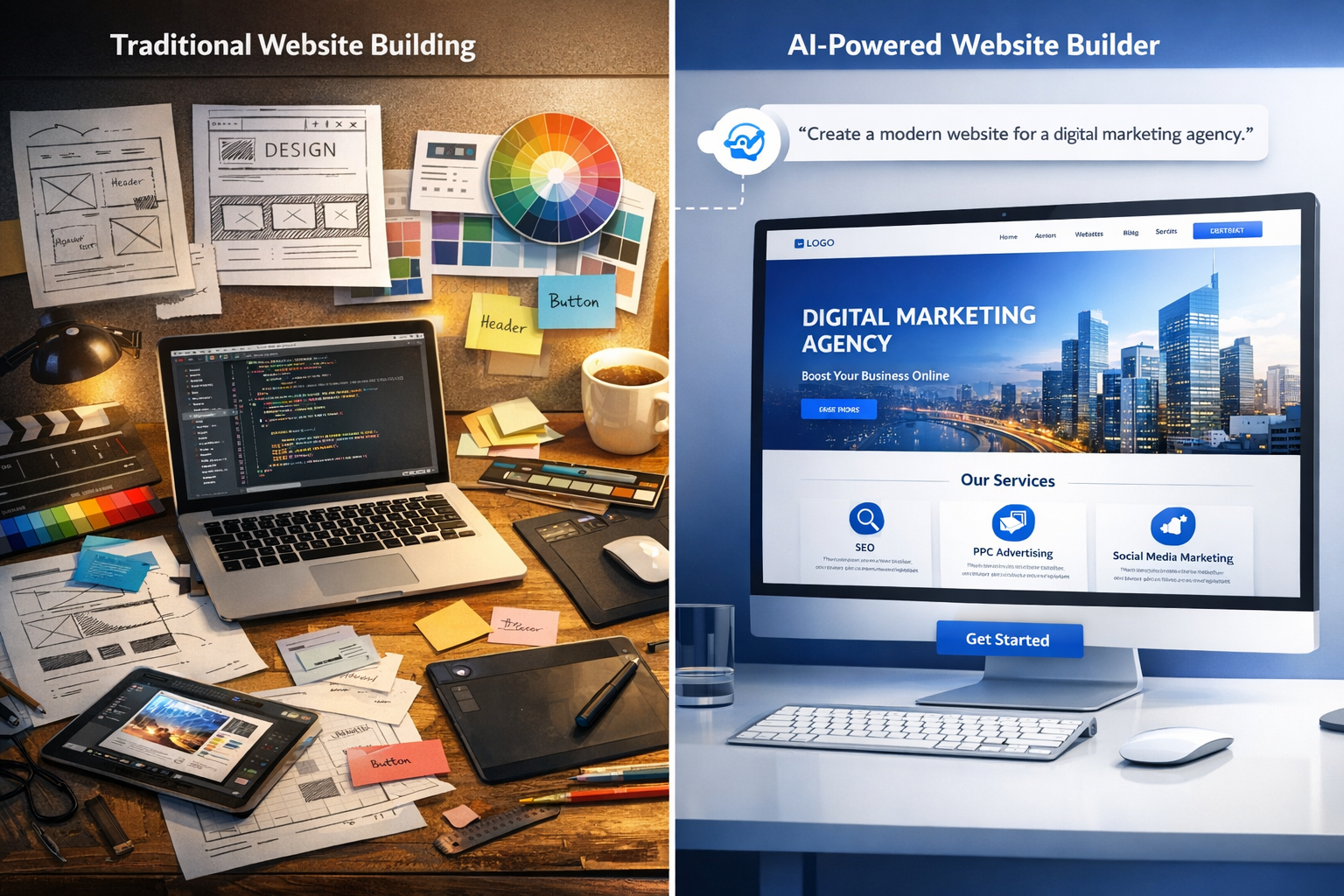
Everything you need to know about AI website creators in 2026: how they work, what they cost, and how to choose the right one for your business or agency.

The way websites get built has changed forever. What used to take a team of designers, developers, and copywriters weeks to deliver can now be generated by an AI website creator in minutes. And here's the surprising part: the results are often good enough to rank, convert, and impress real customers.
You've probably seen the ads. Type a prompt, get a website. It sounds like magic, and honestly, some of it is. But before you trust your online presence to a prompt and a prayer, you need to understand how these tools actually work, where they shine, and where they still need a human touch.
That's exactly what this guide covers. By the end, you'll know how AI website creators work under the hood, how they compare to traditional builders and professional developers, what to look for when choosing one, and exactly how to use one to launch a site that looks anything but generic.
An AI website creator is a platform that uses artificial intelligence to generate a complete website from simple inputs like a text description, a business name, or a few answers about your goals. Instead of you dragging blocks onto a canvas or writing code, the AI makes the design decisions: layout, color palette, typography, page structure, and even the copy.
The term covers a broad category. Some tools generate a full multi-page site in one shot. Others work section by section, letting you direct the AI to build a hero, a pricing table, or a testimonial block. The best ones let you edit everything afterward, which is the difference between a toy and a tool.
The market has grown fast because the demand is enormous. Google Trends data on "ai website builder" has climbed steadily for years, and search volume for "ai website creator" now sits at roughly 40,500 monthly searches in the US alone. Every small business owner who dreaded building a site is suddenly a potential customer.
Traditional website builders like Wix, Squarespace, and WordPress with Elementor are visual editors. They give you a blank canvas and a library of templates, then expect you to assemble the pieces. That works, but it puts all the creative and technical burden on you. You choose the template, adjust the spacing, pick the fonts, write the copy, and fix the mobile layout.
An AI website creator flips the model. You describe what you need, and the platform generates the starting point for you. The difference is like using a GPS instead of reading a paper map: you still drive, but the navigation is handled.
Here's a practical breakdown of the difference:
| Capability | Traditional Website Builder | AI Website Creator |
|---|---|---|
| Starting point | Blank canvas or fixed template | AI-generated draft from your description |
| Copywriting | You write it | AI drafts it based on your business details |
| Design decisions | You choose everything | AI proposes layouts, colors, and fonts |
| Time to first draft | Hours to days | Minutes |
| Editing control | Total, manual | High, after generation |
| Learning curve | Moderate to steep | Gentle |
The traditional builder gives you more manual control, but it costs you time. The AI creator gives you speed and a strong starting point, and modern platforms still let you tweak everything afterward.
Under the hood, modern AI website creators combine two main technologies. The first is a large language model (LLM), the same kind of technology that powers ChatGPT. The LLM handles the text side: it writes your headlines, product descriptions, and calls to action based on your business information.
The second is a design engine. This is the part that makes AI website creators unique. The design engine takes your content and your stated preferences, then applies design rules to produce a layout that looks professional: proper hierarchy, contrast, spacing, and responsive behavior. Some engines use generative models trained on millions of well-designed pages. Others use rule-based systems that encode classic design principles.
The magic of a good AI website creator is the combination: an LLM writes like a copywriter while the design engine lays it out like an art director. Neither alone is enough. Together, they produce a site that feels considered, not assembled.
This architecture explains both the power and the limits of the category. The AI is great at producing a coherent first version. It's less great at understanding your brand's subtle personality or your specific industry quirks, which is why the best workflow always includes a human review pass.
Using an AI website creator feels almost too simple at first. You answer a few questions or type a description, and a full site appears. But a lot happens between your prompt and the published page. Understanding that process helps you get dramatically better results.
Most platforms follow the same basic flow. First, you tell the tool about your business. That usually means providing your business name, industry, location, and a short description of what you do. Some tools also ask about your goals, like whether you want to generate leads, sell products, or build an audience.
Next, the AI generates a site structure. It proposes the pages you need, like Home, About, Services, and Contact, plus the sections within each page. You can accept the structure, remove sections you don't need, or ask the AI to add specific ones.
Then comes the content pass. The AI writes draft copy for every section: your hero headline, your service descriptions, your FAQ answers. This is where the quality varies most between platforms, because it depends on the underlying language model and how well it was prompted with your business details.
Finally, the design pass. The AI applies a visual style, choosing colors, fonts, and layouts that fit your industry. Most tools generate multiple style options so you can pick the direction you like.
After generation, you're in an editor. You can change text, swap images, adjust colors, move sections, and add your own touches. When you're happy, you publish to your own domain.
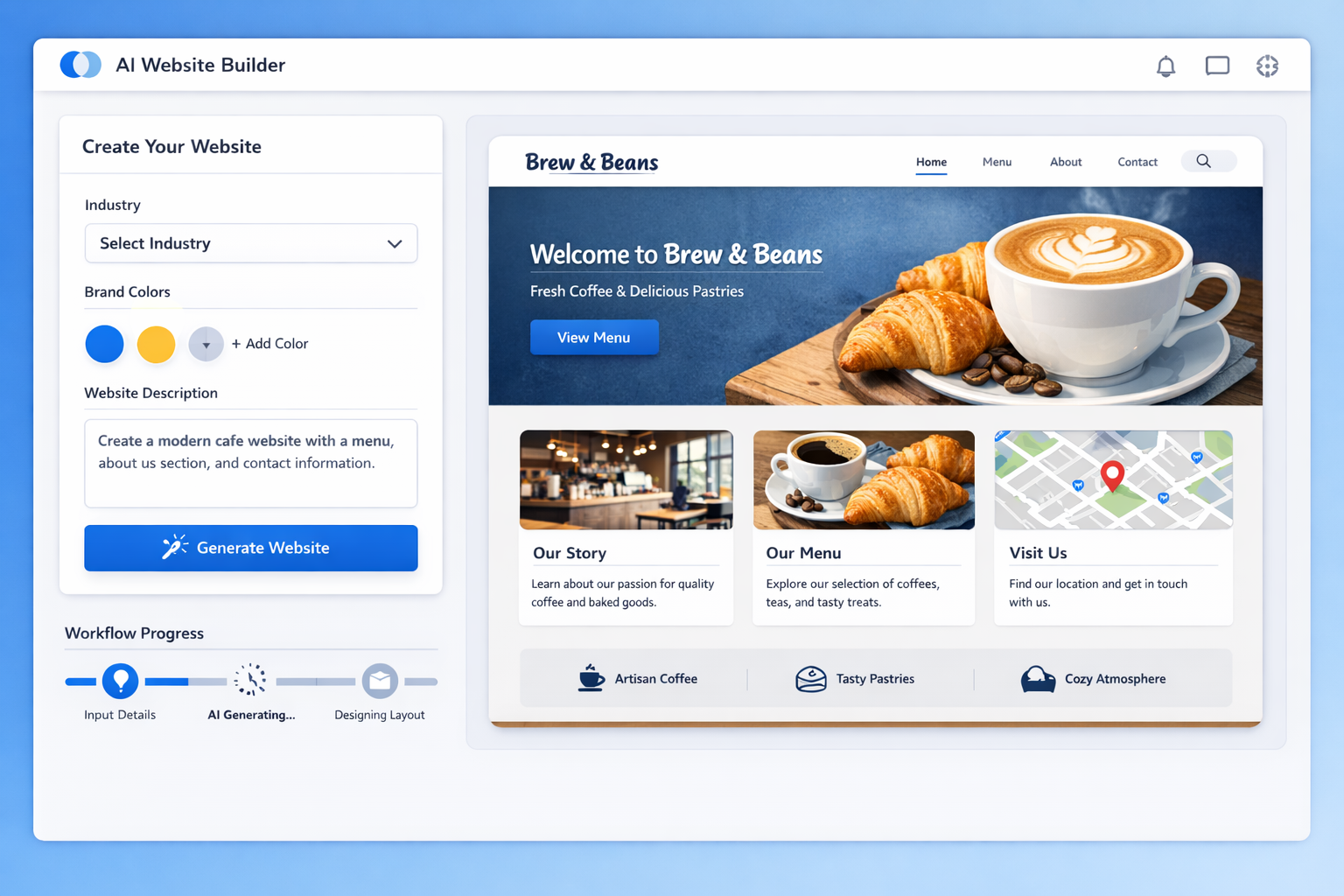
The real breakthrough of the category is that content and design are generated together, in context. In the old workflow, a designer would build a layout and then wait for a copywriter to fill it in, or worse, use lorem ipsum and hope the client's text fit.
An AI website creator eliminates that back-and-forth. The layout adapts to the copy, and the copy is written to fit the layout. The hero section knows how long its headline should be. The pricing table knows how many plans you described. The service cards know what services you listed.
This coherence is why AI-generated sites look better than they have any right to. The pieces fit together because they were created as a system, not as separate parts.
The biggest productivity win isn't speed. It's that copy and design are generated together, so you never stare at a beautiful layout filled with placeholder text.
For agencies, this is a workflow revolution. A web designer who used to spend 20 to 40 hours on a typical small business site can now produce a client-ready draft in an afternoon. That changes the economics of web design entirely, which is why so many agencies are adopting AI builders as their primary production tool.
You have three realistic paths to a website: an AI website creator, a traditional website builder, or a professional developer or agency. Each has a place. Choosing well depends on your budget, your timeline, and your needs.
Money is where the difference gets stark. An AI website creator typically costs between $10 and $50 per month for a business site, with many platforms offering free tiers that let you test before paying. Traditional builders run a similar range, roughly $12 to $40 per month, but you often pay extra for premium templates and apps.
Hiring a developer is a completely different category. A freelance developer might charge $1,500 to $5,000 for a small business site. An agency can charge $6,500 to $15,000 or more, depending on scope. For a basic brochure site, that's a hard pill to swallow.
| Option | Typical Cost | Time to Launch | Skill Required |
|---|---|---|---|
| AI website creator | $10-$50/month | Hours to 1 day | Minimal |
| Traditional builder | $12-$40/month + add-ons | 1-4 weeks | Moderate |
| Freelance developer | $1,500-$5,000 | 2-6 weeks | None (you brief) |
| Agency | $6,500-$15,000+ | 4-12 weeks | None (you brief) |
The monthly cost difference between an AI creator and a traditional builder is small. The real comparison is between both of them and hiring a professional.
If speed matters, nothing beats an AI website creator. You can go from a blank screen to a published, professional-looking site in a single afternoon. That's not an exaggeration; it's the core value proposition of the category.
A traditional builder is faster than hiring a developer but still requires real effort. You need to choose and customize a template, write or source all your content, adjust layouts for mobile, and handle SEO basics yourself. Realistically, most people spend one to four weeks on a polished site, working evenings and weekends.
Hiring a professional is the slowest path because of scheduling and revision cycles. A good agency will manage the process for you, but "managed" still means weeks of waiting between milestones.
Here's the honest part. There are situations where AI and DIY builders genuinely aren't the right call:
In those cases, budget for a developer from the start. For everything else, an AI website creator gets you 90% of the result at 5% of the cost.
Rule of thumb: if a site's job is to communicate, convert, and look professional, an AI website creator is enough. If its job is to compute, integrate, or automate, bring in a developer.
That said, the line keeps moving. AI builders add e-commerce, booking, and membership features every quarter. Before you assume you need a developer, check whether the AI platform you're considering already supports your use case.
Not all AI website creators are created equal. The category is young, and quality varies wildly between platforms. These are the capabilities that actually separate the tools worth paying for from the gimmicks.
The number one complaint about early AI website builders was that everything looked the same. Some tools still suffer from that problem: generate ten sites and you get ten variations of one template.
Look for a platform that gives you real design control after generation. That means the ability to change fonts, colors, spacing, and layouts without fighting the tool. It also means the AI should offer multiple distinct style directions, not just one default look.
A good test: generate a site for a law firm, then generate one for a skate shop. If the results feel interchangeable, the design engine is weak. If they feel genuinely different, the tool understands context.
A website that nobody can find is a website that doesn't exist. The best AI website creators build SEO fundamentals into the generation process: clean page titles, meta descriptions, heading structure, fast loading, and mobile responsiveness.
Ask any candidate platform these questions:
Some AI builders now generate an entire SEO foundation as part of the initial output. That's a huge time saver, because fixing SEO after launch is far more painful than getting it right at generation time.
This is the differentiator that most reviews miss. If you're an agency, freelancer, or marketer building sites for clients, you need more than a site generator. You need a platform that supports your business model.
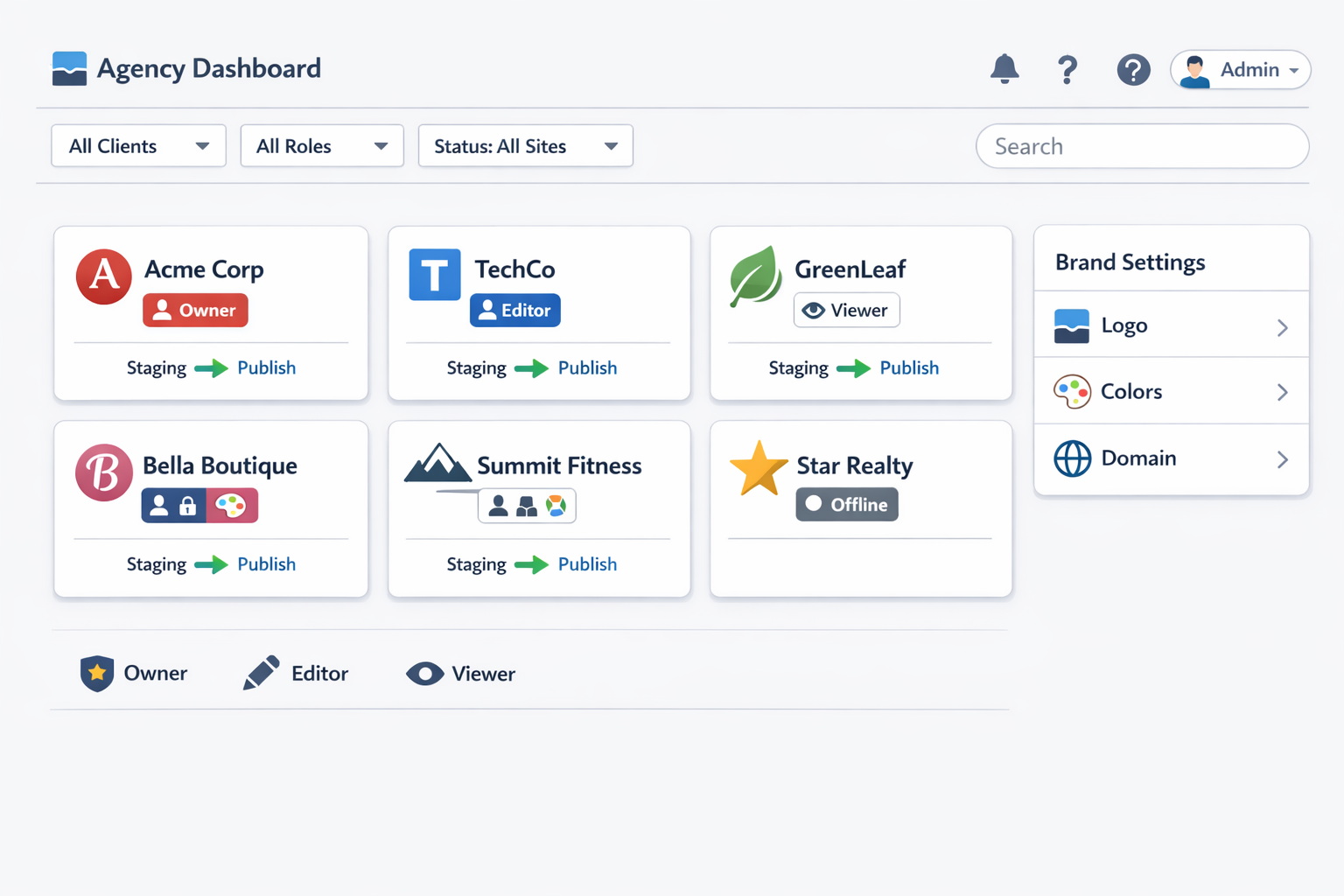
White label capability means you can rebrand the platform as your own: your logo, your domain, your client dashboard. Client management means you can create multiple sites under one account, control access, and bill clients without them ever seeing the platform's brand.
For agencies, the platform is the product. A white-label AI website creator lets you sell websites as a service under your own brand, at margins that traditional delivery can't touch.
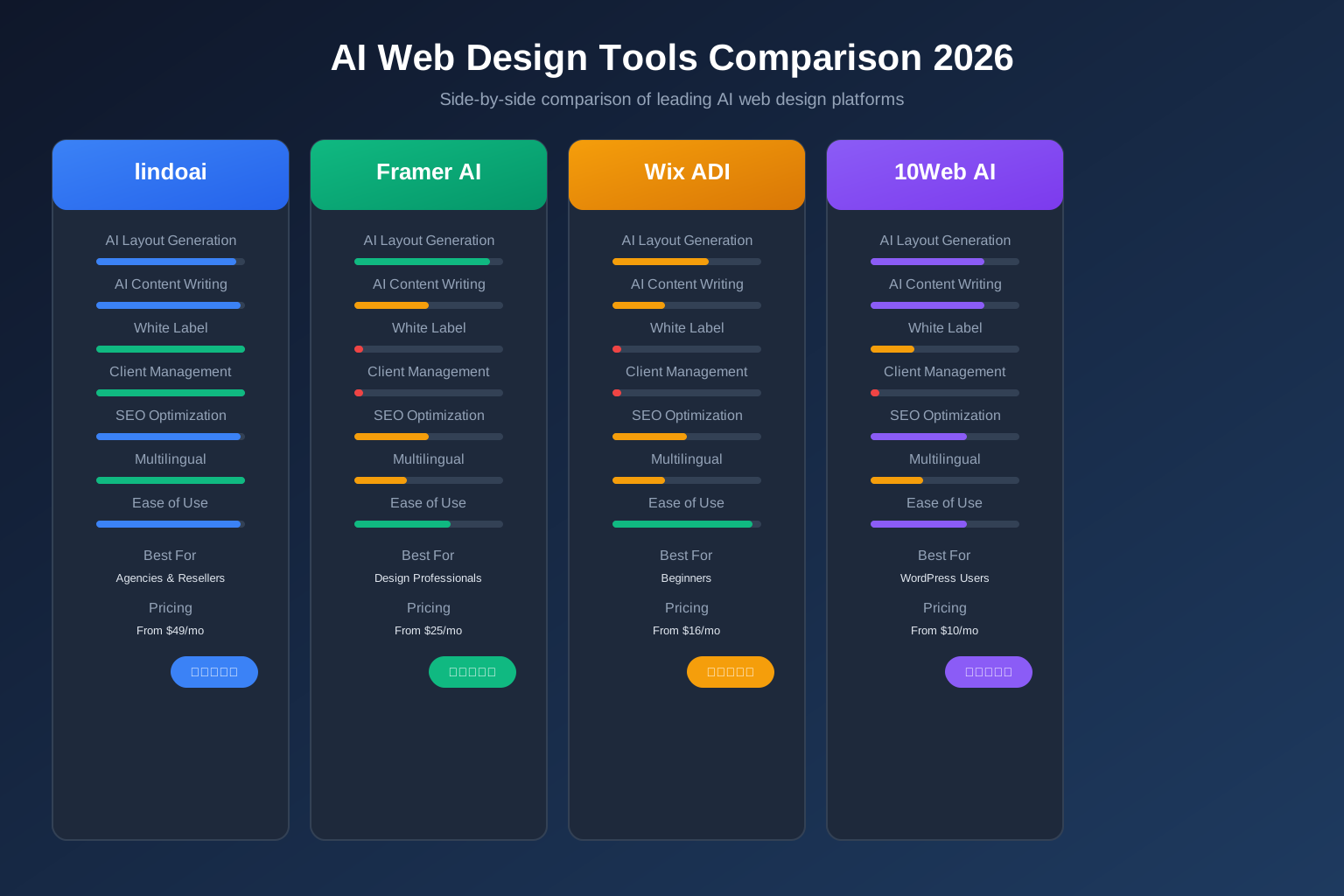
This is exactly the gap lindoai fills. It's an AI website builder built for agencies, with white-label support, client management, and reseller economics built in. If you plan to build more than one site, this category of feature should be a deciding factor.
Who actually uses these tools, and what for? The answer is more varied than you might think. Three use cases dominate.
The classic use case. A plumber, a bakery, a physiotherapy clinic, a consultant: they need a professional online presence, and they need it without a six-figure agency budget.
An AI website creator is ideal here because small business sites follow patterns. They need a hero, services, about, testimonials, contact, and maybe a booking link. The AI generates that structure instantly, the business owner customizes the copy, and the site is live in a day.
The economics are compelling. A small business that pays $25 per month for an AI-built site gets a professional presence that would have cost $3,000+ from an agency. For a business just getting off the ground, that's the difference between having a website and not having one.
This is where AI website creators become a business engine. Agencies that build sites for clients on a recurring basis have discovered that AI builders slash delivery time by 70% or more on standard projects.
The workflow looks like this: the agency collects client details, generates a site, customizes it to match the client's brand, and delivers. What used to be a two-week project becomes a two-day project. That frees capacity to take on more clients or to raise prices on premium work.
White-label AI builders take this further. The agency brands the entire experience as its own, from the client's first login to the delivered site. The client sees the agency's logo, not the platform's. The agency keeps the recurring revenue. It's a reseller model that turns a tool into a margin machine.
Marketers love AI website creators for one simple reason: speed to test. When you want to validate an offer, a campaign, or a product idea, you don't want to wait weeks for a landing page.
With an AI creator, a marketer can spin up a landing page in minutes, run traffic to it, measure the results, and iterate. Failed hypothesis? Generate a new variant in the same afternoon. This speed changes how marketing teams operate, shifting from quarterly site overhauls to weekly experiments.
The same logic applies to event pages, product launches, and campaign microsites. These are temporary by nature, so building them fast and cheaply with AI makes more sense than routing every one through a design agency.
Let's get practical. Here's the exact process I recommend for creating a website with AI, whether you're a business owner or an agency building for clients.
Before you type a single prompt, spend ten minutes getting clear on the fundamentals. What is the site for? If it's to generate leads, your priority sections are services, proof, and a strong call to action. If it's to sell products, your priorities are product pages and checkout trust signals. If it's to build an audience, content and email capture matter most.
Write down the pages you need and the key message for each. You don't need a full content plan, just enough direction that the AI doesn't have to guess.
When the tool asks for your business description, be specific. Instead of "we are a marketing agency," write "we help dental clinics in Austin grow patient bookings through SEO and Google Ads, with 12 years of experience and a 4.9-star rating." The quality of the generated site tracks the quality of your input. Garbage in, garbage out still applies to AI.
Run the generation, then resist the urge to publish immediately. The first draft is a starting point, not a finish line.
Review the copy with a critical eye. AI copy is competent, but it can be generic. Does it sound like your brand, or like every other business in your category? Rewrite the headline in your voice. Adjust the service descriptions to mention specifics: your process, your results, your guarantees.
Evaluate the design the same way. Does the color palette fit your brand? Is the typography readable? Do the images look appropriate? Most platforms let you regenerate individual sections, so iterate on the parts that don't feel right rather than accepting the whole.
Once the site is polished, connect your domain and publish. Then the real work begins: iterating based on feedback and data.
Watch your analytics. Which pages get traffic? Where do visitors drop off? Which calls to action get clicked? Every answer is a prompt to improve the site. Because the AI workflow is fast, you can act on insights quickly instead of waiting for the next redesign cycle.
Treat the AI-generated site as version one, not the final product. The tools make iteration cheap, so the winners are the people who keep refining.
For agencies, this loop is the service. You deliver the site, monitor it, and propose improvements. That's how a one-time project becomes an ongoing retainer.
I've made the case for AI website creators, and I stand by it. But a balanced guide has to cover the downsides too. Here are the real limitations, and how to work around each one.
The most common failure mode is sameness. AI models trained on popular patterns tend to produce popular-looking results, which means your site can end up looking like a hundred others. The fix is intentional customization: your logo, your real photos, your specific copy, your brand colors.
The second pitfall is generic copy. AI writes grammatically correct, mildly persuasive copy that rarely has an edge. It won't know your inside jokes, your founder story, or your industry's specific frustrations unless you tell it. The fix is simple: rewrite the key sections yourself. The AI draft is scaffolding, not scripture.
A third pitfall is image quality. Free AI-generated stock images can look artificial or mismatched. Use your own photos where they matter, especially for team pages, products, and locations. Real photos build trust that generated images can't replicate.
The most successful users of AI website creators treat them as a collaborator, not a replacement. Here's the workflow that produces the best results:
Follow that loop and the limitations fade. The AI handles the heavy lifting, and you handle the judgment.
Be realistic about the boundaries. AI website creators still struggle with highly custom functionality, deep integrations, and genuinely original visual design. If your project needs a custom database structure or a complex application, you're in developer territory.
Also, AI content can raise originality concerns. Search engines generally treat AI-generated content as fine as long as it's helpful and accurate, but if you publish unedited AI copy, you risk blending into a sea of similar sites. The human edit is what keeps your content distinctive and useful.
Finally, brand nuance remains hard. An AI can't fully absorb a brand's personality from a paragraph of input. The closer your input gets to capturing that personality, the closer the output will be, but the final polish is on you.
An AI website creator is a platform that generates a complete website from text inputs like your business name, description, and goals. It uses large language models to write content and design engines to produce layouts, colors, and typography. The result is a full site draft in minutes that you can customize before publishing.
Most AI website creators cost between $10 and $50 per month for business use, with many offering free tiers or trials. Some platforms charge per site or per project. Compared to hiring a developer, who typically charges $1,500 to $15,000 for a custom site, the monthly subscription is a fraction of the cost.
For many standard business websites, yes. AI website creators handle structure, copy, and design well enough to produce professional results without a designer. For complex functionality, bespoke brand experiences, or highly custom design, a professional is still needed. The best approach for many businesses is a hybrid: AI for speed, humans for judgment.
Yes, with the same caveats that apply to any website. Choose a reputable platform that handles hosting security and updates. Review all generated content for accuracy before publishing, since AI can occasionally produce incorrect details. Add your own contact information, legal pages, and real business details, and the site is as professional as any other.
For agencies, the best choice is a platform with white label support and client management, which lets you rebrand the tool as your own and manage multiple client sites from one dashboard. lindoai is built specifically for this model, combining AI website generation with white-label delivery and reseller economics. Check our pricing page for agency plans.
Here's the bottom line. An AI website creator is no longer a novelty; it's the fastest, most cost-effective way to get a professional website online in 2026. Whether you're a small business owner launching your first site or an agency building sites at scale, the tools exist right now to do it better and faster than the old way.
The process is simple: define your goals, generate with AI, refine with human judgment, publish, and iterate. The best part is that you can start today, with no code, no design degree, and no six-figure budget.
If you're ready to see what an AI website creator can do for your business or agency, try lindoai and generate your first site in minutes. And if you're building for clients, explore our white-label website builder to turn that speed into recurring revenue.