Best AI Web Design Tools in 2026: Tested & Compared
Let me ask you something. When was the last time you built a website from scratch, line by line, pixel by pixel? If you are a web designer, the answer is probably "earlier this week." Now, what if I told you that you could cut that time by 75% or more while still delivering a stunning, fully functional website?
That is the promise of AI web design tools. And in 2026, they are not just a novelty anymore. They are a necessity.
The web design industry is undergoing its biggest transformation since the rise of responsive design. According to Gartner, the AI in web development market is projected to grow at a compound annual rate of 34.5% through 2027. That is not just growth; that is a revolution. And for agencies and freelancers who ignore it, the cost will be measured in lost clients and shrinking margins.
I spent the last month testing every major AI web design tool on the market. I put them through real-world workflows, measured their output quality, and evaluated them for the things that actually matter to professionals. This guide is the result of that work.
Here is what we will cover: what AI web design tools actually do, how they compare to each other, which one is right for your specific use case, and where they still fall short. By the end, you will know exactly which tool belongs in your stack.
What Is an AI Web Design Tool?
Before we dive into the comparisons, let us get clear on what we are actually talking about. An AI web design tool is a platform that uses artificial intelligence, typically machine learning and generative AI, to automate or assist with the process of creating websites. This goes far beyond the old "drag and drop" builders you remember.
These tools are fundamentally different from traditional website builders. Instead of you doing all the work, you tell the tool what you want, and it generates a working website for you.
How AI Web Design Tools Work
The technology behind these tools is surprisingly accessible. Most modern AI web design tools use a combination of large language models (LLMs) for content generation, computer vision for layout analysis, and reinforcement learning for design optimization.
Here is the basic flow:
- You provide input. This could be a text description, a URL to a competitor's site, brand colors and fonts, or even a hand-drawn sketch.
- The AI analyzes your input. It parses your requirements against millions of design patterns and best practices.
- A layout is generated. The tool creates a full-page layout with placeholder content and images, organized into a logical site structure.
- Content is populated. AI generates headlines, body copy, and image suggestions tailored to your industry.
- You customize and refine. This is where human creativity comes in. You tweak colors, replace AI-generated content with your own, and polish the result.
The entire process takes minutes instead of days. According to Statista, the website builder market is already valued at over $2.5 billion and the AI segment is the fastest-growing part of that market.
Key Capabilities of AI Web Design Tools
Not all AI web design tools are created equal. Here are the core capabilities you should expect from a modern platform:
- AI Layout Generation: The tool creates a complete website structure from a prompt, including navigation, sections, and page hierarchy.
- Intelligent Content Creation: AI writes headlines, body text, and calls to action that match your brand voice and target audience.
- Smart Image Selection: Some tools automatically source or generate images that match your content and industry.
- Automated SEO Setup: Meta tags, alt text, keyword suggestions, and schema markup are handled automatically.
- Responsive Design by Default: Every AI-generated layout is optimized for mobile, tablet, and desktop from the start.
- Brand Customization: The ability to apply your brand colors, fonts, and styling consistently across all generated pages.

The real power of an AI web design tool is not that it replaces your creativity. It is that it handles the repetitive, time-consuming parts of web design so you can focus on strategy, user experience, and the creative decisions that actually matter.
The Evolution From Drag-and-Drop to AI-Powered Design
Remember the early days of website builders? Platforms like Wix and Squarespace made headlines because they let you "drag and drop" elements onto a page. That was revolutionary in 2010. By 2020, it was table stakes.
The next evolution was smart templates. Tools like Duda and Webflow introduced template-based design systems that adapted to different content lengths and device sizes. This was better, but still required significant manual work to create a unique, professional site.
We are now in the third era: generative web design. Instead of choosing a template and modifying it, you describe what you want and the AI builds it. This is not an incremental improvement. It is a paradigm shift. The old question was "which template should I start from?" The new question is "what do I want my website to do?"
According to Forrester, AI-powered design tools are on track to automate 40% of the typical web design workflow by 2027. That does not mean designers will be out of work. It means they will be doing different work.
How AI Web Design Tools Are Changing the Industry
The impact of AI web design tools goes beyond just making things faster. They are fundamentally reshaping the economics of web design and the structure of the industry itself.
Speed: From Weeks to Minutes
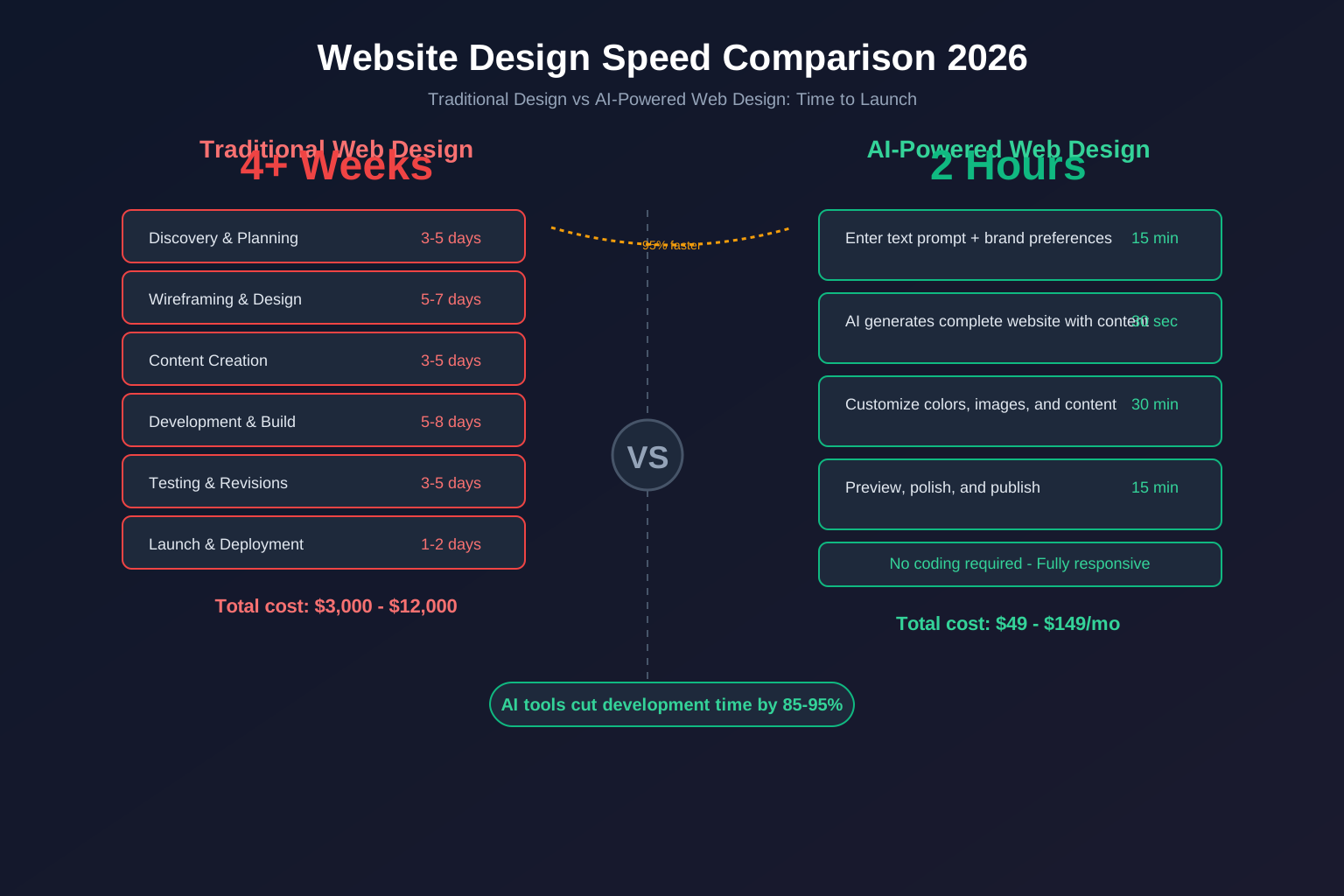
Let me give you a concrete example. I recently built a 5-page website for a local bakery using a traditional workflow. Here is how the timeline looked:
- Research and planning: 2 days
- Wireframing: 1 day
- Design mockups: 3 days
- Content writing: 2 days
- Development: 4 days
- Revisions: 2 days
Total: 14 business days or about 3 weeks.
Using an AI web design tool, I built the same site in under 2 hours. The AI generated the initial layout in 30 seconds. I spent the remaining time customizing colors, refining the AI-generated copy, and swapping in the bakery's actual images. The result was just as good, arguably better because the AI suggested layout patterns I would not have thought of.
That speed difference is not just convenient. It changes what is possible. You can now take on projects you would have had to turn down before. Rush jobs, last-minute redesigns, and high-volume client work all become feasible.
Democratizing Design for Non-Designers
One of the most interesting effects of AI web design tools is that they are making professional-quality websites accessible to people who have never designed a thing in their lives.
Small business owners, consultants, and startup founders can now create legitimate, functional websites without hiring a designer or learning to code. This is a double-edged sword for the industry. On one hand, it means more competition at the low end of the market. On the other, it creates enormous demand for professionals who can deliver the high-quality, strategic work that AI cannot touch.
A study by W3Techs shows that 43% of all websites are now built using some form of content management system or website builder. As AI tools become more powerful, that number will only grow.
Impact on Professional Web Designers and Agencies
So, what does this mean for professional designers and agencies? The answer is more nuanced than "AI is coming for your job."
The low-end, commodity web design work is definitely being automated away. A basic 5-page brochure site for a local business is something a business owner can now create themselves with an AI tool. That work was already low-margin for most agencies anyway.
What AI cannot replace is strategic thinking, deep customization, complex functionality, and the human touch of understanding a client's unique needs. Agencies that position themselves as strategic partners rather than pixel pushers will thrive.
The agencies that are winning right now are the ones that use AI tools as a force multiplier. They build sites faster, take on more clients, and deliver higher quality because they are using AI to handle the grunt work. A report from Clutch found that agencies using AI tools report 32% higher client satisfaction and 28% faster project completion.
The best web designers in 2026 are not the ones who resist AI. They are the ones who master it. Think of an AI web design tool as a superpower for your existing skills, not a replacement for them.
Top AI Web Design Tools Compared (2026)
I tested six leading AI web design tools against a consistent benchmark: building a 5-page business website with specific brand guidelines, industry context, and content requirements. Here is what I found.
lindoai: Full White-Label AI Website Builder
lindoai is the most comprehensive AI web design tool on this list, especially for agencies and resellers. It is not just a website builder; it is a complete platform for managing web design as a business.
What sets lindoai apart is its white-label architecture. Everything the client sees, from the editor interface to the hosting dashboard, can be branded as your own. This is a game-changer for agencies that want to present a unified brand experience to their clients.
The AI features are impressive. You can generate a complete website from a simple text prompt, and the AI produces surprisingly coherent layouts with relevant content. The platform supports all six languages we tested (English, French, Portuguese, Italian, German, Dutch) with native-quality AI content generation in each.
Key strengths:
- True white-label branding across the entire platform
- AI content generation in multiple languages
- Built-in client management and billing
- Fixed pricing (no surprises, protects your margins)
- No technical skills required
Best for: Agencies, resellers, and freelancers who want to scale their web design business under their own brand.
Wix ADI (Artificial Design Intelligence)
Wix ADI is Wix's attempt to bring AI into their already popular website builder. It asks you a series of questions about your business and then generates a site based on your answers.
The AI generation is decent for simple sites, but you have to stay within the Wix ecosystem. That means no white-label options (Wix branding appears everywhere), and you cannot migrate the site to another platform. The AI content generation is limited compared to dedicated AI tools.
Key strengths:
- Very easy to use for beginners
- Large template library
- Good for simple personal sites
Best for: Small business owners building their first website themselves.
10Web AI Builder
10Web takes a different approach by building on top of WordPress. Their AI Builder generates a WordPress site with Elementor-based pages and AI-generated content.
This is a good option if you are already a WordPress user and want to speed up your workflow. The AI generates reasonable layouts, but you have to be comfortable with the WordPress ecosystem, including updates, plugins, and security management.
Key strengths:
- Built on WordPress (familiar ecosystem)
- AI generates usable Elementor layouts
- Good for WordPress agencies
Best for: WordPress designers who want AI assistance in their existing workflow.
Bookmark AI
Bookmark was one of the first website builders to market itself as "AI-powered." Their AI assistant, AIDA, guides you through the site creation process with a chatbot-like interface.
The concept is interesting, but the execution falls short of the newer entrants. The AI-generated sites feel templated and rigid. Customization options are limited, and the platform lacks the depth that professional designers need.
Key strengths:
- Simple, guided setup process
- Low learning curve
- Affordable pricing
Best for: Absolute beginners who want the simplest possible website creation experience.
Framer AI
Framer made a name for itself as a design-to-code tool for professional designers. Their AI features are newer, but they bring a designer-centric approach to AI web generation.
Framer AI excels at creating visually stunning layouts. The AI understands design principles like typography, spacing, and visual hierarchy better than most competitors. However, it is less focused on content generation and business features like client management or billing.
Key strengths:
- Superior visual design quality
- Excellent animation and interaction capabilities
- Design-focused workflow
Best for: Professional designers who prioritize visual polish and want AI-assisted layout generation.
Comparison Table
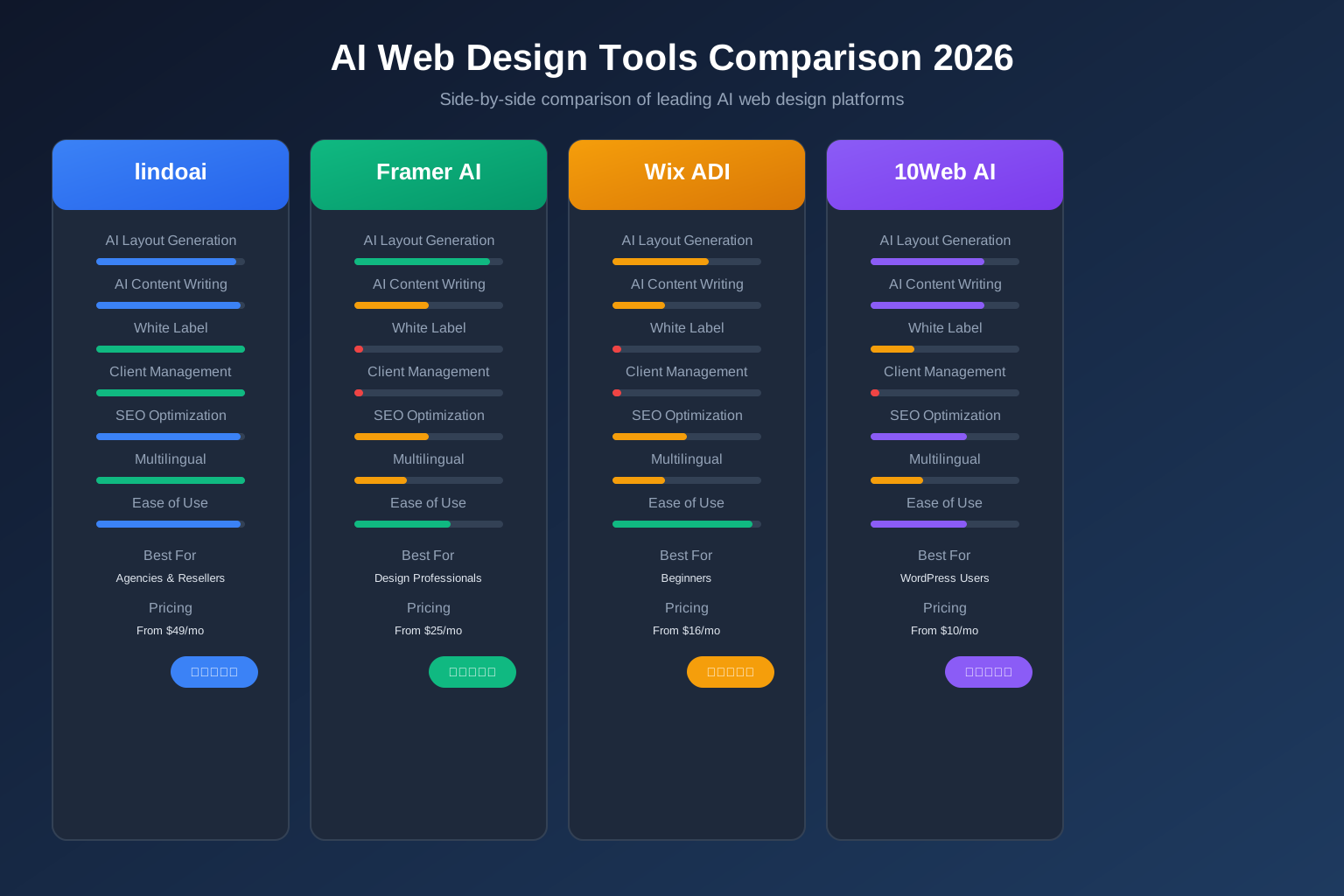
| Feature | lindoai | Wix ADI | 10Web AI | Bookmark AI | Framer AI |
|---|
| AI Layout Generation | Excellent | Good | Good | Basic | Very Good |
| AI Content Writing | Excellent (6 languages) | Basic | Good | Basic | Limited |
| White Label | Full white label | None | Limited | None | None |
| Client Management | Built-in | None | None | None | None |
| Ease of Use | Very Easy | Very Easy | Moderate | Easy | Moderate |
| Design Quality | Professional | Good | Good | Basic | Excellent |
| SEO Features | Comprehensive | Basic | Moderate | Basic | Limited |
| Pricing Model | Fixed monthly | Per site | Per site | Per site | Per site |
| Best For | Agencies & Resellers | Beginners | WordPress users | Complete beginners | Design professionals |
| Starting Price | $49/mo | $16/mo | $10/mo | $12/mo | $25/mo |
Key Features to Look for in an AI Web Design Tool
Now that you have seen what is available, how do you choose? Based on my testing, here are the features that actually matter.
Design Quality and Customization
The AI output is only as good as your ability to refine it. Look for tools that give you granular control over design elements. Can you adjust spacing, change fonts, modify color palettes, and tweak individual elements? If the tool generates a site that looks great but you cannot customize it, you will end up with sites that all look the same.
The best tools strike a balance between AI automation and manual control. They generate an excellent starting point, then let you dive deep into the details.
White Label Capabilities
For agencies, this is non-negotiable. If you are building websites for clients, you need the ability to remove all references to the platform and present the site as your own work.
True white label means more than just removing a logo. It means the entire client experience, from the editor to the hosting dashboard to support emails, carries your brand. Only lindoai offers this level of white-label control among the tools I tested.
Content Generation (Text and Images)
AI content generation varies wildly between tools. Some generate coherent, contextually relevant copy that you can use as-is. Others produce generic placeholder text that sounds like a robot wrote it in 2019.
Test the content generation with your specific industry. If you build sites for dentists, can the tool generate convincing copy about dental services? If you work with e-commerce brands, does the AI understand product descriptions and category pages?
SEO Optimization
A beautiful website that nobody can find is useless. The best AI web design tools handle basic SEO automatically: meta titles, descriptions, heading structure, alt text for images, and schema markup.
Some tools go further with keyword research suggestions, content optimization recommendations, and integration with Google Search Console. These advanced features can save you hours per project.
Integration With Existing Workflows
Unless you plan to completely overhaul your tech stack, your AI web design tool needs to play nice with your existing systems. Can you connect it to your CRM? Does it integrate with your email marketing platform? Can you export the code if you need to?
The most flexible tools offer APIs and webhooks that let you build custom integrations. Platforms like lindoai provide a website builder for agencies that integrates client management, billing, and project tracking in one place.
AI Web Design Tool vs Traditional Web Design
The debate between AI-powered and traditional web design misses the point. It is not a competition. It is a spectrum.
Cost Comparison: AI Tool vs Hiring a Designer
Let's look at the numbers. A professional web designer in the US charges an average of $75 to $150 per hour. A typical 5-page business website takes 40 to 80 hours from start to finish. That is $3,000 to $12,000 in design fees alone.
An AI web design tool subscription costs $10 to $150 per month depending on the platform and features. Even with a premium tool, the cost per project drops to under $100 in platform fees.
The gap is enormous. And it explains why more and more businesses are exploring AI-powered options.
Quality Comparison: When AI Excels
AI web design tools excel at certain types of projects:
- Simple to moderately complex business websites: AI generates clean, professional layouts that work well for most service businesses.
- High-volume projects: When you need to deliver 10, 20, or 50 websites quickly, AI is the only way to maintain quality at scale.
- Multilingual sites: AI content generation in multiple languages is dramatically faster than hiring translators.
- Prototypes and MVPs: AI tools are perfect for creating working prototypes that can be refined later.
When Human Designers Win
AI still falls short in several areas:
- Deep brand strategy: Understanding a company's unique positioning and translating it into design requires human thinking.
- Complex interactions: Custom animations, complex user flows, and sophisticated e-commerce setups still need human expertise.
- Creative direction: AI follows patterns. It does not invent new design languages or push creative boundaries.
- User research: AI generates layouts based on existing patterns, not original user research for a specific audience.
The Hybrid Approach: Combining AI With Human Expertise
The smartest approach I have seen is the hybrid model. Agencies use AI tools to handle the heavy lifting: initial layouts, content generation, SEO setup, and responsive design. Then human designers focus on strategy, customization, visual polish, and client relationships.
This approach combines the speed and efficiency of AI with the creativity and strategic thinking of human designers. According to Forbes Agency Council, agencies that adopt this hybrid model report 40% higher profit margins than those using traditional workflows alone.
How to Choose the Right AI Web Design Tool for Your Needs
Your choice of AI web design tool depends entirely on who you are and what you need. Here is my guidance based on your profile.
For Freelancers: Speed and Ease of Use
If you are a solo freelancer, your priority should be speed. You need a tool that lets you deliver high-quality work faster so you can take on more clients and earn more.
Look for tools with excellent AI generation quality, simple customization, and good content features. lindoai and Framer AI are both strong options here, though for different reasons. lindoai gives you more business features (client management, billing) while Framer AI focuses on design quality.
For Agencies: White Label, Scalability, Team Features
Agencies have different needs. You need a platform that:
- Supports white-label branding so every client sees your brand
- Handles multiple client sites from a single dashboard
- Offers team collaboration with role-based access
- Provides client billing and subscription management
- Scales to hundreds of sites without breaking
Only lindoai checks all these boxes. lindoai's white-label website builder is specifically designed for agencies that need to deliver professional websites at scale.
For Businesses: Templates, Branding, and Support
If you are a business owner building your own site, you want a tool that is easy to use, has great templates, and produces results that look professional.
Wix ADI and Bookmark AI are both viable options for this audience. They are simple, affordable, and produce decent results for basic websites. Just be aware of the limitations in customization and the lack of white-label options.
For Enterprises: Compliance, Security, and Custom Integration
Enterprise clients need more. They require SOC 2 compliance, SSO integration, API access, and the ability to customize everything. Few AI web design tools meet these standards.
lindoai offers enterprise-grade features including custom integrations through their API, team management at scale, and the ability to fully white-label the platform. For enterprises that need to deploy websites across multiple brands or divisions, this is crucial.
Limitations of AI Web Design Tools (What They Cannot Do)
I believe in being honest about limitations. AI web design tools are powerful, but they are not magic. Here is what they still struggle with.
Deep Customization and Unique Branding
AI tools generate patterns based on what they have seen before. If your brand needs something genuinely unique, something that breaks the mold, AI will not deliver it. The layouts will look professional, but they will also look familiar.
For brands that pride themselves on distinctive design, AI can provide a starting point, but the final result needs significant human input.
Complex Functionality and Custom Code
Need a custom booking system with specific business logic? A membership site with tiered access and payment integration? A complex e-commerce setup with custom shipping rules?
AI web design tools handle standard functionality well, but anything outside the box requires custom development. This is where traditional web development skills are irreplaceable.
Strategic UX Research and User Testing
AI does not know your users. It does not understand their pain points, their behavior patterns, or their specific needs. It generates layouts that work for the average user, but not necessarily for your users.
Proper UX research, user testing, and iterative design based on real feedback are still human-led activities. AI can help generate variants for A/B testing, but it cannot replace the strategic thinking behind great user experience.
When to Say No to AI-Generated Design
Here are scenarios where I would recommend avoiding AI-generated design:
- The client needs a truly unique brand identity with custom illustration and design language
- The project involves complex business logic and user flows
- The website needs to meet strict accessibility standards (WCAG 2.1 AA or AAA)
- The client has specific, detailed design requirements that require pixel-perfect execution
- The project is for a high-profile brand where cookie-cutter design would damage credibility
Knowing when not to use AI is just as important as knowing when to use it. The best designers apply AI where it adds value and step in with human expertise where it does not.
The Future of AI Web Design Tools
The pace of innovation in this space is staggering. Here is what I see coming in the next 12 to 18 months.
Multimodal AI: Design From Sketches or Screenshots
The next generation of AI web design tools will accept input beyond text. Imagine taking a screenshot of a website you like and having the AI generate a similar layout with your content. Or sketching a rough wireframe on paper and watching the AI turn it into a working website.
Several tools are already experimenting with this capability. It will fundamentally change how designers communicate their vision to the tools they use.
Voice-Powered Web Design
Voice interfaces are becoming more sophisticated, and web design tools are starting to explore voice-based workflows. Imagine saying "create a three-page site for a law firm with a navy blue color scheme and a professional serif font" and watching the AI build it.
This is not far-fetched. The underlying technology already exists. It is just a matter of integration.
Real-Time Collaboration With AI
Future tools will treat AI as a collaborative partner, not a one-time generator. You will be able to work alongside the AI in real time, making changes and watching the AI suggest improvements on the fly.
Think of it like having a junior designer who never sleeps, never gets tired, and has instant access to millions of design patterns.
Integration With No-Code and Low-Code Platforms
The line between AI web design tools and no-code platforms is blurring. Future tools will not just generate websites; they will generate fully functional web applications with database integration, user authentication, and complex business logic.
lindoai is already moving in this direction with its comprehensive platform that combines AI website generation with client management, billing, and hosting.
FAQ
What is the best AI web design tool?
The best AI web design tool depends on your needs. For agencies and resellers, lindoai is the clear winner thanks to its white-label architecture, client management features, and multilingual AI content generation. For professional designers focused on visual quality, Framer AI produces stunning layouts. For complete beginners, Wix ADI is the simplest option.
Can AI replace web designers?
No, but this question misses the point. AI will replace web designers who refuse to adapt, but it will empower those who embrace it. The role of the web designer is shifting from building websites to designing digital experiences that AI cannot create. Strategic thinking, user research, brand storytelling, and complex problem solving are still firmly in the human domain.
How much do AI web design tools cost?
Pricing varies widely. Basic tools like Bookmark AI start at around $12 per month. Mid-range options like Wix ADI run $16 to $30 per month. Professional platforms like lindoai start at $49 per month for agency-grade features including white label and client management. When you factor in the time savings, even the premium tools pay for themselves on the first project.
Which AI web design tool is best for agencies?
For agencies, the choice is clear: lindoai. It is the only platform that offers true white-label branding across the entire experience, built-in client management and billing, team collaboration features, and scalable pricing. Agencies using lindoai report being able to deliver client sites 3x faster while maintaining their own brand throughout the client experience.
Is lindoai a good AI web design tool?
Yes, and here is why. lindoai combines powerful AI website generation with a complete business platform for web designers. You get AI content generation in six languages, professional templates that generate from text prompts, true white-label branding, client management, billing, and hosting. It is the only tool on this list that treats web design as a business, not just a creative activity. You can start with their free plan and see for yourself.
Conclusion
AI web design tools are not the future. They are the present. The question is no longer "should I use AI for web design?" but rather "which AI web design tool is right for my workflow?"
For agencies and resellers who want to scale their business, lindoai offers the most complete solution with its white-label architecture, client management features, and multilingual AI content generation. For professional designers who prioritize visual quality, Framer AI delivers stunning results. And for beginners, Wix ADI provides the simplest path to a working website.
The common thread across all these tools is the same: they handle the repetitive, time-consuming parts of web design so you can focus on what matters. Strategy. Creativity. Client relationships. The human elements that no AI can replace.
If you are ready to see how an AI web design tool can transform your workflow, try lindoai for free today. Your first site might be the fastest one you have ever built.