Switching website platforms is not fun. It is disruptive, it can mess with SEO, and it forces your team to rebuild muscle memory.
But if you are an agency using Duda, you are probably here for a reason: you have hit a limit. Maybe it is pricing pressure, maybe it is workflow friction, maybe it is the depth of white label controls, or maybe it is the simple reality that your clients now expect faster delivery and more ongoing value.
This guide is for agencies evaluating Duda alternatives in 2026. It is commercial-investigation on purpose. You will get a clear comparison framework, a shortlist of platforms, and a practical migration checklist to reduce risk.
Along the way, I will also show where AI-assisted production and maintenance fits in, because in 2026 it is no longer a side feature. It is an operating advantage.
Why agencies look for Duda alternatives
Most agencies do not switch because they are bored. They switch because their delivery model changes.
The market has moved toward faster builds, productized packages, and recurring website management. Clients expect more outcomes and less drama.
Here are the most common reasons agencies start searching for Duda competitors.
Common constraints: pricing, limits, and workflow friction
If you are an agency, you care about three things more than almost any individual business owner:
- Unit economics (margin per site, support cost per client, lifetime value)
- Delivery speed (time to first draft, time to launch, revision cycles)
- Operational control (roles, governance, QA, multi-site workflows)
When any of these feel off, you start looking around.
Common triggers include:
- You want to standardize templates and component libraries across many clients, but your process still feels too manual.
- You need deeper role-based permissions so clients can edit content without breaking layouts.
- You need a stronger client portal experience so your agency looks like a platform, not a freelancer.
- You are packaging website maintenance and want the platform to support that workflow with alerts, audits, and easy updates.
- You are building for markets where performance and Core Web Vitals are a business requirement, not a nice-to-have. (If you want the official baseline, start with web.dev performance guidance.)
If you feel like your platform is the bottleneck, it probably is. Platforms are leverage, and agencies live or die on leverage.
Decide first: DIY builder vs managed platform
Before you compare platforms, make one decision. Are you trying to sell a DIY builder experience to clients, or are you trying to sell a managed service?
There is no morally correct answer. There is only business model fit.
DIY-leaning model (client edits often):
- You need strong in-editor controls, guardrails, and training.
- You need permissions that are easy to understand.
- You will tolerate less developer control in exchange for usability.
Managed model (agency does most work):
- You need speed, QA, governance, and repeatable delivery.
- You need multi-site management and bulk actions.
- You care more about workflows than about giving clients full freedom.
This matters because a platform that is amazing for DIY can be frustrating for a managed agency model, and vice versa.
If you are building a recurring service, you should also think about your operating layer. A good reference point is ongoing website management as a product, not as random support tickets.
What to compare (agency checklist)
Listicles love to say "best" without defining what best means.
Here is a practical agency checklist you can use in demos, trials, and internal scoring.
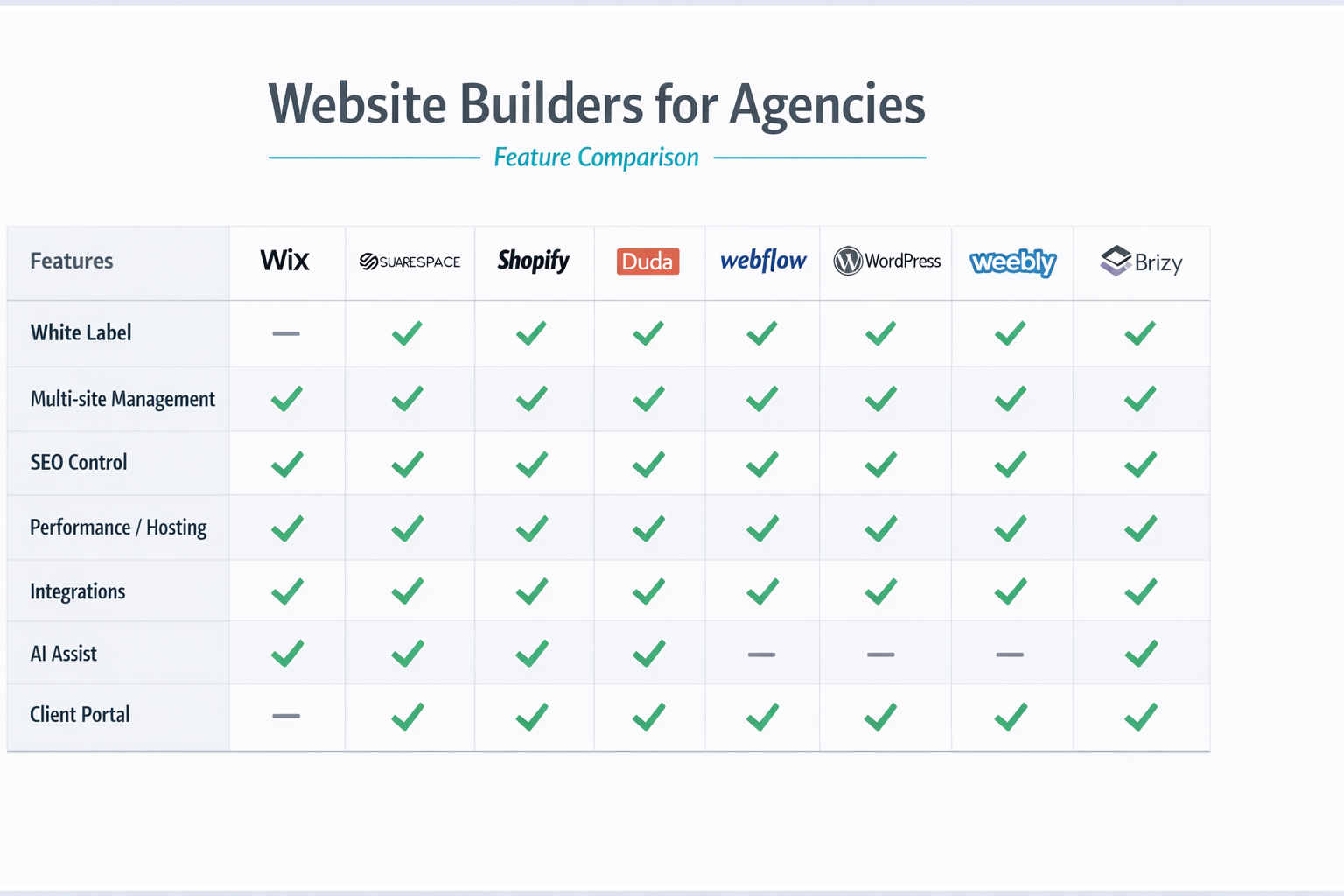
White label depth (portal, domain, emails)
White label is not a toggle. It is a stack.
At minimum, evaluate:
- Client portal branding: logo, colors, domain, email sender
- White label reports: audit reports, maintenance summaries, SEO snapshots
- Support perception: can you route support through your agency first?
- Reseller readiness: can you package the platform as part of your service?
A quick red flag: if your “white label” is just a logo swap, your clients will still feel like they are using someone else’s software.
Multi-site management and roles
Agencies run portfolios, not one site.
Ask about:
- Multi-site dashboard with search, tags, and filters
- Bulk updates (templates, components, global settings)
- Role-based access (agency admin, designer, SEO, client editor)
- Staging workflows (draft, preview, approve, publish)
Also ask the uncomfortable question: what happens when a client leaves? Can you transfer, export, or archive cleanly?
SEO control (technical plus content)
SEO is where migrations go wrong.
A platform needs to support the basics perfectly:
- Custom titles, meta descriptions, canonical tags
- 301 redirects and redirect mapping
- XML sitemaps and robots controls
- Clean URL structure and slug control
- Image optimization and lazy loading
If you want a baseline for what Google expects during site moves, bookmark Google Search Central documentation.
Performance and hosting
Performance is not only speed. It is predictability.
Ask about:
- CDN and caching behavior
- Image resizing and format support
- Uptime and incident transparency
- SSL and security update responsibility
- Backups and restore options
If you are evaluating reliability and DDoS protection basics, Cloudflare Learning Center is a good neutral explainer for your team.
Integrations and extensibility
Integrations are where agency workflows get expensive if they are weak.
Evaluate:
- Forms and CRM webhooks
- Zapier, Make, native integrations
- Ecommerce and payments
- Memberships, gating, portals
- API access (if relevant)
Even if your agency is not "developer heavy," you want to avoid becoming trapped inside a closed ecosystem.
AI assistance and governance (the 2026 differentiator)
In 2026, AI is no longer about “generate a headline.” Agencies want:
- Faster first drafts (structure, copy, layout suggestions)
- Easier maintenance (content refreshes, broken link checks, SEO suggestions)
- Governance (brand voice, allowed claims, legal constraints)
The most important question is not “does it have AI.” It is:
- Can your team control what AI produces?
- Can you review and approve changes safely?
- Can you standardize outcomes across many clients?
The best AI features reduce operational load without creating new QA risk.
The best Duda alternatives (shortlist for agencies)
This shortlist is intentionally framed around agency needs.
One note before we start: pricing changes constantly. Unless you have verified current numbers, treat pricing as signals, not as fixed facts.
A quick comparison table (use this for your internal scoring)
Use this table as a starting rubric during demos.
| Platform type | White label depth | Multi-site ops | SEO control | Performance focus | Best for |
|---|---|---|---|---|---|
| All-in-one agency platform | High | High | High | High | Agencies selling productized builds + maintenance |
| No-code builder | Medium | Medium | Medium to High | Medium to High | Design-forward teams and fast iteration |
| CMS with plugins | Low to Medium | Medium | High (with effort) | Medium | Teams wanting maximum control |
| Ecommerce-first | Low | Medium | Medium | Medium | Store-focused builds |
Now let’s talk platforms.
Alternative 1: An agency-first, white label AI platform (lindo.ai)
Best for: agencies that want speed, repeatable delivery, and a branded client experience.
If your goal is to produce sites fast and maintain them as a service, an agency-first platform with AI acceleration is the most direct replacement category.
What to look for:
- White label portal and agency branding
- Production speed with guardrails
- A workflow that supports ongoing services, not only a one-off build
lindo.ai is designed for this model. You can explore the product positioning at lindo.ai and the specific offer for agencies at solutions for web design agencies.
Pros (agency view):
- Strong alignment with white label delivery and ongoing management
- Faster production with AI assistance
- Easier to standardize offers across clients
Cons (be honest):
- If you want deep custom development freedom like an open-source CMS, this is not that category
White label notes:
- Evaluate how far the client portal branding goes and how support and reporting look under your brand.
SEO and performance notes:
- Use your own scoring rubric: redirects, metadata, page speed, indexation behavior.
Pricing signals:
- Expect agency pricing models (per site, per seat, or bundles). What matters is your margin after support and revisions.
Alternative 2: No-code designer-first builders (Webflow-style category)
Best for: teams that care about visual design systems and want more layout control.
This category is popular because it gives designers power without full custom code. It can be a strong Duda alternative if your agency sells premium design.
Pros:
- Strong visual control and design systems
- Great for marketing sites and landing page iteration
Cons:
- Multi-client operations can become a project management challenge if your workflows are not standardized
- White label depth varies
White label notes:
- Your client portal might not feel like your product, depending on plan and features.
Alternative 3: WordPress (CMS plus page builder ecosystem)
Best for: agencies that want maximum flexibility and are willing to manage complexity.
WordPress is still a "default" alternative because it is flexible, and clients recognize it. But for agencies, flexibility often becomes a maintenance tax.
Pros:
- Huge ecosystem of themes, plugins, and developers
- Strong SEO control if you know what you are doing
Cons:
- Security, updates, and plugin conflicts become operational overhead
- Performance varies wildly depending on build discipline
If you choose this route, build a strong maintenance product from day one. Otherwise, you end up doing emergency support for free.
Alternative 4: Shopify (ecommerce-first)
Best for: ecommerce-heavy agencies.
Shopify is not a general website builder substitute. But if most of your revenue comes from stores, it can still be the right "alternative" because it solves the business problem.
Pros:
- Strong ecommerce capabilities
- Stable hosting and predictable operations
Cons:
- Not ideal for non-commerce sites
- White label options are limited
Alternative 5: Squarespace and similar SMB builders
Best for: small businesses that want simple sites, and agencies doing light-touch delivery.
This category can be a Duda alternative for low-complexity projects, but it may not fit a scaled agency service model.
Pros:
- Easy for clients to use
- Fast to publish
Cons:
- Agency workflow features can be limited
- Harder to standardize multi-site governance
Alternative 6: Wix and similar high-feature builders
Best for: broad SMB needs with many built-in features.
Wix-style platforms can compete on breadth. For agencies, the question is whether the agency workflow and permissions match your delivery model.
Pros:
- Large feature set, many integrations
- Plenty of templates and apps
Cons:
- White label experience is limited compared to agency-first platforms
- Multi-client management is not always the core focus
Alternative 7: Headless CMS (content-first, developer-led)
Best for: teams with developer resources building content-heavy sites.
Headless can be powerful, but it is rarely a “simple Duda replacement.” It is a different architecture.
Pros:
- Strong content modeling and flexibility
- Great for complex content needs
Cons:
- Higher build and maintenance complexity
- Harder to productize for smaller clients
Alternative 8: All-in-one marketing suites
Best for: agencies that build sites as part of a marketing ops bundle.
Some platforms are less about web design and more about marketing automation. They can still be alternatives if your agency sells outcomes and campaigns.
Pros:
- CRM and automation are tightly integrated
Cons:
- Website builder may not be best-in-class
- White label control varies
A practical agency scorecard (copy this into your demo notes)
If you want to choose quickly, score each platform on a simple 0 to 2 scale.
- 0 = missing or painful
- 1 = workable with caveats
- 2 = strong and agency-ready
The 60-minute demo script
Bring this to every vendor call. You will be shocked how quickly it exposes weaknesses.
- White label reality check (10 minutes) — Show me the client portal as if I am a client. Where do I add my agency domain, logo, and email sender? What does a report look like with my branding?
- Multi-site operations (10 minutes) — Show me how you manage 50 client sites. Can I tag sites by plan or template? Can I bulk update global elements or settings?
- Permissions and guardrails (10 minutes) — Create a “Client Editor” role. Prove the client can edit text and images without breaking layout. Show version history or rollback.
- SEO and redirects (10 minutes) — Show me where to set title, meta description, canonical. Show me the redirect manager and how to import a redirect list. Show me the sitemap and robots controls.
- Performance and hosting (10 minutes) — Show me how images are optimized. Explain caching and CDN behavior in plain English. Show uptime history or status reporting if available.
- Support model (10 minutes) — What is the actual SLA on agency plans? What counts as “priority” support? How do escalations work when something is broken in production?
A vendor that cannot demo these basics in an hour will cost you weeks in production.
A scoring table you can reuse
Fill this out live during demos.
| Criteria | Score (0-2) | Notes you can act on |
|---|---|---|
| White label portal and reporting | ||
| Multi-site dashboard and bulk actions | ||
| Roles, permissions, and guardrails | ||
| Redirect management and SEO controls | ||
| Performance tooling and hosting transparency | ||
| Integration ecosystem (Zapier/Make/webhooks) | ||
| AI features with approval workflow | ||
| Support SLA and escalation path | ||
| Export/migration options | ||
| Pricing model clarity for agencies |
Duda competitors: pricing signals and margin math for agencies
“Is it cheaper?” is the wrong first question.
The right question is: what is our margin per site after delivery and support?
Here is a simple model you can run in a spreadsheet.
The basic formula
- Revenue per site (monthly) = client plan or retainer you charge
- Direct platform cost (monthly) = per-site fee, seats, add-ons
- Support cost (monthly) = hours per month × your internal cost per hour
- Gross margin per site = revenue - platform cost - support cost
Example assumptions (change these to your reality):
- You charge $149/month for “website management + hosting”
- Platform costs you $29/month per site equivalent
- Your team spends 0.5 hours/month per site on edits and support
- Your internal blended cost is $45/hour
Support cost = 0.5 × 45 = $22.50
Gross margin per site = 149 - 29 - 22.5 = $97.50
Now multiply:
- At 30 sites, gross margin is about $2,925/month
- At 100 sites, gross margin is about $9,750/month
This is why agencies obsess over operations. A tiny difference in platform friction becomes real money.
Hidden costs to watch in website builders like Duda
When you compare Duda alternatives, ask specifically about:
- Seat pricing: how many staff accounts do you need as you grow?
- Add-ons: forms, memberships, ecommerce, multilingual, staging
- Support tiers: do you pay extra for real SLAs?
- White label depth: is advanced branding locked behind enterprise plans?
- Export risk: can you leave without rebuilding everything?
If a vendor cannot explain pricing clearly, assume you will discover the cost later.
“Websites like Duda”: a clearer shortlist by agency scenario
If you are overwhelmed by listicles, use scenarios instead.
Scenario A: you sell 10 to 50 small business sites per year
Priorities:
- Fast production
- Templates and repeatable packages
- Simple client editing without chaos
Best-fit categories:
- Agency-first platforms with white label and multi-site ops
- Mature SMB builders if your workflow is light
Scenario B: you sell fewer sites, but higher design fees
Priorities:
- Design system control
- Custom interactions
- High-end marketing outcomes
Best-fit categories:
- Designer-first no-code platforms
- CMS + front-end frameworks (if you have dev capacity)
Scenario C: you sell ecommerce builds and ongoing growth
Priorities:
- Stable checkout and payments
- App ecosystem
- Store performance
Best-fit categories:
- Ecommerce-first platforms
- Marketing suite platforms when CRM is central
Scenario D: you sell regulated or performance-critical sites
Priorities:
- Governance and permissions
- Security posture
- Performance predictability
Best-fit categories:
- Platforms with clear hosting and security responsibility
- Headless or enterprise setups when needed
Common migration failure modes (and how to avoid them)
Most migrations fail in predictable ways.
Failure mode 1: changing URL structure without a redirect plan
Even “small” URL changes can tank traffic if you do not map redirects.
Fix:
- Crawl the old site and create a redirect sheet.
- Validate redirects in staging.
- Launch with monitoring.
Failure mode 2: rewriting content at the same time
A platform migration already changes templates, performance, and markup.
Fix:
- Keep content changes controlled.
- Do a content refresh after rankings stabilize.
Failure mode 3: broken forms and lead routing
This is the fastest way to lose client trust.
Fix:
- Build a form test plan.
- Send test leads to every destination (email, CRM, Slack).
Failure mode 4: analytics and conversion tracking drift
If tracking breaks, you cannot prove the migration was successful.
Fix:
- Document current analytics events.
- Validate tags and events before launch.
- Compare post-launch data to baseline.
Failure mode 5: unclear ownership and offboarding terms
Agencies get stuck supporting sites they cannot control.
Fix:
- Define ownership in your contract.
- Define offboarding and export expectations.
- Avoid platforms that trap you.
Two mini case-style scenarios (so you can sanity-check fit)
Mini case 1: A local services agency migrating 25 sites
- Starting point: 25 brochure sites, most with the same 6 to 10 page structure, many small edits each month.
- Agency pain: too much time spent on tiny changes, not enough margin left for proactive improvements.
A good Duda alternative for this agency is the one that makes these three things easy:
- Template standardization: one base template, reusable sections, and a clean way to roll out improvements across many sites.
- Client-safe editing: clients can update photos and text without layout breakage.
- Maintenance workflow: easy monthly updates, reporting, and a predictable support path.
The win condition is simple: if you can reduce monthly support from 0.8 hours per site to 0.4 hours, you effectively gain the equivalent of 10 hours back each month across 25 sites. That is a real margin change, not a feature checklist.
Mini case 2: A design studio delivering 2 high-end sites per month
- Starting point: fewer projects, higher fees, clients who care about craft and brand.
- Studio pain: client editing needs to be simple, but the team still wants strong control over the design system.
A good alternative here is usually a designer-first category where your team can ship visually unique experiences and iterate quickly. The tradeoff is operational scaling. If you later want to manage 100 sites, you may need stronger portfolio tooling and bulk operations than these tools naturally prioritize.
The right Duda competitor is the one that protects your business model. Not the one with the longest feature list.
A tighter shortlist template (use this when you compare vendors)
When you evaluate Duda alternatives, use the same template for every option. This prevents “demo charm” from driving your decision.
For each platform, capture:
- Best for (one sentence)
- Deal-breakers (the 1 to 2 things that would disqualify it for your agency)
- White label notes (what is actually branded, and what is not)
- Ops notes (multi-site, bulk changes, roles)
- SEO notes (redirect imports, metadata control, sitemap)
- Pricing signals (per site, per seat, add-ons, support tiers)
- Exit plan (export options, ownership, offboarding)
If you do this consistently, your internal recommendation becomes defensible.
Two more alternative categories worth considering
Best for: agencies that want WordPress flexibility without self-hosting chaos.
These vendors try to solve the biggest WordPress agency pain: updates, security, backups, and performance. This can be a valid Duda competitor if you need plugin ecosystem depth but want more predictability.
What to watch: plugin limits, staging workflows, and how support is handled when a plugin breaks your site.
Best for: agencies that keep their builder, but upgrade their service layer.
Sometimes the “alternative” is not switching the builder. It is adding a client portal, reporting, and maintenance workflow that makes your agency feel like a product. If your team likes Duda’s editor but hates the operational layer, this hybrid approach can buy time while you plan a future migration.
White label plus AI angle: what is new in 2026
A few years ago, switching platforms was mostly about templates and pricing.
In 2026, the bigger differentiator is whether the platform helps you run your agency.
AI-assisted production (build faster without hiring)
AI can help you compress the early phases:
- First-draft sitemap and page outline
- Initial copy draft and tone adaptation
- Section layout suggestions
- Image generation and placeholder content
This can cut build time dramatically, but only if your workflow includes guardrails.
A simple governance model:
- AI generates a draft.
- Your strategist edits structure and messaging.
- Your designer refines layout.
- Your SEO lead validates metadata and internal links.
- Your PM runs a launch checklist.
AI-assisted maintenance (deliver ongoing value)
Maintenance is where agencies win recurring revenue.
AI-supported maintenance can include:
- Content refresh recommendations
- Internal linking suggestions
- Broken link detection
- Performance checks and image optimization prompts
- Basic on-page SEO improvements
If you want to sell this under your brand, white label reporting matters.
This is also where an agency-first platform can help you sell AI website builder value as part of a managed service.
Governance and QA: keep control
AI can create risk if it changes things without your process.
Make sure you can answer:
- Can we review changes before publishing?
- Can we lock brand elements and layout components?
- Can we keep revision scope under control?
The safest way to adopt AI is to treat it as an accelerator inside a strict checklist, not as an autopilot.
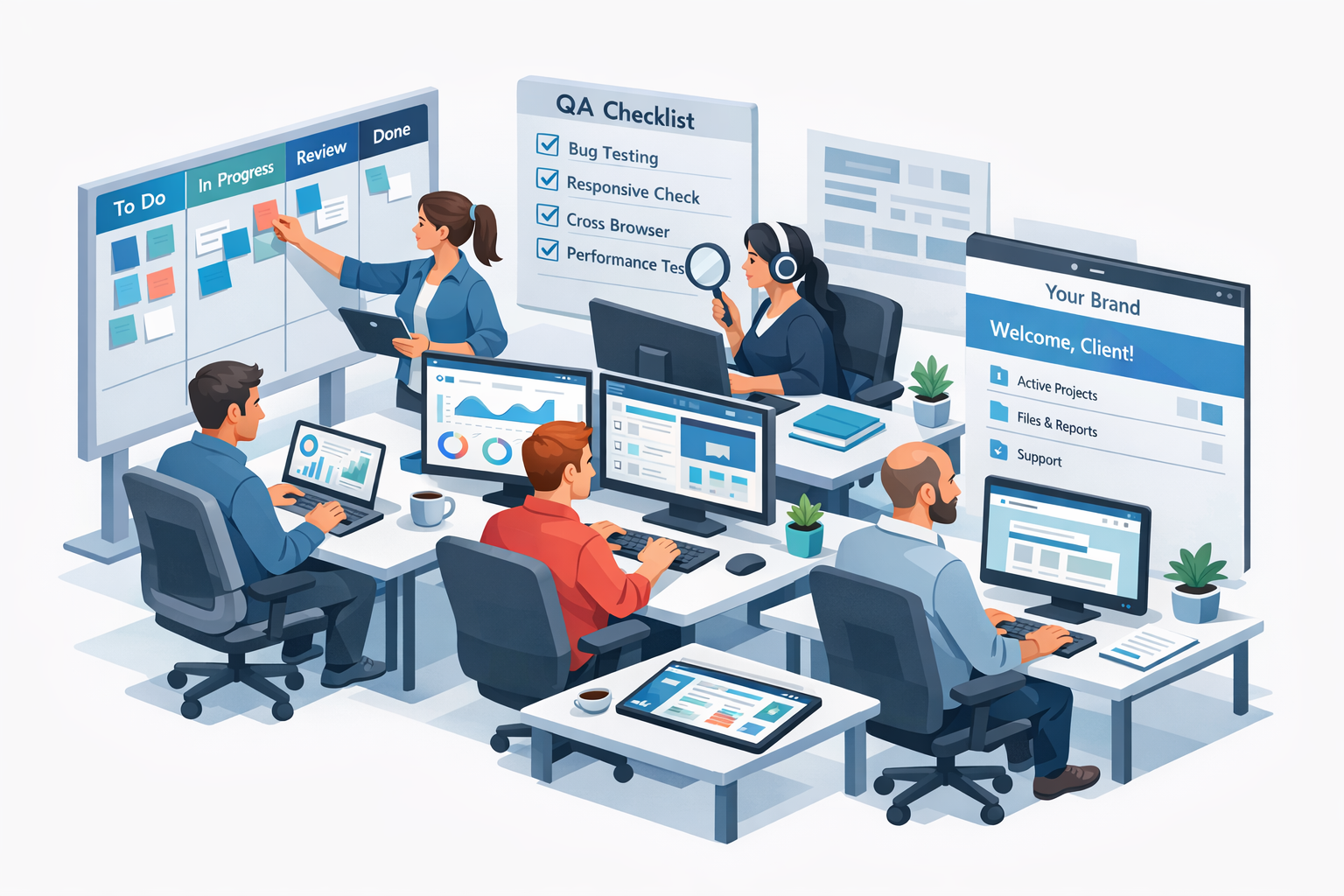
Migration checklist (Duda to an alternative)
A platform switch is a project. Treat it like one.
Here is the checklist you can use for a controlled migration.
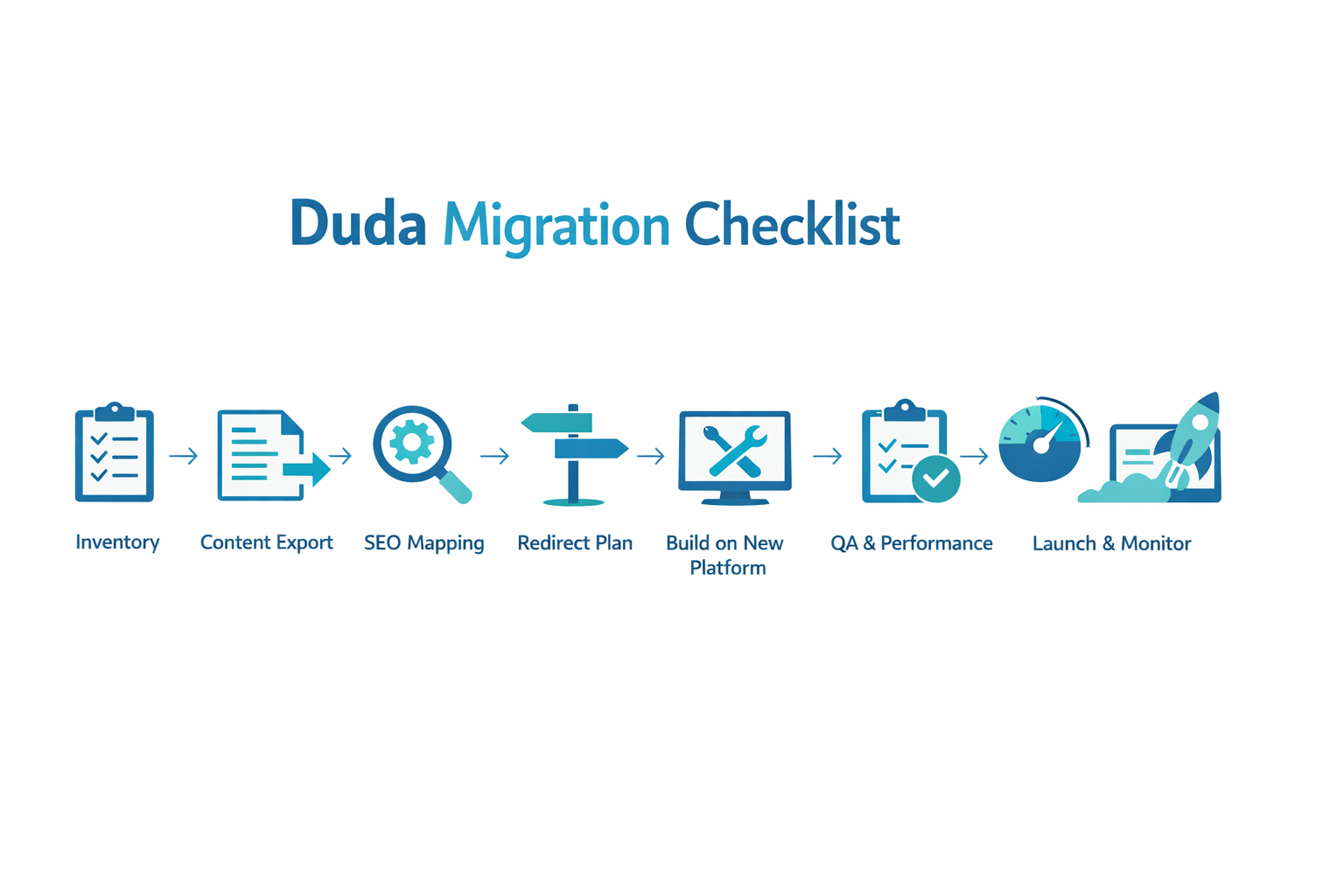
Step 1: Inventory what you have
Before you touch anything, document:
- All live URLs (crawl the site)
- Top landing pages by traffic and conversions
- Forms and where they send leads
- Integrations (CRM, booking, email marketing)
- Scripts (analytics, pixels, chat)
If you have access to Search Console, export top queries and pages so you have a baseline.
Step 2: Map URLs and redirects (do not guess)
Redirects are where SEO migrations die.
Create a spreadsheet with:
- Old URL
- New URL
- Redirect type (301)
- Notes (canonical, parameter behavior)
Follow Google guidance for URL changes at Site move with URL changes.
Step 3: Migrate metadata and on-page essentials
For each key page, migrate:
- Title tag
- Meta description
- H1
- Primary internal links
- Structured content blocks (testimonials, FAQs)
If you are making copy changes at the same time, control the scope. A migration plus a full rewrite is risky.
Step 4: Rebuild integrations and forms
Agencies often forget that the website is not the product. The lead flow is.
Test:
- Contact forms and notifications
- CRM mapping
- Booking flows
- Payment or ecommerce flows
Step 5: QA for performance, tracking, and accessibility
Do not skip QA.
Minimum checklist:
- Core pages render correctly on mobile
- Analytics events are firing
- Forms deliver leads
- Redirects work as expected
- Pages meet a performance budget (use Lighthouse)
Use web.dev performance guidance as your baseline if you need a shared standard.
Step 6: Launch and monitor
Launch is not the end. It is the start of monitoring.
For the first 14 days:
- Watch Search Console for coverage issues
- Track rankings for key queries
- Monitor conversion events
- Fix crawl errors quickly
Step 7: Package the change for the client
Clients do not care that you migrated from Duda.
They care that:
- Their leads still come in
- The site loads fast
- Updates are easier
- They have a better ongoing support model
This is a sales moment. Use it.
How lindo.ai can help agencies evaluating alternatives
If your goal is to build a scalable agency offer, you want more than a builder. You want a delivery platform.
lindo.ai is built for agencies that want to:
- Deliver sites faster with AI-assisted workflows
- Resell under their own brand
- Bundle ongoing maintenance and improvements
If that matches your model, start here:
- Learn what a white label website builder can do for your agency
- See the agency use cases on web design agencies
FAQ
Is Duda good for agencies?
Yes, Duda can be a strong option for agencies, especially if you value a structured builder experience and predictable delivery. The tradeoff is that as you scale, the things that matter most become workflow depth, multi-site operations, and white label control. If your team feels friction in those areas, it is rational to evaluate Duda alternatives.
What are the best Duda alternatives for agencies?
The best Duda alternative depends on your delivery model. If you want a managed, productized agency offer with stronger white label and operations, an agency-first platform is usually the closest fit. If you sell premium design and want layout control, a designer-first no-code category can be better. If you want maximum flexibility and accept maintenance overhead, a CMS ecosystem can work.
Which platform is best for white label websites?
Look for depth, not labels. A strong white label platform gives you a branded client portal, agency-controlled reporting, and the ability to package maintenance and support under your brand. If white label is central to your offer, prioritize it in your demo scorecard and treat it like a core requirement.
What is the easiest way to migrate from Duda without losing SEO?
Treat the migration like an SEO project. Inventory your URLs, map redirects, migrate metadata, and QA the new site before launch. Most SEO damage comes from missing redirects, changing URL structures without a plan, or accidentally removing indexable content. Follow Google’s site move guidance and monitor Search Console closely after launch.
Should agencies choose an AI website builder in 2026?
If your business model depends on speed and repeatability, AI can be a real advantage. The key is governance. You need AI that accelerates drafts and maintenance without removing your review process. The best outcome is faster delivery and better ongoing service, not uncontrolled changes.