Let’s be honest, when agencies search for a free white label website builder, they are not looking for a toy.
They are looking for a way to:
- ship more client sites without a bigger dev team
- protect margin with predictable tooling costs
- sell recurring “website management” retainers
- keep the client experience under their brand
Here’s the problem. Most “free” offers in the white label world are not free forever. They are free to start, free to demo, or free until you need the parts that make it resellable.
This guide is the agency reality check. You’ll learn what can realistically be free, what cannot, and how to evaluate trials, freemiums, and low-cost paid plans without getting trapped by hidden costs.
What people mean by “free white label website builder”
When someone says “free,” they usually mean one of three things:
- Free forever (rare in true white label)
- Free trial (common, and often the best option)
- Freemium (common, but usually not agency-ready)
The confusing part is that vendors often use the word “white label” loosely. A logo swap is not the same thing as a full agency-branded experience.
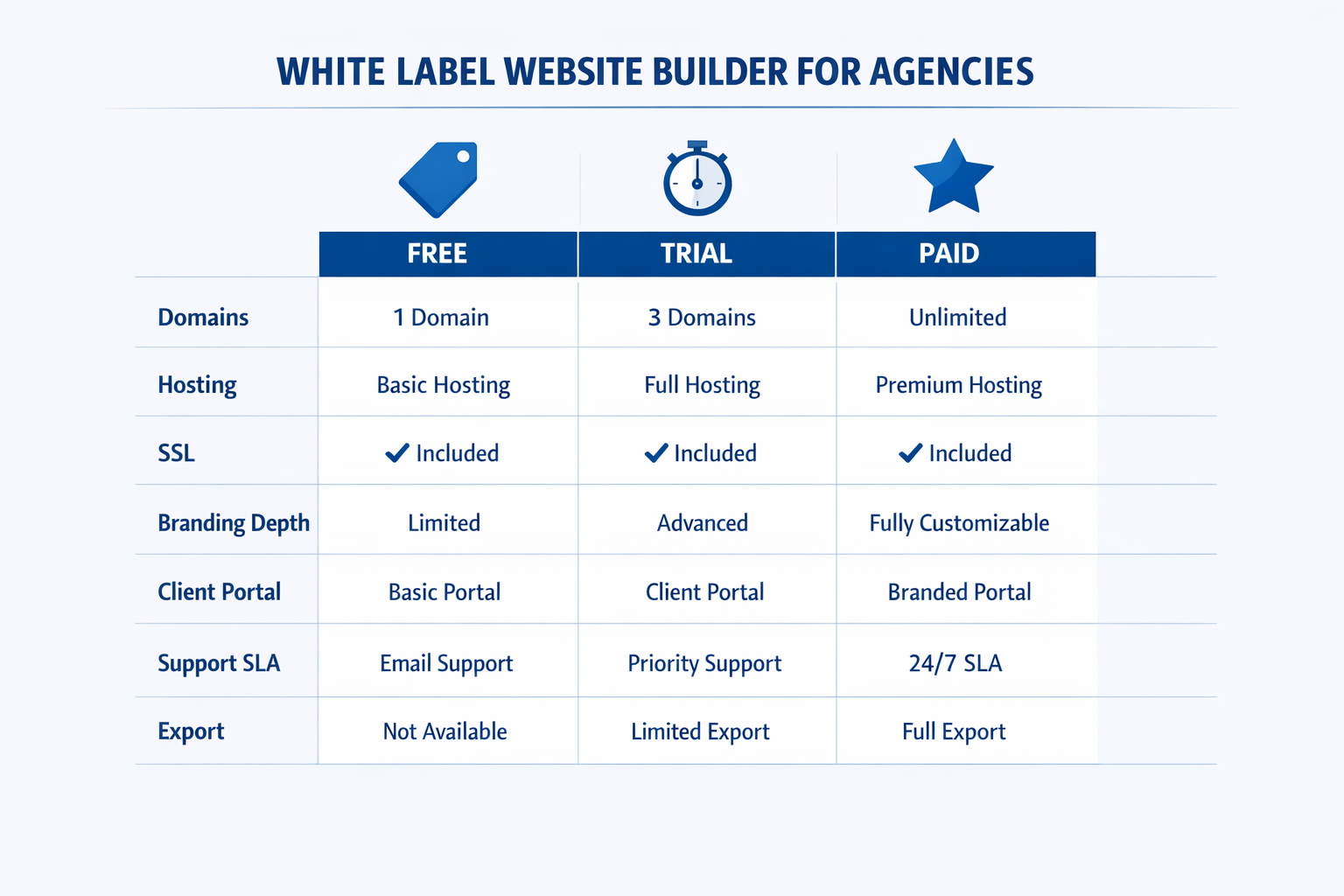
Free forever vs free trial vs freemium
Free forever typically means you can create a site and publish it with limitations (subdomain, vendor branding, limited pages, limited features).
Free trials usually unlock premium features for a time window (7, 14, 30 days). The best trials let you test the agency features too: client portal, roles, staging, white label emails, and support.
Freemium often looks attractive, but it usually caps the exact things agencies need to sell websites at scale:
- number of sites
- custom domains
- removal of vendor branding
- CMS or blogging
- SEO controls (redirects, metadata, sitemaps)
- team seats and permissions
Agency takeaway: if the free plan does not allow a custom domain and removal of vendor branding, it is not a white label offer. It is a lead generator for the vendor.
White label vs reseller vs “powered by” branding
You will see three patterns:
- White label: you sell the platform under your brand. Ideally, the client never sees the vendor.
- Reseller program: you resell access, but the vendor may still show up in parts of the UX.
- “Powered by” branding: you can add your logo, but the vendor remains visible. This is usually not a fit if you want to build agency equity.
If you are building a recurring revenue line, the difference matters. Brand visibility is not just pride, it is churn risk. If the client sees the vendor, they can bypass you.
Here’s a quick skim table you can use internally or drop into a proposal.
| Model | Who owns the client relationship? | What the client sees | Typical agency fit |
|---|---|---|---|
| White label | You | Your brand across portal, emails, and often the editor | Best if you sell ongoing website management and want to build agency equity |
| Reseller program | Mostly you | Mixed branding, vendor may appear in invoices, portal, or login flows | Good if you want speed to market, but still need a partner structure |
| “Powered by” | Shared | Vendor branding is visible by design | OK for low-touch launches, not ideal if you want to be the primary provider |
What can realistically be free (and what cannot)
A white label builder is not a static tool. It is hosting, security, publishing infrastructure, support, and product development.
So yes, parts can be free. But the core value (agency-ready white label) is rarely free forever.
Hosting, custom domains, SSL, and support
Some costs do not disappear just because a vendor runs a promotion.
- Hosting and bandwidth cost money. If a vendor offers “free hosting,” it usually has limits.
- Custom domains require DNS management, certificate automation, and support.
- SSL certificates need automated issuance and renewals. Cloudflare explains the fundamentals well in their learning center: Cloudflare Learning Center.
- Support is one of the biggest hidden expenses. If you do not get vendor support, you become support.
This is why many “free” offers quietly shift the cost to agencies in time spent troubleshooting.
The cost of client management and multi-tenancy
Agencies do not need “a builder.” They need operations.
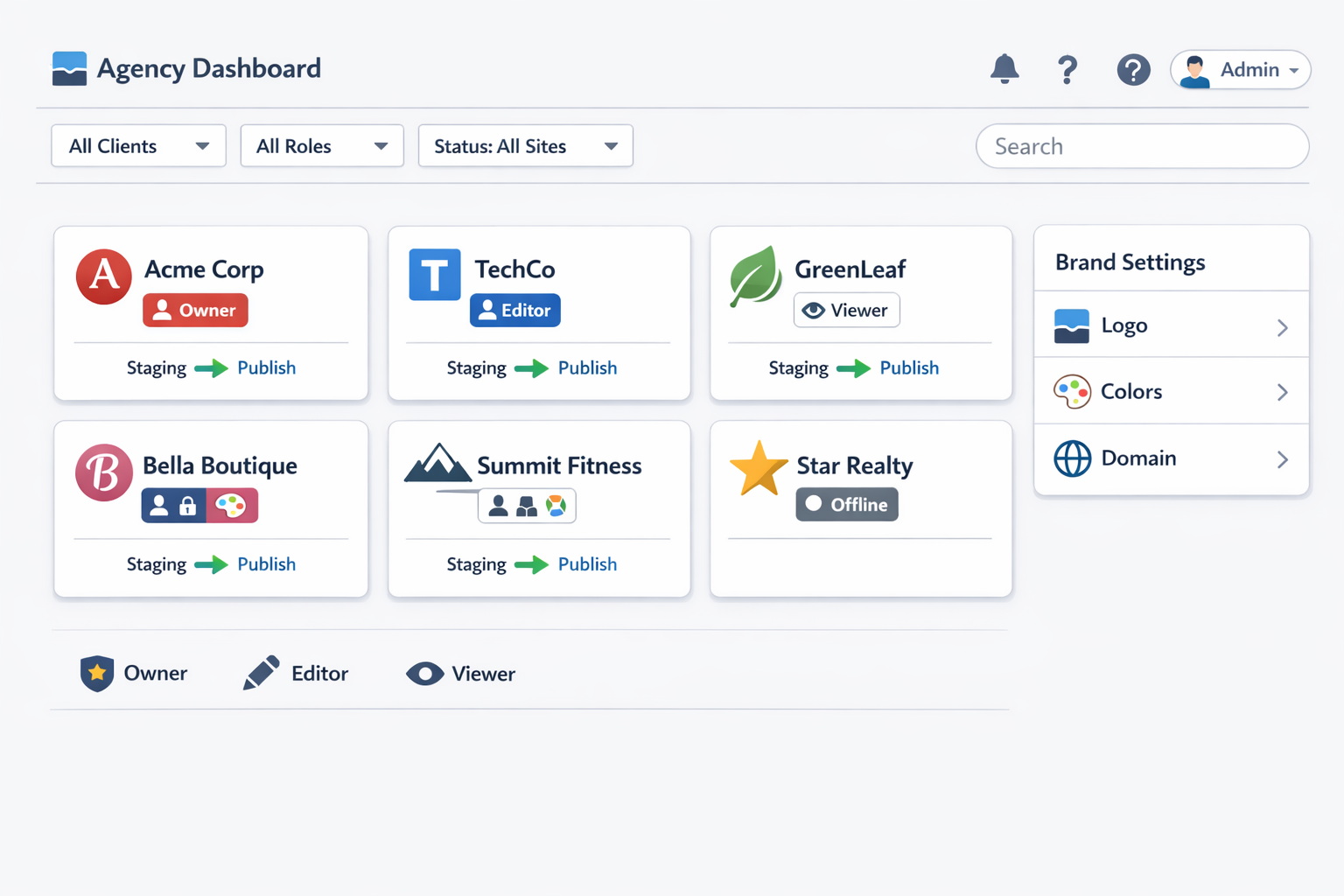
A true white label website builder for agencies includes:
- a multi-client dashboard
- roles and permissions (agency admin, editor, client viewer)
- staging and approval workflows
- backups and restore
- an audit trail
That system is expensive to build and maintain. If a vendor offers those features in a free plan, it is usually a short-term trial.
Hidden costs to watch for (agency checklist)
If you only remember one thing from this article, remember this: “free” is rarely the price. The price is the pricing model.
Here are the hidden costs that typically appear once you try to scale.
A quick reality check with real numbers (why “free” can be expensive)
Even if your tool is “free,” your risk profile isn’t.
- Outages and downtime: Pingdom reports that relatively small businesses often see downtime costs in a range of $137–$427 per minute. That is $8,220–$25,620 per hour for a site that cannot take calls, capture leads, or process orders. Source: Pingdom on the average cost of downtime per industry.
- Breaches are still brutally expensive: IBM’s Cost of a Data Breach research (with Ponemon Institute) reports a global average data breach cost of $4.4M (USD). Source: IBM Cost of a Data Breach report.
- The agency multiplier effect: if you manage 20–50 client sites, one vendor incident can trigger dozens of client tickets, refund requests, and emergency work. That cost lands on your team, not the vendor.
This is why agencies should evaluate “free” offers as operational risk plus opportunity cost, not just a line item on a pricing page.
Here is a quick comparison table you can use in sales calls when a prospect asks, “Why not just use something free?”
| Model | What you usually get | What’s usually missing (agency pain) | Best use case for an agency |
|---|---|---|---|
| Free forever | Basic builder, vendor subdomain, limited pages/templates | Real white label, custom domains, roles/permissions, redirects, SLA support | Personal demos, internal testing, very small experiments |
| Free trial | Full features for 7–30 days, better support access | Trial expires, sometimes limits on domains/branding | Serious evaluation with a scorecard, build a pilot site |
| Freemium | Some features unlocked, pay-as-you-grow | Add-on fees, branding removal behind paywall, seat caps | Low-risk start, but only if you can model scale costs |
| Paid (agency tier) | Predictable unit economics, partner support, white label depth | Higher base cost | Real reselling, recurring revenue, and multi-client management |
Per-site add-ons and traffic charges
A common pattern:
- the base plan is cheap
- the add-ons are where margin dies
Watch for fees tied to:
- per-site publishing
- staging environments
- form submissions
- e-commerce transactions
- bandwidth and traffic “overages”
- premium templates or blocks
If your agency sells websites to local businesses, traffic spikes are not rare. Campaigns, PR, seasonal demand, and SEO wins can all change usage.
Agency takeaway: you do not want a platform where your cost per site is a surprise. If you cannot forecast cost at 20 sites, you will not like it at 200.
Seat-based fees, support tiers, and overages
Seat pricing can work, but it can also punish growth.
Mini-case: how seat pricing can squeeze your margin at 30 clients
Let’s use a simple scenario that many small agencies end up in.
- You sell a managed website plan for $299/mo.
- You have 30 client sites.
- Your platform charges $20 per internal seat.
- You need 6 seats to operate (owner, PM, designer, copywriter, support, sales).
Your seat cost is 6 × $20 = $120/mo.
If you divide that cost across your 30 clients, your seat cost alone becomes $4 per client per month. That sounds small.
Now the gotcha that shows up at scale: many platforms also count client logins as seats, or they force you into a higher tier once you pass a seat threshold.
If the vendor counts client access as seats and you give just 1 login per client, you now have 30 additional seats.
That turns your seat line item into:
- Total seats: 36
- Total seat cost: 36 × $20 = $720/mo
- Per-client seat cost: $720 / 30 = $24/mo
On a $299/mo plan, that single pricing mechanic eats about 8% of revenue before you pay for hosting, domains, support time, or ads.
Agency takeaway: seat pricing is fine when it only applies to your team. It is dangerous when seats quietly includes your clients.
Ask these questions:
- How many team seats are included?
- Are client logins counted as seats?
- Does support cost extra (priority support, SLA, partner channel)?
- Are there overages for storage, domains, or publishing?
Also check whether the vendor charges extra for the features that make your service sticky:
- white label emails
- branded reports
- client portal customization
Migration and lock-in risk
This is the part agencies ignore until it hurts.
If you ever need to switch platforms, you need to know:
- what you can export (pages, blog posts, media)
- whether you can keep your client domains
- how redirects work
- what happens to forms and integrations
Google’s SEO documentation is a good baseline for understanding why redirects and URL control matter: Google Search Central.
Minimum requirements for agencies (the non-negotiables)
If you are looking for a white label website builder free plan, use this section as your filter. If the platform misses these, treat it as a demo tool, not something you can sell.
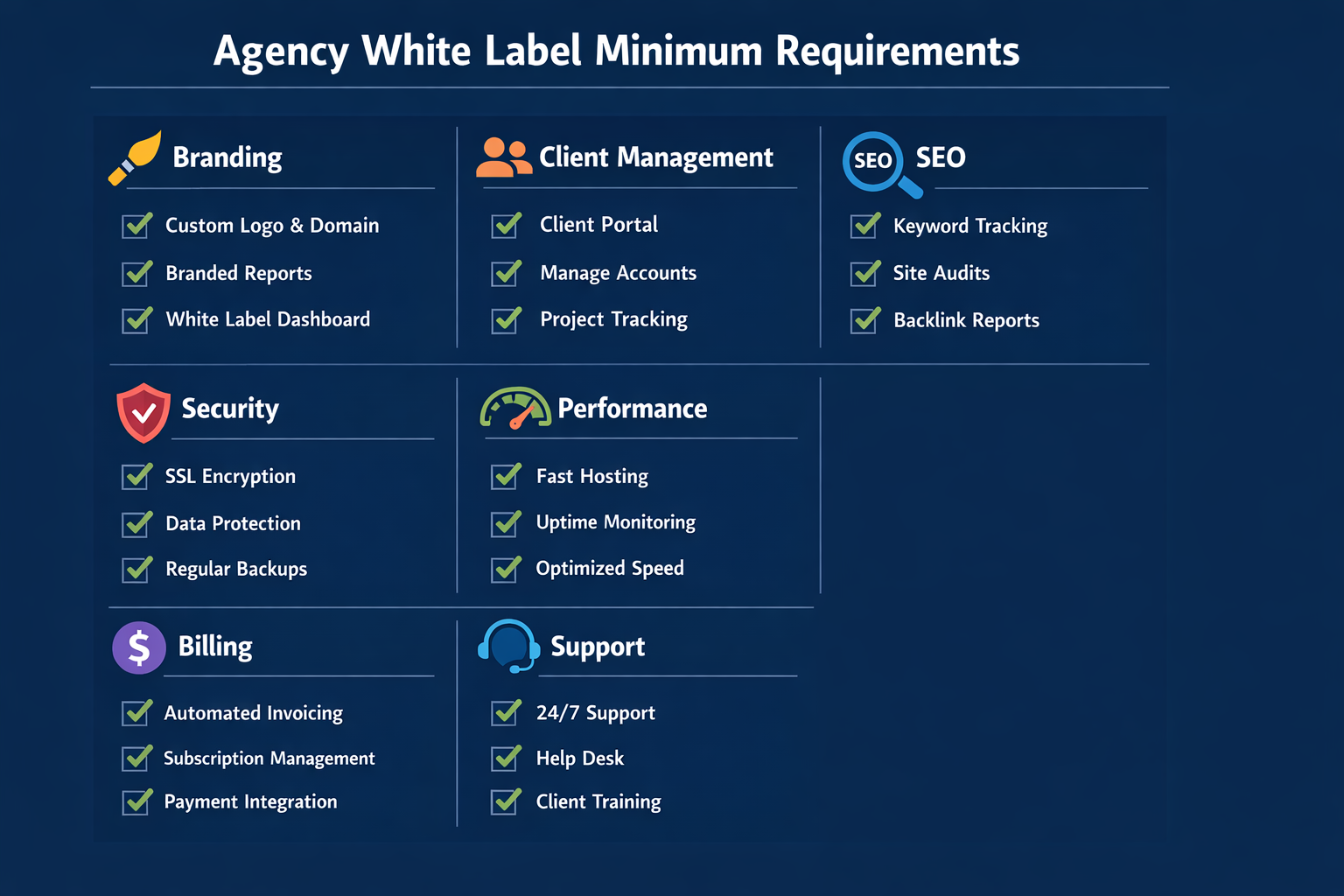
Multi-client dashboard plus roles and permissions
You need to manage multiple client sites without chaos.
Minimum:
- one dashboard for all sites
- roles for agency team members
- roles for clients (viewer, editor, admin)
- permission controls per site
If the platform forces you to share one login across clients, that is a security issue and a support nightmare.
Staging, approvals, backups, and uptime
Agencies need predictable delivery.
Look for:
- staging or preview links
- approval workflows
- backups and version history
- clear uptime commitments
Security is not optional either. Even if you are not running a bank, you are running client websites and handling leads.
OWASP’s Top 10 is a useful reference for the types of risks you should assume exist on the internet: OWASP Top 10.
Vendor questions to ask before you commit
Use these questions on a sales call. If the vendor cannot answer clearly, treat it as risk.
- What counts as a billable site? Does staging count?
- Do client users count as seats?
- Do you support bulk redirects and migration?
- What is your uptime target and your average first response time for partners?
- Can we white label emails and use our own domain for the portal?
SEO controls and analytics basics
A lot of “free” platforms hide SEO behind paid tiers.
Agency minimum SEO checklist:
- edit meta titles and descriptions
- control indexation (noindex when needed)
- generate sitemaps
- manage redirects
- clean URLs
If the platform cannot do redirects, your client migration story is broken and your SEO risk is high.
Free trials vs freemiums: how to evaluate in 60 minutes
A 60-minute test is enough to tell whether a “free” offer is serious.
Here is a practical scorecard.
1) Build a test site (15 minutes)
Pick a simple scenario. For example, a local service business.
In 15 minutes, you should be able to:
- create the core pages (home, services, about, contact)
- add a lead form
- set a custom domain or at least confirm the process
If you cannot build a clean draft quickly, the platform will slow your delivery.
2) Check the white label depth (15 minutes)
Ask:
- Can you remove vendor branding?
- Can you brand the client portal?
- Do system emails show your brand?
- Can you use your own domain for login?
If the answer is “only on enterprise,” then the “free white label website builder trial” is not really testing white label.
3) Test SEO and performance defaults (15 minutes)
Look for:
- page speed basics (image optimization, lazy loading)
- metadata controls
- clean HTML output
- sitemap and robots settings
Even a basic check using Lighthouse can tell you if the platform’s defaults are healthy.
4) Test support and partner workflows (15 minutes)
Here’s a simple test. Submit a support ticket with a real question:
- “Do client logins count as seats?”
- “Do you support redirects at scale?”
- “What is your average first response time for partners?”
How the vendor responds is part of the product.
Agency takeaway: if the vendor will not answer pricing and support questions clearly during the trial, it will not improve after you pay.
Alternatives to “free”: low-cost paid plans that protect margin
The smartest agency move is often not “free.” It is cheap and predictable.
A low-cost plan that includes the right white label features can be a better deal than a free plan that forces you to spend hours doing work the platform should do.
Bundle website management to fund tooling
If you sell websites as one-off projects, you will always feel cost pressure.
If you sell websites as a managed service, tooling becomes easy to fund.
A simple packaging approach:
- Site build fee (one-time)
- Monthly website management subscription
This is where an agency-friendly system like website management becomes the center of your model.
Pricing examples agencies can actually use
These are ranges, not rules. The point is to protect margin.
- Starter managed site: $149–$299/mo (hosting, updates, basic support)
- Growth package: $299–$699/mo (content updates, landing pages, basic SEO)
- Lead-gen package: $699–$2,000+/mo (strategy, CRO, SEO, reporting)
The best way to pick your pricing is to model it.
Here is a simple gross margin model:
- Platform cost per site (predictable)
- Support time per month (hours)
- Your blended hourly cost
If you cannot keep at least 60% gross margin on the managed plans, your “free” platform choice is already hurting you.
Why agencies choose a paid white label builder (ROI math)
Paid plans feel expensive only when you compare them to $0. They look cheap when you compare them to labor.
A simple ROI example (with real agency math)
Imagine you sell a managed website package for $299/mo. Your platform costs you $25/mo per site, and you spend 30 minutes per month on average on minor updates and support. If your blended internal cost is $60/hr, your monthly delivery cost is:
- Platform: $25
- Labor: 0.5 hr × $60 = $30
- Total cost: $55/mo
That’s ~82% gross margin before sales and overhead.
Now compare that to a “free” plan that adds surprise costs: a paid domain feature, extra seats, premium support, and traffic overages. You might still pay $0 for the core builder, but you lose the part that matters, predictable margins.
Paid plans win when they reduce labor.
Delivery time saved
If a platform saves you even 3–5 hours per site on setup, QA, updates, and fixes, that is often more valuable than “free.”
At an agency billing rate of $100–$200/hr, time savings quickly outweigh a software subscription.
Reduced support load
Support is the silent killer of web margins.
If a platform includes:
- stable hosting
- built-in security
- fewer plugin conflicts
- clear partner support
you reduce the hours you spend on low-value firefighting.
One more data point to frame agency economics
When you are deciding between free and agency-ready, it helps to anchor your time cost.
Clutch’s pricing guides show that many agencies list hourly rates in the $25–$49/hour range (and many experienced shops charge more). Source: Clutch digital marketing agency pricing.
Even if you use the low end of that range, a platform that adds just 2–3 extra hours of monthly support across a handful of clients is no longer free.
The agency cost model: how to price around “free”
If you want to choose the cheapest white label website builder, stop thinking in monthly subscription price. Start thinking in cost per client per month and support hours per site.
Here’s a simple model you can copy into a spreadsheet:
Step 1: Estimate platform cost per live site
Break it down into items you can actually predict:
- Base subscription divided by expected number of sites
- Per-site fees (if any)
- Domains and SSL add-ons (if not included)
- Priority support or partner tier
If a vendor cannot explain pricing in one page, that is a warning sign.
Step 2: Estimate support load per site
Most agency support is not “technical.” It is small, recurring work:
- content updates
- image swaps
- landing pages
- form tweaks
- permissions and access requests
Even at 20 minutes/month per site, support becomes real at scale. At 50 sites, that is ~16.6 hours/month. At 200 sites, it is ~66.6 hours/month.
Step 3: Set packaging based on margin bands
A practical approach is to design 3 managed tiers with clear deliverables:
- Maintenance (updates, security, basic support)
- Growth (landing pages, light SEO, content support)
- Lead-gen (CRO, reporting, SEO strategy)
You are not selling a builder, you are selling an outcome. The platform is your internal engine.
Agency takeaway: “Free” is only a win if it reduces labor. If it increases support and client confusion, it is expensive.
Common “free” traps (and how to avoid them)
Let’s call out the patterns agencies run into.
Trap 1: The subdomain that kills conversion
A free plan that publishes on a vendor subdomain is fine for internal demos. It is terrible for client trust.
Clients notice. Prospects notice. And it makes SEO harder long-term.
Avoid it by requiring custom domains in any plan you sell.
Trap 2: The branding removal paywall
This is the classic bait and switch. You build a demo, your client likes it, then you learn the white label option is only available on a much higher tier.
Avoid it by confirming white label features in writing during the trial.
Trap 3: The SEO limitation you find after launch
Redirects, metadata control, and sitemap management are not “nice to have.” They are what lets you fix mistakes and migrate safely.
Avoid it by testing redirects and indexation settings during week 3 of the trial.
Trap 4: The seat pricing surprise
You hire a new account manager, or you add clients who want access, and suddenly your costs jump.
Avoid it by asking whether client logins count as seats and what the growth curve looks like.
A lightweight vendor evaluation script (copy/paste)
Use this script on calls with vendors. It keeps the conversation commercial, not feature-theater.
- “We resell websites under our brand. What does the client see that proves it is our platform, not yours?”
- “Does your pricing scale per site or per seat, and what are the common add-ons?”
- “Do you support staging, approvals, and backups? What is the restore process?”
- “What SEO controls do we get: redirects, metadata, sitemaps, robots, clean URLs?”
- “What is your partner support model and typical first response time?”
- “If we ever leave, what can we export and how do redirects work?”
If you do not like the answers, do not sell the platform to your clients.
Realistic pricing scenarios (so you can quote without guessing)
Agencies often freeze when a prospect asks, “What will this cost per month?” The trick is to stop improvising and use scenarios.
Scenario 1: Local service business (lead-gen brochure site)
- 5 pages
- 1 lead form
- 1 monthly update batch
- basic reporting
A common range is $199–$399/mo depending on how much content and support you include.
Scenario 2: Multi-location brand
- core site plus 10 location pages
- ongoing landing pages for campaigns
- more frequent edits
A common range is $499–$1,200/mo because the operational load is higher and the value is tied to bookings and calls.
Scenario 3: Small ecommerce
- product pages
- shipping and payment integrations
- higher support expectations
A common range is $699–$2,000+/mo, especially if you include CRO and merchandising support.
These ranges only work if your platform costs and support load are predictable. That is why “free” plans often fail agencies after the first few clients.
How lindoai approaches white label (and how to start)
If you want to evaluate a platform designed for agencies, start here:
Then map the feature set to your requirements checklist.
Quick start steps for agencies
- Create a demo site for one niche you sell to (local services is a good start)
- Build a 4-page template you can reuse
- Set up roles and permissions for your team
- Define your packaging and onboarding process
- Run a 7-day pilot with one friendly client
You are not looking for perfection. You are looking for a platform that lets you ship, manage, and scale.
A 30-day trial due diligence plan (week-by-week)
If you are using a white label website builder trial, treat it like a mini procurement project. Agencies that win do not just build a pretty homepage, they validate the operational details that decide profit later.
Week 1: Build speed and template quality
- Build 1 demo site from scratch and time it (start to publish).
- Create a reusable page kit (hero, services grid, testimonials, CTA block).
- Test responsiveness on mobile and check editing friction.
Deliverable: a repeatable 4-page starter template you could sell.
Week 2: White label depth and client experience
- Remove vendor branding everywhere you can.
- Test the client portal, permissions, and access flows.
- Send test emails (invites, password resets, notifications) and check branding.
Deliverable: a white label checklist with screenshots for your team.
Week 3: SEO and performance validation
- Confirm metadata controls, sitemap generation, robots settings, and redirects.
- Run Lighthouse on key pages and document baseline Core Web Vitals.
- Validate image optimization and caching behavior.
Deliverable: an SEO controls checklist plus a performance budget you can reuse.
Week 4: Support, billing, and exit plan
- Submit 3 support requests and measure response time and quality.
- Confirm billing model and what counts as a billable site or seat.
- Validate export and migration options, and document the exit path.
Deliverable: a one-page agency decision memo with your recommended plan and why.
Agency takeaway: do not finish a trial without writing down your unit economics. If you cannot explain costs and margins to your team, you are not ready to sell the platform to clients.
Build a “free-to-paid” offer ladder (what to sell to clients)
Most agencies do not need a free platform. They need a free entry point that leads to paid recurring revenue.
Here are three ladders that work.
Ladder A: Free audit → paid build → managed plan
- Step 1: free website audit (performance, SEO basics, conversion)
- Step 2: fixed-fee rebuild on your white label platform
- Step 3: monthly website management
This works because the audit creates urgency and makes the build decision easy.
Ladder B: 7-day pilot → 90-day growth sprint
- Step 1: build a pilot site during the trial
- Step 2: launch with a clear KPI (leads, calls, bookings)
- Step 3: 90-day sprint with landing pages and CRO
Clients love pilots because risk feels low. Agencies love pilots because you validate the platform and your process.
Ladder C: Template-based niche package
Pick one niche you already serve (dentists, electricians, boutique gyms). Build a reusable template and sell a standardized package.
Standardization is what turns a builder into margin.
A 7-day pilot plan you can run with a real client
If a prospect asks for “something free,” offer a pilot instead. It is honest, controlled, and measurable.
Day 1: kickoff and content collection. Day 2: build the core pages. Day 3: forms, tracking, and call-to-action polish. Day 4: SEO basics (metadata, sitemap, indexation). Day 5: performance and mobile QA. Day 6: client review and revisions. Day 7: launch and handoff, then upsell the managed plan.
Agency takeaway: a pilot is not a discount. It is a structured evaluation with a clear path to recurring revenue.
The decision checklist (print this)
Use this checklist to decide if a “free white label website builder” offer is worth your time.
Pricing and scaling
- Can you calculate cost per live site at 20, 50, and 200 sites?
- Are there per-site add-ons (domains, staging, forms, analytics)?
- Do client users count as paid seats?
White label depth
- Can you remove vendor branding fully?
- Can you brand the portal and emails?
- Can you use your own domain for login?
Operations
- Is there a multi-client dashboard?
- Are there roles and permissions per site?
- Are backups and restore simple?
SEO and performance
- Can you edit metadata and generate sitemaps?
- Can you create redirects?
- Are performance defaults strong enough to pass basic Core Web Vitals targets?
Support and risk
- Is partner support included?
- Are response times stated?
- Is the exit path documented (export, domains, redirects)?
If you cannot confidently check these boxes, treat the platform as a demo tool, not an agency product.
FAQ
Is there a truly free white label website builder?
Almost never, not for agencies. You can find free builders, but true white label (no vendor branding, custom domains, client portal) is usually a trial or a paid tier. If a vendor claims “free white label,” verify what is included, especially domains, branding removal, and support.
What’s the cheapest white label website builder for agencies?
The cheapest option is the one with predictable unit economics. A low-cost paid plan that includes real white label features often beats a “free” plan with paid add-ons. Model your cost per site at 20, 50, and 200 sites. If it breaks at scale, it is not cheap.
Do free trials include white-label features?
Sometimes, but not always. Many trials let you test the editor, but hide portal branding, custom domains, or white label emails behind higher tiers. Ask for a trial that includes the features you actually sell.
How should agencies price monthly website management?
Start from costs, then price for outcomes. Add your platform costs and estimated support time, then package based on value (leads, bookings, revenue). Most agencies land in the $149–$699/mo range for managed sites, with higher retainers for lead-gen and CRO.