If you run a web design agency, you already know the dirty secret: building websites is not the hard part anymore.
The hard part is building them profitably, at scale, with predictable delivery, predictable support, and predictable margins.
That is why “website builder reseller” searches are climbing. Agencies are looking for a reseller website builder platform they can package, sell, and manage for dozens (or hundreds) of client sites without hiring a small army.
This guide breaks down how website builder reseller programs actually work, what “white label” really includes, how to do margin math that does not lie to you, and how to launch your reseller offer in 30 days.
Along the way, you will also see where lindoai fits, especially if your goal is to resell sites under your brand and earn recurring revenue through management.
What is a website builder reseller program?
A website builder reseller program is a partnership where a platform lets your agency sell websites and related services using their underlying website builder.
Depending on the program, you might:
- Sell the platform as part of your package (you set your prices)
- Get discounted per-site costs (you keep the margin)
- Get an agency “seat” plan (you pay for users or capacity)
- Receive revenue share (you earn a percentage of subscription)
- Run the client portal under your brand (white label)
It sounds simple. But there are three very different business models hiding behind the same marketing words.
Reseller vs affiliate vs referral partnerships
Do not confuse these.
Affiliate programs usually mean you send traffic, the vendor closes the sale, and you get a commission. This can be fine for creators, but it is rarely how agencies build a defensible offer.
Referral partnerships are similar, sometimes with better payouts or a one-time finder’s fee. You still do not own the product experience, billing relationship, or renewal.
Reseller programs are different. You sell. You package. You control the client relationship. Ideally, you control branding and billing too.
If you want recurring revenue, you need recurring control. Affiliate and referral models are optional add-ons, not the foundation of an agency reseller offer.
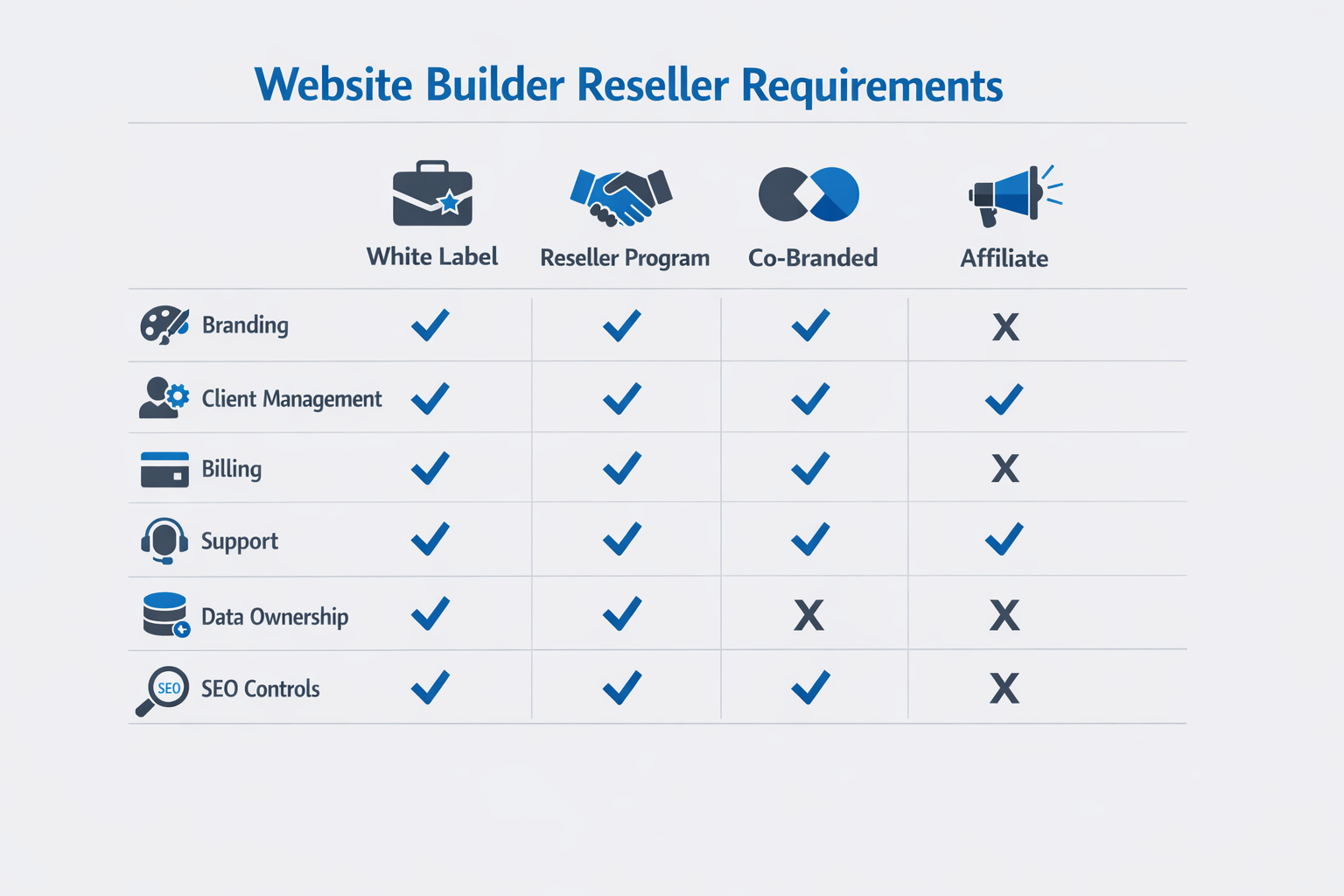
White label vs co-branded partner portals
A white label website builder typically means the customer-facing experience can be branded as yours.
That can include:
- Your logo, colors, and domain
- A branded client portal
- Branded templates and “starter sites”
- Your own pricing and packaging
A co-branded portal usually means “powered by X” appears somewhere, or clients can still see vendor branding inside the product.
In 2026, your clients notice this.
If you are selling “managed websites” at premium pricing, your ability to deliver a seamless brand experience matters.
Why agencies resell a website builder (the business case)
If your agency only sells one-off website projects, you are basically choosing a treadmill.
You must keep selling new work to hit revenue targets.
A reseller website builder offer changes the economics, because you can combine:
- A one-time build or setup fee
- Monthly website management retainers
- Optional add-ons (SEO, ads landing pages, content, CRO)
Predictable revenue with management retainers
The biggest benefit of a website builder reseller program is not “passive income.”
It is predictable, renewable revenue.
When you own the website platform relationship, you can attach ongoing services:
- Hosting and performance monitoring
- Updates and content changes
- Security, backups, and restores
- Analytics reporting
- SEO maintenance
- A/B testing and conversion improvements
This is why a strong website management layer matters. If you want to build recurring revenue, start by looking at what you will actually deliver every month.
If you want a practical example of what ongoing management can look like, see website management.
Speed-to-launch and lower delivery costs
Reseller programs also change the delivery side.
Instead of building every site from scratch, you rely on:
- Reusable templates
- Brand kits
- Built-in hosting and deployment
- Centralized multi-client management
Speed matters because agencies are under pricing pressure.
When you cut build time from 6 to 8 weeks down to 1 to 2 weeks, your gross margin changes dramatically.
The trick is not “building faster.” It is building faster without sacrificing quality.
The 10 features that matter most in a reseller website builder
Most vendor comparison pages are fluff.
They list 200 features, and none of them answer your real question.
“Will this platform let us deliver and manage 50 client sites without breaking our operations?”
These are the features that actually matter.
1) Multi-client management, roles, permissions, and billing
A reseller website builder should feel like an agency operating system.
Look for:
- A true multi-client dashboard
- Role-based permissions (admin, editor, client view)
- Audit logs (who changed what)
- Ability to transfer ownership when needed
- Central billing controls, or at least clear separation per client
This is not optional.
When you manage dozens of sites, permissions mistakes turn into support tickets, and support tickets destroy margins.
2) Templates, brand kits, staging, and approvals
To scale, you need repeatability.
That means:
- Templates you can duplicate and customize fast
- Brand kits (fonts, colors, components) that are easy to apply
- Staging environments or preview links
- A clear approval workflow (so “one more change” does not last forever)
A good approval flow is a margin protection system.
3) Performance, hosting, security, and backups
Your clients do not care which stack you use.
They care about uptime, speed, and peace of mind.
At a minimum, evaluate:
- Hosting architecture and CDN
- Built-in caching controls
- Backup frequency and restore time
- Security posture and vendor transparency
If you need a simple, high-level reference for performance and security concepts, Cloudflare’s learning center is a good starting point: Cloudflare Learning Center.
Also, your reseller agreement should clarify who owns the incident response when something goes wrong.
4) SEO controls and analytics
Agencies sell outcomes. Outcomes require measurement.
Make sure the reseller website builder supports:
- Editing meta title and meta description per page
- Headings and basic page structure control
- Image alt text
- Redirects
- Indexing controls (noindex, canonical)
- Easy analytics integration
For SEO best practices and technical hygiene, Google’s documentation is the baseline: Google Search Central.
5) Integrations that matter for real client work
You do not need 1,000 integrations.
You need the 10 your clients actually use.
Common must-haves:
- Forms and CRM
- Email marketing
- Payment processing
- Booking and scheduling
- Reviews and social embeds
If the platform cannot integrate cleanly, you will end up building duct tape systems that create support debt.
6) Collaboration and change control
Most agencies underestimate the cost of collaboration.
Look for:
- Comments or collaboration inside the editor
- Version history
- Easy rollback
- A clean workflow for client edits vs agency edits
7) Ecommerce readiness (even if you do not sell ecommerce today)
Ecommerce is where “simple websites” become complex fast.
Even if your current ICP is local services, you want a path to sell:
- Digital products
- Simple catalogs
- Payments and invoices
It is easier to upsell than to migrate.
8) White labeling depth
Many vendors call themselves white label.
Then you discover:
- The login page still shows their brand
- Support emails come from their domain
- Client portal cannot be customized
Ask for a demo of the entire client experience.
9) Data ownership and exportability
This is a risk area.
Your agency should be able to:
- Export client content
- Migrate sites if needed
- Transfer ownership cleanly
Vendor lock-in is not always evil, but it must be understood and priced.
10) Partner support and escalation
A website builder reseller program is a partnership.
The program should include:
- Dedicated support channel
- Escalation path for urgent issues
- Clear SLAs, especially for incidents
If your “partner support” is just a generic help desk, you will pay for it with your time.
Here is what “real partner support” looks like in practice.
A simple mini-SLA template agencies can ask for
You do not need a 40-page contract on day one. You do need a few promises in plain English.
- Severity definitions(so you and the vendor agree on what “urgent” means)
- P0: site down, checkout down, widespread login failure
- P1: major feature broken, publishing blocked, performance incident
- P2: bug with workaround, isolated user issue
- Response targets (acknowledgement is not resolution, but it matters)
- P0: acknowledge in 30–60 minutes, status updates every 60 minutes
- P1: acknowledge in 2–4 hours, status updates every 4 hours
- P2: acknowledge in 1 business day
- Resolution targets (or at least a clear time-to-mitigation)
- P0: mitigation within 4–8 hours
- P1: mitigation within 1–2 business days
If the vendor refuses to discuss this, that is information.
Example escalation ladder (what you want before you onboard 30 clients)
Ask the vendor to show you the ladder, not just describe it.
- Partner support inbox or chat (tier 1)
- Partner manager escalation (tier 2, when your ticket is stuck)
- On-call engineer or incident commander (P0 only)
- Leadership escalation for repeated incidents or SLA breaches
In a reseller model, you do not need perfect uptime. You need predictable escalation, predictable communication, and a path to resolution when something breaks on a client’s deadline.
Website builder reseller pricing models and margin math (with examples)
This is where most agencies make the mistake.
They look at platform pricing, then they guess at margins.
Do not guess.
Model it.
Per-site pricing vs agency seat pricing vs revenue share
Most reseller website builder programs fall into one of these pricing models.
| Model | How it works | Pros | Cons | Best for |
|---|---|---|---|---|
| Per-site wholesale | You pay a fixed cost per site | Simple math, scales linearly | Can get expensive at scale | Agencies with predictable site volume |
| Agency seats | You pay per user or capacity | Costs do not always rise per client | Can hide limits (sites, traffic, features) | Teams with many internal editors |
| Revenue share | Vendor bills client, you earn % | Low upfront cost | You do not control billing, lower leverage | Agencies testing demand |
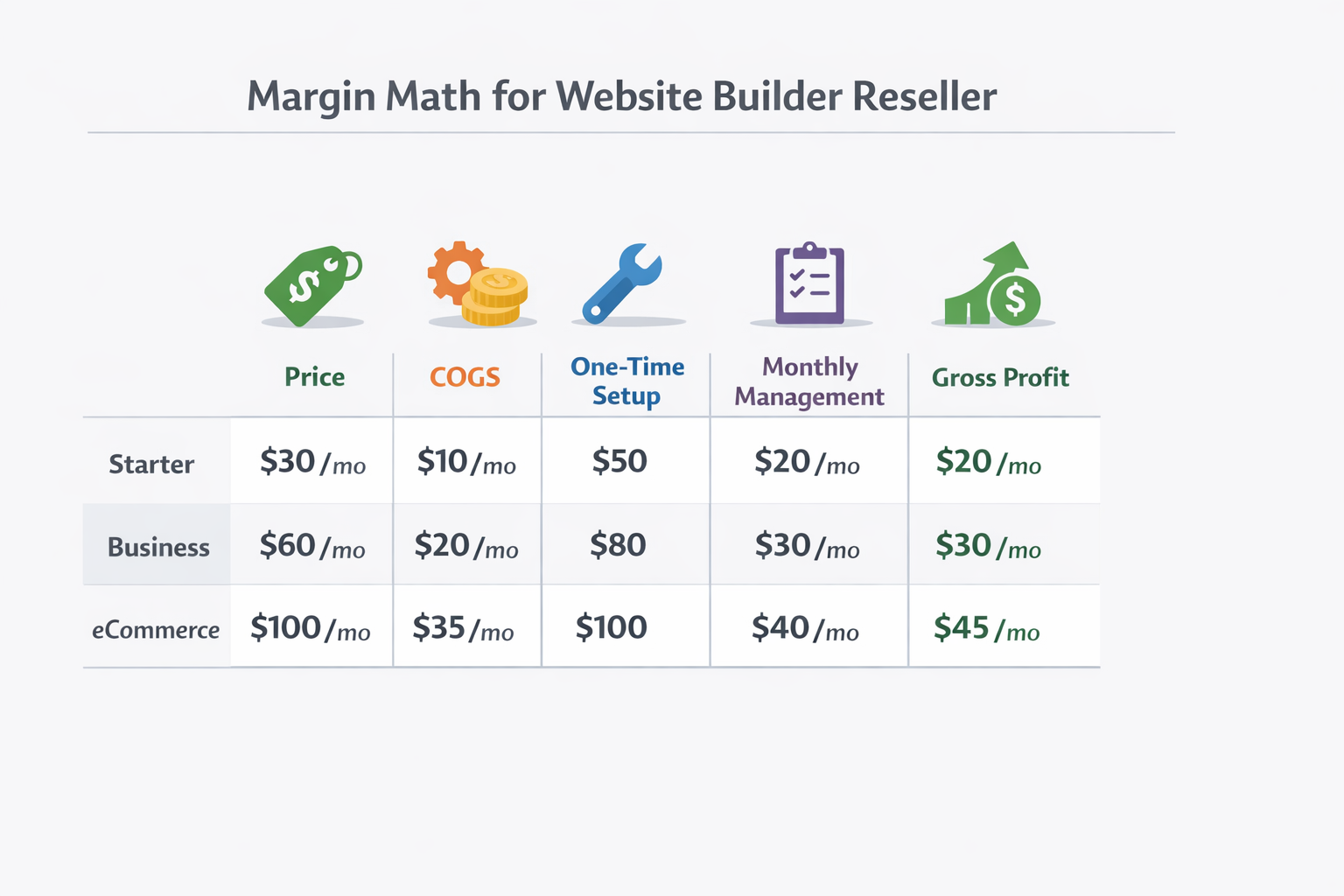
Example packages (Starter / Business / eCom)
If you want to sell a website builder reseller offer, you need packaging.
Here is a practical example of how agencies commonly structure it.
| Package | One-time setup | Monthly management | Includes |
|---|---|---|---|
| Starter | $1,000–$1,500 | $99–$199/mo | 5 pages, template-based build, hosting, basic edits |
| Business | $2,000–$4,000 | $249–$499/mo | custom sections, SEO setup, monthly reporting, faster turnaround |
| Ecommerce | $3,500–$8,000 | $399–$999/mo | catalog, payments, training, promotions, CRO tests |
You can adjust to your market. The point is the structure.
Now let’s do math.
Margin math example (the kind your spreadsheet should include)
Assume a Business package:
- Setup fee: $1,500
- Monthly management: $199/mo
- Platform cost: $39/mo
- Labor to build: 6 hours at $75/hr = $450
- Support time: 1 hour/month at $60/hr = $60/mo
Year 1 revenue:
- Setup: $1,500
- Monthly: $199 x 12 = $2,388
- Total: $3,888
Year 1 costs:
- Build labor: $450
- Platform: $39 x 12 = $468
- Support: $60 x 12 = $720
- Total: $1,638
Year 1 gross profit (before overhead):
- $3,888 - $1,638 = $2,250
That is a strong outcome.
But only if support time stays controlled.
In a reseller model, support is the silent margin killer. The platform’s features matter less than your ability to keep monthly hours predictable.
The 30-client scenario (why “small” pricing decisions matter)
Let’s scale the same model to 30 clients.
If each client pays $199/mo, you generate:
- $5,970/mo in management revenue
If your platform cost is $39/mo per site, your direct platform cost is:
- $1,170/mo
Now the support reality.
If you spend 1 hour/month per client, that is 30 hours/month.
At $60/hr, that is:
- $1,800/mo
So far:
- Revenue: $5,970
- Platform cost: $1,170
- Support labor: $1,800
- Gross profit: $3,000/mo
Now imagine support creeps from 1 hour to 2 hours per client.
Your support labor becomes $3,600/mo.
That single change cuts profit from $3,000 down to $1,200/mo.
Same pricing. Same platform.
Completely different business.
This is why the reseller website builder must reduce support load through stability, permissions, and good workflows.
White label website builder: what “white label” includes (and what it doesn’t)
Here is the reality.
White labeling is not a checkbox.
It is a bundle of capabilities, and most vendors only deliver part of the bundle.
What true white label should include
If you are selling a white label website builder offer, you usually want:
- A custom domain for the portal (for example, clients.youragency.com)
- Your logo and brand colors in the portal
- Branded templates, starter sites, and brand kits
- Ability to set your own pricing
- Clear client ownership and transfer options
If you are evaluating options, start here: white label website builder.
What it often does not include
Even in “white label” plans, you might not get:
- Fully white-labeled system emails
- Full removal of vendor branding in the editor
- Support handled as your team (many vendors still appear)
- Control over the billing relationship
This matters because clients notice when the seams show.
Contracting and support responsibilities
The most important question is not “can I put my logo on it?”
It is “who is responsible when something breaks?”
If you sell a managed website package, you are typically the first line of support.
Make sure the vendor offers:
- Partner escalation
- Fast incident response
- Clear communication
Also decide what you will do:
- Build a small support playbook
- Set client expectations (response times, what is included)
- Use a ticketing system early
Implementation plan: how to launch your reseller offer in 30 days
Most agencies delay because they think launching a reseller offer requires a perfect product.
It does not.
It requires a clear offer, a repeatable process, and a platform you trust.
Here is a realistic 30-day rollout.
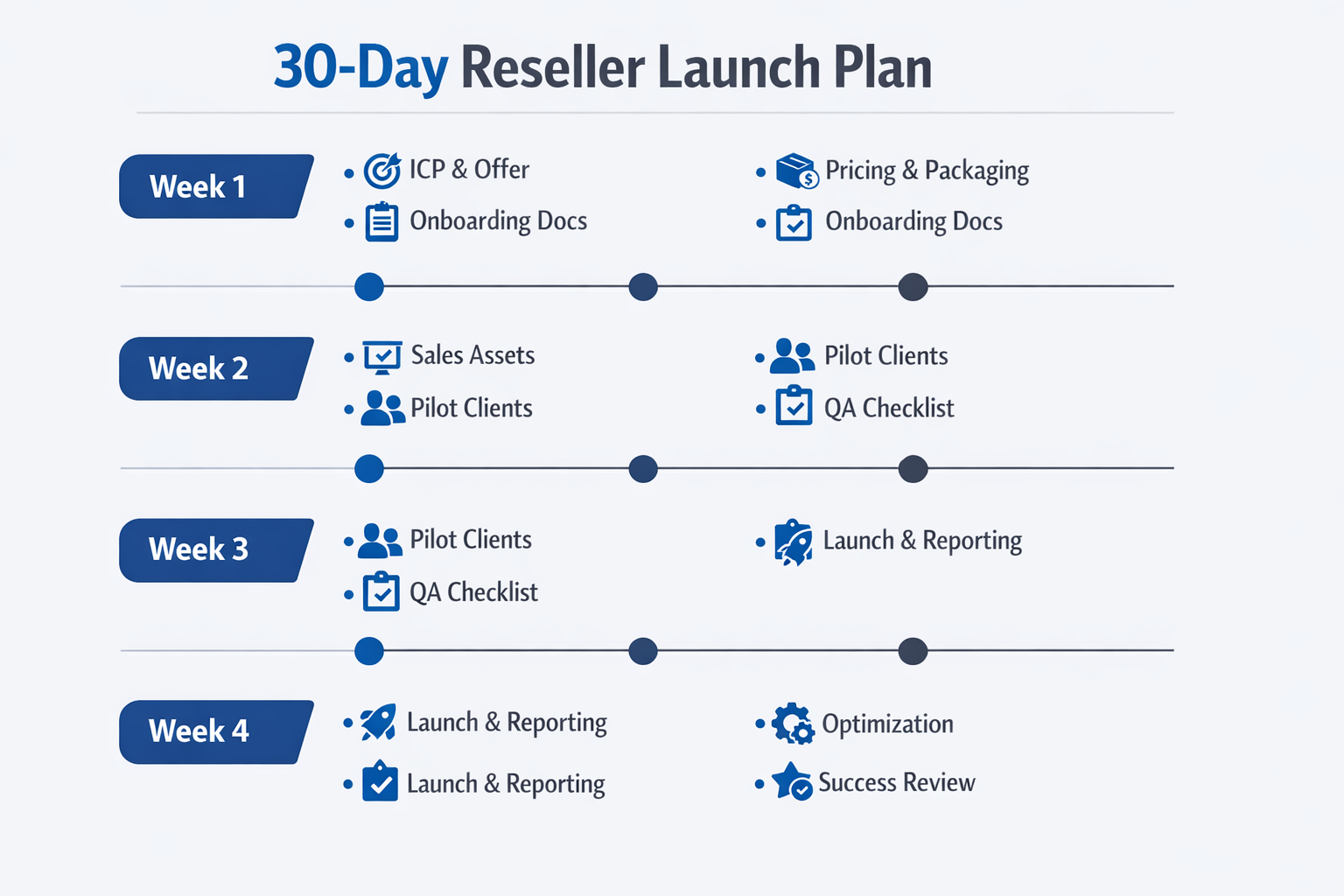
Week 1: Define ICP and offers
Start with your ideal customer profile.
Pick one:
- Local service businesses
- Small ecommerce brands
- Professional services
- SaaS landing pages
Then define your offer:
- What is included in setup
- What is included monthly
- What is out of scope
Deliverables for week 1:
- 1-page offer sheet (pricing and scope)
- A 3-tier package table
- A simple qualification checklist
Week 2: Sales assets and onboarding playbook
You need sales assets that do the heavy lifting.
Build:
- A short pitch deck
- A demo script
- A pricing calculator (even a Google Sheet)
- A “what happens next” onboarding page
If you sell to agencies or teams, use a buyer’s guide style demo.
Talk about risk, migration, support, and growth.
Week 3: Delivery workflow and QA
This is where reseller offers win or lose.
Document:
- Your site build checklist
- Your SEO setup checklist
- Your launch QA checklist
- Your handoff process
Your goal is to make delivery boring.
Boring delivery is profitable delivery.
If your agency plans to build recurring revenue, define what you will do monthly, and how you will report it.
Week 4: Pilot, refine, and launch
Do not launch publicly without a pilot.
Pick 2 to 3 friendly clients.
Offer a discounted setup fee in exchange for:
- Fast feedback
- A testimonial
- Permission to use the site in your portfolio
After the pilot, refine:
- Your scope boundaries
- Your support workflow
- Your pricing
Then launch.
Common pitfalls (vendor lock-in, support load, quality control)
Most agencies do not fail at the reseller model because of marketing.
They fail because of operations.
Here are the pitfalls to plan for.
Data ownership and exportability
Ask the vendor:
- Can I export content?
- Can I migrate sites?
- What happens if we cancel?
Also ask yourself:
- How will we document client assets?
- How will we store credentials and DNS access?
If you cannot exit cleanly, you must price higher, because you are taking on more risk.
SLA and escalation
Many partner programs avoid the hard conversation about SLAs.
Have it anyway.
For example:
- Incident response time
- Planned maintenance notifications
- Escalation channel for agencies
If your program does not have clear escalation, your agency becomes the shock absorber.
Support load and “death by small edits”
Here is the most common reseller margin killer:
- “Can you change one sentence?”
- “Can you swap this image?”
- “Can you add a new section?”
If your monthly management plan has no boundaries, you will end up doing unlimited work for a fixed fee.
Fix it with:
- A defined number of content updates per month
- A turnaround promise tied to package level
- A change request process
Quality control across many sites
When you manage 50 sites, small technical mistakes compound.
Create standards:
- Performance budgets
- Accessibility baseline
- SEO checklist per page type
Then enforce them with QA.
How to evaluate a website builder reseller program in 60 minutes
If you are comparing reseller website builder options, you need a decision tool you can use quickly with your team.
Here is a simple scorecard I like because it forces the right questions. Score each item 0, 1, or 2:
- 0 = missing or unclear
- 1 = present, but with limitations
- 2 = strong and proven
| Category | What to check |
|---|---|
| White label depth | Portal on your domain, branding everywhere that matters |
| Multi-client ops | True multi-site dashboard, roles, permissions, audit trail |
| Support model | Partner channel, escalation path, incident response clarity |
| SEO and analytics | Meta controls, redirects, indexing controls, easy analytics |
| Performance | CDN, caching, predictable Core Web Vitals patterns |
| Security and backups | Backup frequency, restore workflow, security transparency |
| Data ownership | Export, migration path, clean ownership transfer |
| Billing flexibility | Your pricing, invoicing approach, or clear separation per client |
| Template system | Reusable templates, brand kits, approvals and staging |
| Roadmap fit | Platform direction matches your agency niche for 12 months |
Add up your score and be honest.
- 0–8: risk is high, you will absorb problems
- 9–14: workable if your ops are strong
- 15–20: strong candidate for a reseller offer
If a vendor cannot answer basic questions about backups, exports, and escalation, treat it like a red flag. Your agency will be the one explaining outages to clients.
Your reseller website builder due diligence checklist (before you sign anything)
A website builder reseller program is part technology choice and part contract choice. Before you commit, make sure you can answer these questions in writing.
Product and operations
- Can you create separate workspaces for each client?
- Can you restrict clients from breaking global components?
- Is there version history and rollback?
- Is there a staging environment or preview link workflow?
- Can you templatize your best-performing layouts?
SEO and performance
- Can you edit meta titles and descriptions per page?
- Can you manage 301 redirects without a developer?
- Can you control indexing and canonicals where needed?
- Can you integrate analytics cleanly?
- Does the vendor publish clear guidance on search and indexing? (Use Google Search Central as your baseline.)
Security, backups, and liability
- How often are backups taken, and how long are they retained?
- How quickly can a site be restored, and who performs the restore?
- What is the incident escalation process for agencies?
- Are there limits on traffic, bandwidth, or storage that could cause surprise charges?
If you want a plain-language overview of common security and performance concepts, Cloudflare’s library is useful for non-specialists: Cloudflare Learning Center.
Business model details
- Who bills the end client?
- Can you set your own pricing?
- Do you get wholesale pricing, a seat model, or a revenue share?
- What happens if you want to move a client off the platform?
Packaging your reseller offer (so clients say yes faster)
A reseller website builder offer sells better when it is framed as a business outcome, not a software subscription.
Instead of selling “a website builder,” sell:
- A fast launch
- A managed website
- A measurable improvement (leads, bookings, sales)
The positioning that works in sales calls
Here is an easy way to explain it:
- We build and launch your site quickly using a proven framework.
- We manage it monthly so it stays fast, secure, and up to date.
- You get reporting and improvements instead of a site that slowly breaks.
This naturally supports higher monthly retainers, because you are not selling hosting, you are selling peace of mind and results.
Add-ons that increase ARPA without increasing chaos
Pick add-ons that are repeatable across clients:
- Landing pages for promotions
- Seasonal refresh packages
- Local SEO content sets
- Review generation and embedding
- Simple CRO tests (headline, CTA, form length)
The goal is to grow account value without creating custom work every time.
The reseller vs white label vs “powered by” mini table
This is the simplest way to explain partnership options internally and to clients.
| Option | Who owns the client relationship? | What the client sees | Who does support? |
|---|---|---|---|
| Affiliate | Vendor | Vendor brand | Vendor |
| Referral | Vendor (mostly) | Vendor brand | Vendor |
| Reseller program | Agency | Mixed or co-branded | Agency first, vendor escalation |
| White label | Agency | Agency brand (ideally end-to-end) | Agency first, vendor escalation |
A practical decision: when a reseller website builder is the wrong move
Not every agency should resell a platform.
A reseller model is the wrong move if:
- You do not want ongoing support responsibilities
- Your team is not ready to document a repeatable delivery process
- You only want high-ticket custom builds with no recurring layer
In those cases, referral partnerships can still be useful. But do not pretend it is the same business.
If your goal is recurring revenue, you need a real operations plan and a platform that supports it.
Why lindoai for agencies
If you want to sell websites under your brand, you need two layers:
- A white label platform to build and deliver sites
- A management layer that supports recurring revenue
That is exactly where lindoai is focused.
White-label website builder capabilities
lindoai supports agencies that want to deliver sites faster, keep branding consistent, and operate across many clients. Start with the core product overview: white label website builder.
Website management for recurring revenue
The fastest way to stabilize revenue is to attach management. That means packaging:
- Monitoring
- Updates
- Reporting
- Support boundaries
Explore website management and solutions for web design agencies.
FAQ
How much does it cost to become a website builder reseller?
It depends on the program model. Some website builder reseller programs have a low-cost entry point (revenue share or referral), while true reseller plans usually require a paid agency tier or per-site wholesale costs. The right way to think about cost is “platform cost + support labor + operational overhead,” because support is often more expensive than the software.
Can I white-label a website builder under my own brand?
Yes, but you need to confirm what “white label” means in practice. A white label website builder may include your logo, custom domain, templates, and portal branding, but it might not include white-labeled emails or full removal of vendor branding inside the editor. Ask for a demo of the entire client journey before you commit.
What’s the best reseller website builder for agencies?
The best reseller website builder is the one that protects your margins. Look for multi-client management, strong permissions, reliable hosting, SEO controls, clear data ownership, and real partner support with escalation. If those are weak, your agency will pay the difference in time.
How do agencies price website management?
Most agencies price website management as a monthly retainer based on expected support hours, update volume, and reporting requirements. A common approach is tiered packaging (Starter, Business, Ecommerce) with clear boundaries. Your price should also reflect risk, especially if you are responsible for uptime, security, and incident response.