How to Automate Website Creation with AI (Step-by-Step 2026)
Building websites by hand is slow, expensive, and hard to scale. The fix is simpler than most people think: automated website creation. With AI tools and a repeatable workflow, you can go from a blank page to a published, client-ready site in minutes instead of weeks.
This guide shows you exactly how to automate website creation with AI. We'll cover what automation really does, the business case behind it, a copy-paste 5-step workflow, the best tools in 2026, and how agencies turn this into a recurring revenue machine. No fluff, no vague advice. Just a system you can start using today.
What Is Automated Website Creation?
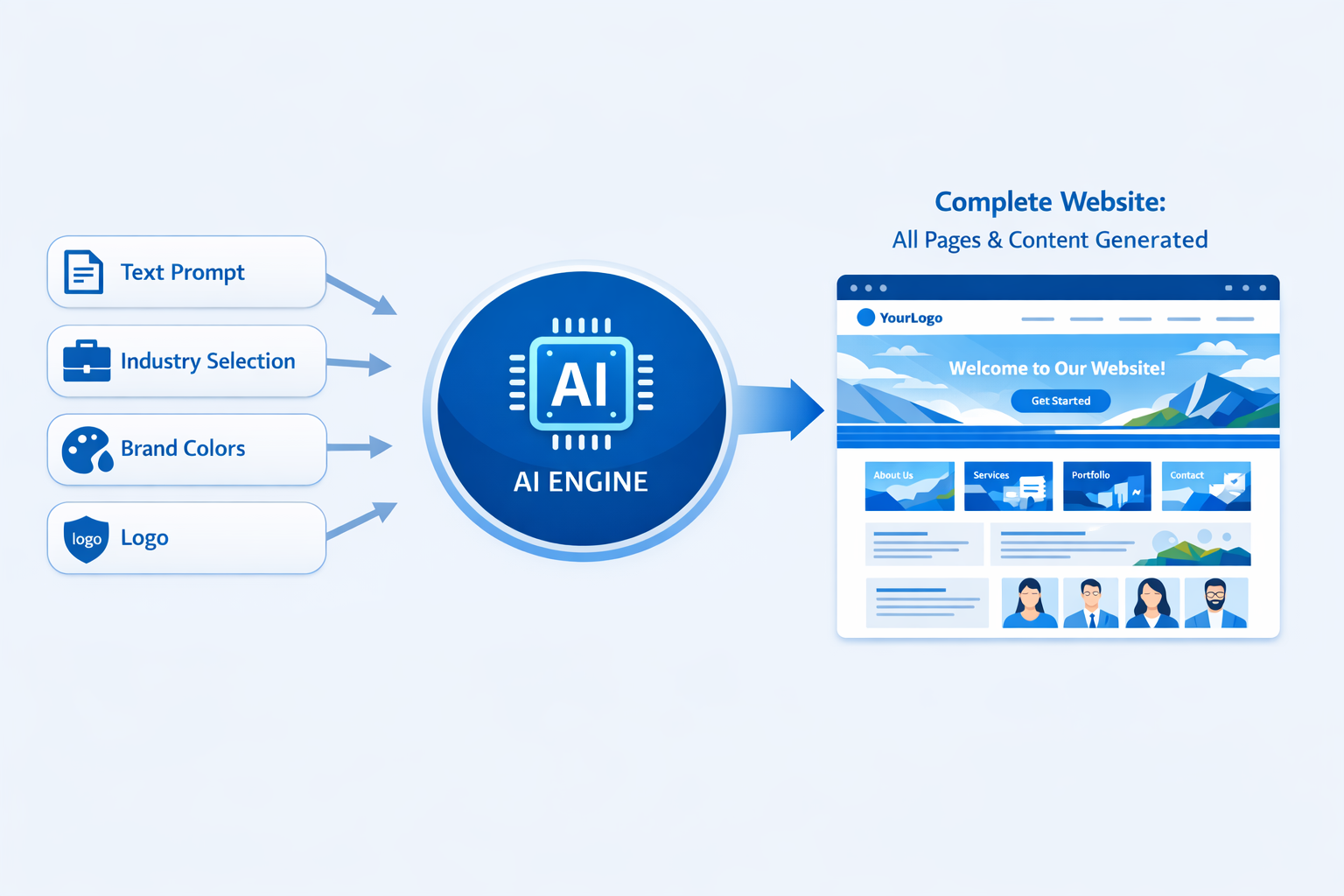
Automated website creation means using AI tools to generate, assemble, and launch websites with minimal manual work. Instead of writing every line of code, designing every section, and typing every page of copy yourself, you describe what you need and the platform builds it. You review, refine, and publish.
This is a genuine shift in how websites get made. It's not a gimmick and it's not a toy. The technology has matured to the point where automated website creation is the default choice for thousands of agencies and freelancers who need to ship quality sites at volume.
From Manual Coding to AI-Generated Sites
Think about what building a website looked like ten years ago. You'd write HTML, CSS, and JavaScript by hand. Then page builders arrived and removed the coding barrier. Then templates removed the design barrier. Now AI is removing the last bottleneck: the time and skill it takes to turn an idea into a finished, working site.
The trajectory is clear. Every layer of website creation has been automated over time, and AI is the biggest leap yet. Gartner predicted that by 2026, more than 80% of enterprises would have used generative AI APIs or models in production, up from less than 5% in 2023. You can read the full prediction on the Gartner newsroom. The website industry is squarely inside that wave.
With automated website creation, the workflow changes completely:
- You provide a brief: business type, goals, pages, tone, examples you like.
- The AI generates the structure, layout, copy, and imagery.
- You refine the output with simple prompts instead of dragging pixels.
- You brand it, connect a domain, and hit publish.
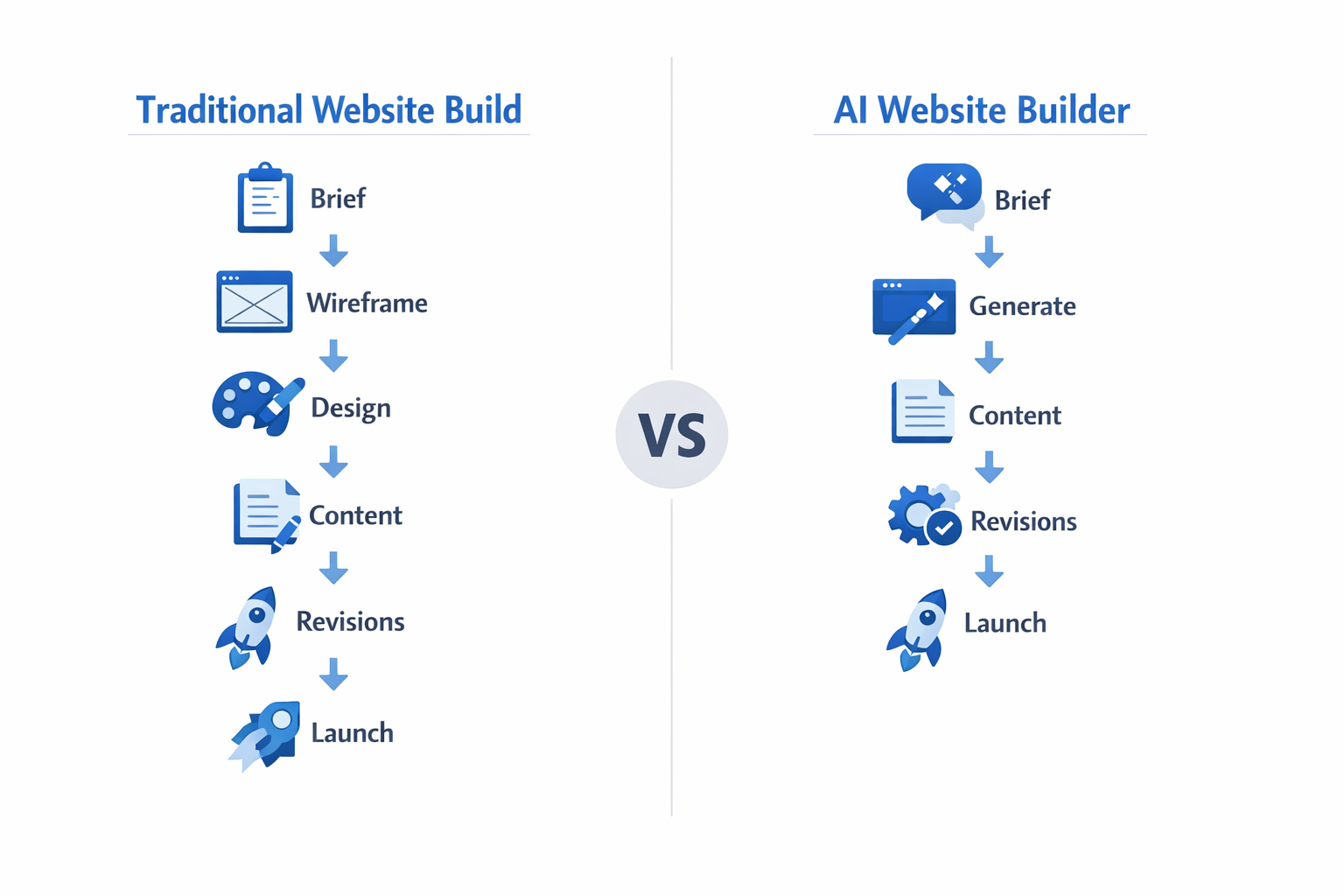
The site that used to take 40 to 60 hours to build can now take 2 to 4 hours, and the first draft arrives in minutes.
What Automation Actually Does (and Doesn't)
Let's be honest about what automated website creation can and can't do, because the hype gets loud.
What it does:
- Generates a complete, responsive site structure from a text brief.
- Writes on-brand copy for every page, including headlines, product sections, and calls to action.
- Produces matching visuals and suggests layouts that convert.
- Handles technical SEO setup, mobile responsiveness, and performance basics automatically.
- Lets you clone, reuse, and adapt your best sites into templates.
What it doesn't do:
- It won't replace your strategic thinking. Someone still needs to define the goal of the site.
- It won't know your client's brand voice until you teach it. Garbage in, garbage out still applies.
- It won't magically fix a bad offer or a confusing business model.
Automated website creation removes the busywork, not the brains. The strategist, the brand expert, and the project manager become more valuable than ever because they decide what the AI builds.
See the difference? Automation handles the execution. You handle the judgment. That combination is exactly why agencies are adopting it so fast.
Why Automate Website Creation? The Business Case
Automation isn't just a convenience, it's a business advantage. If you sell websites, or if you need websites for your own marketing, the numbers force you to pay attention. Let's break down the two biggest drivers: speed and cost.
Speed-to-Launch for Agencies and Freelancers
Time is the one resource you can't buy more of. Every hour you spend hand-coding a site is an hour you can't spend on sales, client care, or your next project. Automated website creation compresses the timeline dramatically.
A typical agency project before AI looked like this:
| Phase | Manual Build | Automated Build |
|---|
| Discovery and brief | 2-3 days | 2-3 days |
| Design and mockups | 5-10 days | 1-2 hours |
| Development and build | 10-20 days | 1-3 hours |
| Copywriting | 3-5 days | 1-2 hours |
| Review and revisions | 3-5 days | 1-2 days |
| Launch | 1 day | Same day |
That's the difference between a 4 to 6 week project and a 3 to 5 day project. When you can deliver in days, you can take on more clients, close more deals, and still sleep at night. Agencies that automate can run 2 to 3 times more projects per month with the same team size.
Cost per Website: Manual vs. Automated
The cost math is where automation gets really interesting. Let's put real numbers on it.
A manual custom website build typically costs an agency:
- $3,000 to $6,000 in internal labor for a standard business site.
- $6,500 to $15,000+ for a complex or e-commerce build, which matches what clients are quoted.
With automated website creation, the labor cost per site drops to a fraction of that. The AI does the design and development work, so your team spends its time on the brief, the review, and the polish. The result is a cost per site that can drop by 60 to 80%, depending on how much you reuse templates and workflows.
The website builder market is growing fast because of exactly this shift. Statista projects steady growth for the website builder segment globally as more businesses move online, and you can track the market outlook on their website builders page. The businesses that win in this market are the ones that can deliver quality faster and cheaper than the rest, which is precisely what automation enables.
The agency that can deliver a professional website in 4 days at half the internal cost doesn't just compete on price. It competes on speed, volume, and margin, and that is a very comfortable position to be in.
The ROI of Automation in Real Numbers
Let's make the business case concrete with a simple example. Imagine a small agency that sells a $3,500 website package and currently delivers 2 sites per month with a team of three.
Under the manual model, each site eats up roughly $1,800 in internal labor (design, development, copy, revisions). That leaves a $1,700 gross margin per site, or $3,400 per month total, and the team is working flat out.
Now switch to automated website creation. Each site now costs about $500 in labor, mostly brief, review, and polish. The margin jumps to $3,000 per site, and because delivery takes days instead of weeks, the same team ships 5 to 6 sites per month without burning out.
The monthly picture: $16,500 to $18,000 in gross margin from the same headcount, roughly 5 times what the manual model produced. You're not working harder, you're working through a system. That's the entire argument for automation in one paragraph, and it's why the smartest agencies treat it as a core capability rather than a nice-to-have.
There's also a softer benefit that's easy to overlook: consistency. Automated website creation gives every client the same baseline quality, the same checklist, and the same launch experience. When delivery becomes predictable, so does your reputation, and predictable delivery is what turns one-off clients into referrals.
How to Automate Website Creation: The 5-Step Workflow
This is the core of the guide. Here is a repeatable workflow for automated website creation that you can apply to your own site or to client projects. It works whether you're a solo freelancer or a busy agency.
Step 1: Define Your Site Structure and Content Brief
Every good automated build starts with a good brief. The AI can't read your mind, so you need to tell it what the site is for, who it serves, and what it must do.
A strong brief answers these questions:
- Business type: What does the company do, and in which industry?
- Goal: Is the site meant to generate leads, sell products, or build authority?
- Audience: Who is the ideal visitor, and what do they care about?
- Pages: Home, services, about, contact, blog, and anything specific to the business.
- Tone: Professional, friendly, technical, luxury, or bold?
- References: Two or three websites that feel like the right direction.
Write this down in a short document. It takes 30 minutes once, and you can reuse and adapt it for every project. Agencies can turn this into a client intake form so the brief arrives structured and complete, which we'll cover later.
Step 2: Generate the Site with an AI Builder
Now the fun part. Paste your brief into an AI website builder and let it create the first version of the site. A good platform like lindoai generates the full site structure, layout, and design in one pass, so you're not assembling pages one by one.
When the first version lands, resist the urge to start over. Treat it as a strong draft. Almost every professional workflow is: generate, critique, refine. You'll be surprised how close the AI gets when the brief is clear.
Step 3: Automate Copy, Images, and SEO Setup
The site structure is done, but a website needs content and visibility. This is where automation multiplies again.
- Copy: Generate on-brand text for every section with AI, then edit it to match the client's voice. The first draft saves hours of staring at a blank page.
- Images: Use AI-generated visuals instead of stock photos. They match the brand, they're unique, and you never worry about licensing.
- SEO: Let the platform handle the technical basics: meta titles, descriptions, alt text, heading structure, and mobile performance. The samples from our guide on building websites with AI show how much of this becomes automatic.
This step is where automated website creation stops being a novelty and starts being a production system. One person can do in an afternoon what used to take a designer, a copywriter, and an SEO specialist.
A few practical notes on each piece of the content layer:
- Copy that converts: Don't just accept the first draft. Feed the AI your best-performing headlines and proven calls to action, then ask it to match that style across the site. Your previous wins become the pattern for every new build.
- Images with intent: Describe the mood, the setting, and the people you want to see. AI-generated visuals give you full control over brand fit, and they keep every site unique instead of recycling the same stock photo library.
- SEO as a byproduct: When the platform handles meta data, alt text, and heading structure automatically, SEO stops being a separate project. It becomes a byproduct of the build, which is exactly how it should work.
The best part? All of this scales. The same content automation that polishes one site polishes ten, so your per-site effort stays flat while your output multiplies.
Step 4: Review, Brand, and Launch
Automation gets you to 90%, and the last 10% is where you add the human touch that makes a site feel alive.
- Review every page with fresh eyes. Check the messaging against the brief.
- Apply brand details: logo, colors, fonts, and any custom touches the client needs.
- Connect the domain and set up forms, analytics, and any integrations.
- Test on mobile and run a final performance check.
Then hit publish. On the pricing page, you can see how lindoai bundles hosting, domains, and management into one platform, which removes the last set of manual steps around launch day.
Step 5: Scale with Templates and Client Intake Automation
Here's where the workflow stops being a trick and starts being a business model. Every good site you build becomes a template for the next one.
- Save winning builds as templates. A great restaurant site becomes your restaurant template. Adjust the brief, regenerate, and the next project starts at 80% done.
- Automate client intake. Use a form that collects the brief, the brand assets, and the approvals in one place.
- Standardize your deliverables. The same review checklist, the same launch process, the same handover package for every client.
This is how you scale from one project a month to ten. Not by working more hours, but by making every hour more productive.
Best Tools for Automated Website Creation in 2026
The tool landscape has consolidated around a few serious players. Here's how to think about them, and why lindoai is the standout for agencies.
lindoai: AI-Powered, White Label, Agency-Ready
lindoai is built specifically for the automated website creation use case. It's an AI platform that lets agencies and businesses build AI-powered websites, and it covers the entire lifecycle: generate, edit, publish, host, and manage clients.
What makes it different for agencies:
- White label everything. Your brand, your domain, your client portal. The platform stays invisible.
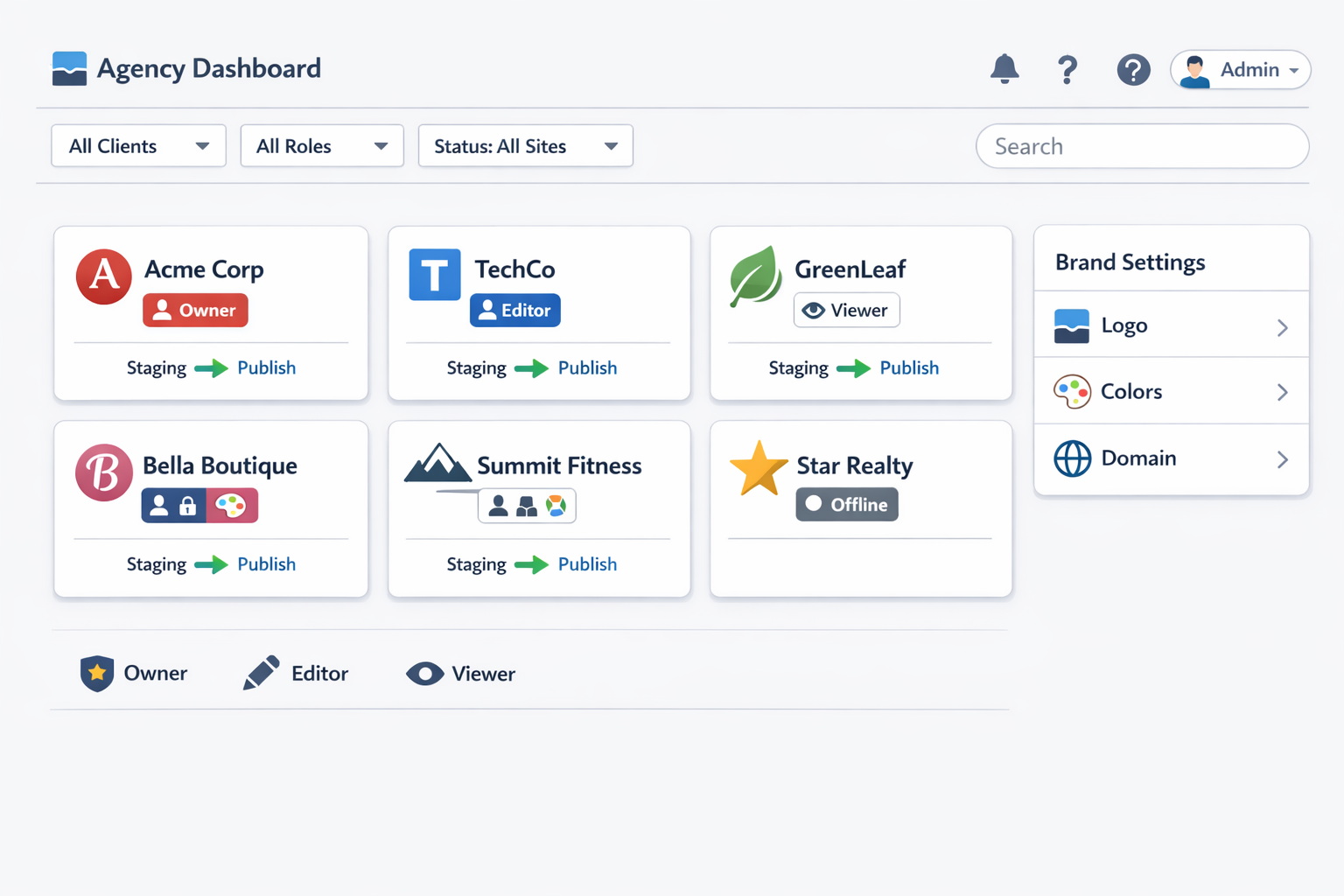
- Built for scale. Multi-client dashboards, reusable templates, and automations that turn delivery into a pipeline.
- All-in-one. Hosting, SEO basics, and site management are included, so you don't stitch together five different tools.
For a deeper look at how agencies use it, read our guide to the best website builder for agencies.
AI Website Generators Compared
If you're evaluating options, here's a practical comparison table for automated website creation tools:
| Tool | Best For | White Label | Build Speed | Automation Depth |
|---|
| lindoai | Agencies and resellers | Yes, full | Minutes | Brief to launch, end to end |
| General AI builders | Simple personal or small business sites | Rarely | Minutes | Basic generation, manual polish |
| Traditional builders | Designers who want full control | Partial | Hours to days | Templates and plugins, not AI |
| Custom code + AI helpers | Developers | Yes | Days | AI assists, human assembles |
The honest take: if you want maximum control and you enjoy building, traditional tools still work. If you want to automate website creation end to end and run it as a business, an agency-ready platform like lindoai wins on speed and margin.
Automation Layers: Content, Design, Publishing
The smartest setups don't rely on one tool. They stack automation layers:
- Content layer: AI writes copy, generates images, and creates blog drafts.
- Design layer: The builder generates layouts, applies brand styles, and keeps everything responsive.
- Publishing layer: Domains, hosting, SEO metadata, and updates run on autopilot.
When the layers work together, you get what Zapier's research describes across automation broadly: teams reclaim hours every week that used to go to repetitive work. Their automation statistics page collects the data, and the pattern is the same everywhere. The more of the pipeline you automate, the more output you get per hour.
Automating Website Creation for Agencies
Agencies have the most to gain from automated website creation, because they deal with websites in bulk. If you run an agency, this section is your playbook.
Client Intake to Site Delivery Pipeline
The classic agency bottleneck is the handoff between sales and delivery. The salesperson promises a site, the delivery team scrambles, and the client waits. Automation fixes this by turning delivery into a pipeline.
Here's the pipeline in practice:
- Client signs up through your branded intake form.
- The brief is captured automatically: business info, goals, pages, tone, and assets.
- The AI builds the first version while the client is still onboarding.
- Your team reviews and refines with the client on a structured schedule.
- The site launches with hosting, SEO, and analytics already configured.
The result is a delivery process that looks and feels like a product, not a favor. Clients get a clear timeline, you get a repeatable process, and nobody is rebuilding the wheel every time.
White Label Automation and Recurring Revenue
Here's the part that changes your business model. When you automate website creation under your own brand, you stop selling one-off projects and start selling subscriptions.
The math:
- One-time project: $2,500 to $5,000, then the client is gone.
- Managed subscription: $150 to $500 per month for hosting, updates, and support.
A client who stays for two years on a $300 per month subscription is worth $7,200, more than most one-time projects, and the ongoing work is light because the platform handles hosting and maintenance. Our white label website builder guide explains the full model in detail.
Recurring revenue is the difference between an agency that survives and an agency that compounds. Automated website creation makes the subscription model practical, because delivery costs stay low enough that the math works.
HubSpot's research on agencies shows the same trend from the marketing side: teams that adopt AI tools report significant time savings on content and production work. Their AI marketing research tracks how quickly the adoption is spreading across agencies and businesses.
Common Mistakes When Automating Website Creation
Automation is powerful, but it fails when it's used carelessly. Here are the mistakes we see most often, and how to avoid them.
Over-Automating Without Brand Input
The biggest mistake is handing the AI everything and accepting whatever comes back. The result is a site that looks generic, sounds like everyone else, and doesn't connect with the audience.
The fix: always inject brand into the process.
- Give the AI your brand voice in the brief, with real examples.
- Review and rewrite the hero message yourself. That headline is the most important sentence on the site.
- Swap in real client proof, real photos where they matter, and real specifics about the business.
Automation should handle the scaffolding. The brand should always come from the people who own it.
Ignoring SEO and Performance Basics
Just because the site is generated doesn't mean it ranks. If you skip SEO and performance, you'll have a beautiful site that nobody finds.
The non-negotiables:
- Meta titles and descriptions for every page, written for humans and search engines.
- Heading structure that matches the page's content hierarchy.
- Image compression and alt text, so the site loads fast and is accessible.
- Mobile performance, since most traffic now comes from phones.
The good news: modern AI builders handle most of this automatically, which is exactly why choosing the right platform matters. A tool that bakes in SEO and performance saves you from the most common failure modes.
Treating Every Site as a Snowflake
Every client project does not need to start from zero. The agencies that scale are the ones that standardize ruthlessly.
Instead of reinventing the structure for every site, keep a library of proven templates, review checklists, and launch processes. Then customize the parts that matter: messaging, brand, and specific business logic. That's how you get speed without sacrificing quality.
Skipping the Review Process
Automation is fast, which makes it tempting to skip the review and ship the first draft. That's a trap. The generated site is a strong starting point, not a finished product, and clients notice the difference between a polished build and a generated one.
Build a fixed review ritual into every project, even your own sites:
- Pass one, structure: Does the site cover everything in the brief? Are the pages in the right order?
- Pass two, messaging: Does every headline speak to the target audience? Is the tone consistent?
- Pass three, details: Are contact forms wired up, links working, and images optimized?
- Pass four, mobile: Does the site look and feel right on a phone?
A four-pass review takes an hour, and it's the difference between a site that converts and a site that just exists. Automation earns its keep on the build; your review earns the reputation.
Not Planning for Maintenance and Updates
A website isn't a one-time deliverable, and automation doesn't change that. Content goes stale, offers change, and security updates happen. Agencies that forget this end up with clients who drift away after launch.
The fix is to build the ongoing relationship into your offering from day one:
- Include hosting and maintenance in a monthly plan instead of a one-off fee.
- Use the platform's management features to handle updates, backups, and security automatically.
- Schedule a quarterly content refresh, and use AI to draft the new pages and blog posts quickly.
Clients stay with agencies that keep their site working and growing. Automation makes that ongoing service cheap to deliver, which turns maintenance from a burden into your most profitable line of revenue.
FAQ
Can I automate website creation?
Yes, completely. Modern AI website builders can generate a full site from a text brief: structure, design, copy, and even images. The process isn't fully hands-off, since you still review and refine the output, but the heavy lifting of design and development is automated. For most business websites, the first draft is ready within minutes, and the full site can launch in days instead of weeks.
What is the best tool for automated website creation?
For agencies and resellers, the best tool is an AI platform that combines generation, white label branding, and site management in one place, like lindoai. For individuals who want a simple personal site, a general AI website builder may be enough. The right choice depends on whether you need white label branding, multi-client management, and recurring revenue features, which only agency-ready platforms provide.
How long does it take to build a website with AI automation?
The first AI-generated draft usually appears in minutes. A full, polished site with brand copy, custom images, SEO setup, and a connected domain typically takes 2 to 4 days, including client review rounds. Compare that to the 4 to 6 weeks a manual build takes, and you can see why automated website creation is becoming the standard for agencies that need volume.
Can agencies automate client website delivery?
Yes, and the most successful ones do. The system works like this: a branded intake form captures the brief, the AI generates the first version, your team reviews and refines it, and the site launches with hosting and SEO already configured. This turns delivery into a repeatable pipeline and makes subscription pricing viable, because the cost per delivered site stays low.
How much does automated website creation cost?
You pay for the platform, not for hours of manual labor. Most AI website builders run on monthly subscriptions that are a fraction of what one manual build costs. For an agency, the internal cost per site can drop by 60 to 80% compared to manual delivery, while the value to the client stays the same or increases thanks to faster launch times.
Conclusion
Automated website creation isn't the future, it's the present. The tools are mature, the workflow is proven, and the business case is overwhelming: sites launch in days instead of weeks, costs drop dramatically, and agencies can finally build a scalable, recurring revenue model.
Here's what to remember:
- Automation handles execution, you handle judgment. Briefs, brand, and review still need humans.
- The 5-step workflow, brief, generate, automate content, review, scale, turns website creation into a repeatable system.
- Agencies win biggest by combining white label automation with subscription pricing.
- Avoid the classic mistakes: no brand input, no SEO, no review, and no maintenance plan.
The best time to start was a year ago. The second best time is today. Open your brief, pick your tool, and launch your first automated website this week. If you want to automate website creation end to end, start with a single project or a single client, run the 5-step workflow, and measure the difference in hours and margin. That first data point will convince you faster than any article can.
If you want a platform built for exactly this, start with lindoai and see how fast the first draft arrives. The workflow in this guide works on any capable tool, but a platform that handles generation, white label branding, and management in one place removes the friction that kills automation projects. Your first automated site is one brief away.