
Workflows that build websites while you sleep.
Triggers, actions, and AI agent tools for n8n. A prospect books a call — your workflow builds a demo site, preps the AE, and posts to Slack. All before you finish your coffee.
Why n8n + Lindo
Stop doing manually what a workflow can do in 8 seconds.
Every agency has the same bottleneck: the gap between “deal closed” and “website delivered.” That gap is filled with manual steps — create the client, set up the workspace, build the starter site, send the welcome email, update the CRM.
With n8n + Lindo, that entire sequence runs automatically. A Stripe payment triggers client creation. A Calendly booking triggers a demo site. A keyword approval triggers an SEO page. The AI agent handles the creative decisions; n8n handles the orchestration.
One agency reduced client onboarding from 2 hours to 8 seconds using these workflows.
Three node types
From simple automation to full autonomy
Lindo Trigger
Start workflows when events happen — new website, new client, workflow completed. Fires within seconds via webhook.
Lindo Action
Deterministic operations — create website, create page, create client, allocate credits. Configure once, runs the same every time.
Lindo Tool (AI Agent)
Give an AI agent autonomous access to Lindo. It decides what to create, when to publish, and how to structure content.
Templates
Workflows agencies actually run in production
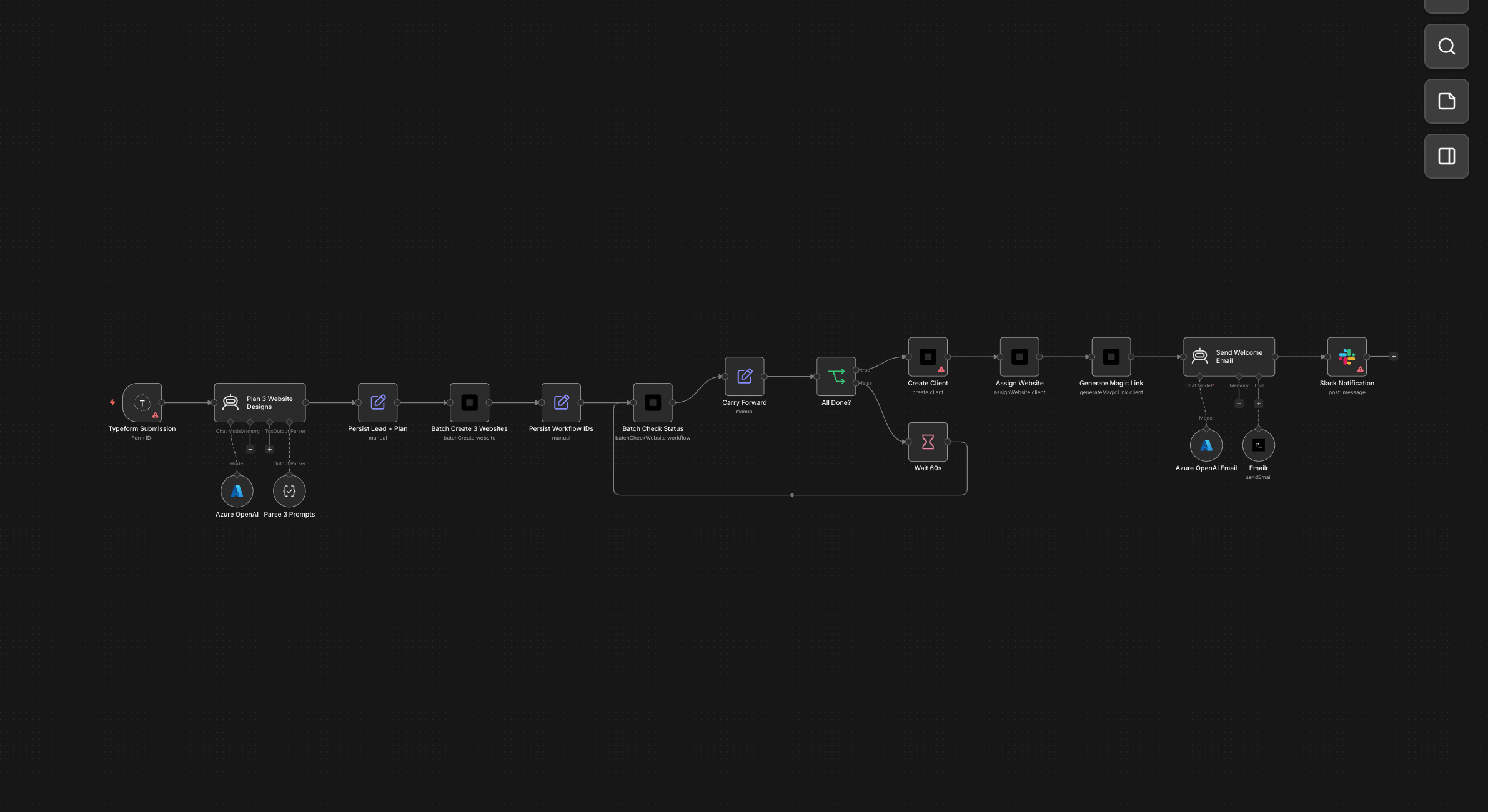
Typeform → 3 Design Options + Client Portal
A prospect fills out your intake form. Instead of spending hours on mockups, the AI generates three completely different website designs in minutes. The lead gets a branded email with all three options and a magic link to pick their favourite — no back-and-forth, no delays.
Form submission → AI plans 3 distinct website designs → batch-creates all 3 → polls status → creates client + assigns site + magic link → sends welcome email with all URLs + portal access.
Download template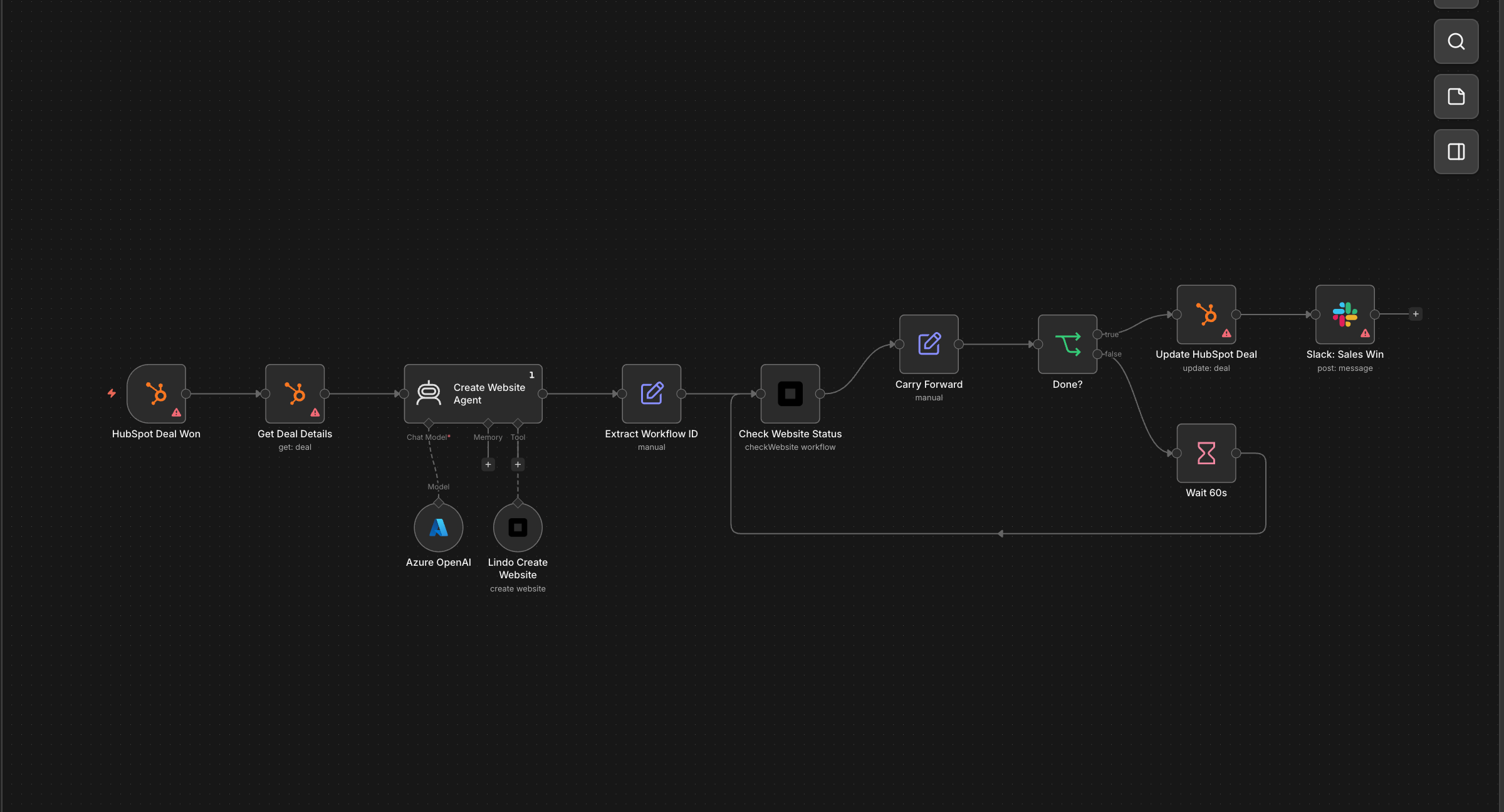
CRM Deal Won → Auto-Build Client Site
The moment your sales rep marks a deal as won in HubSpot, the client's website starts building itself. By the time the AE sends the welcome call invite, the site is live and the CRM already has the URL. Zero handoff friction between sales and delivery.
HubSpot deal closed-won → AI agent creates a Lindo website tailored to the deal → polls status → updates deal with live URL → posts Slack celebration.
Download template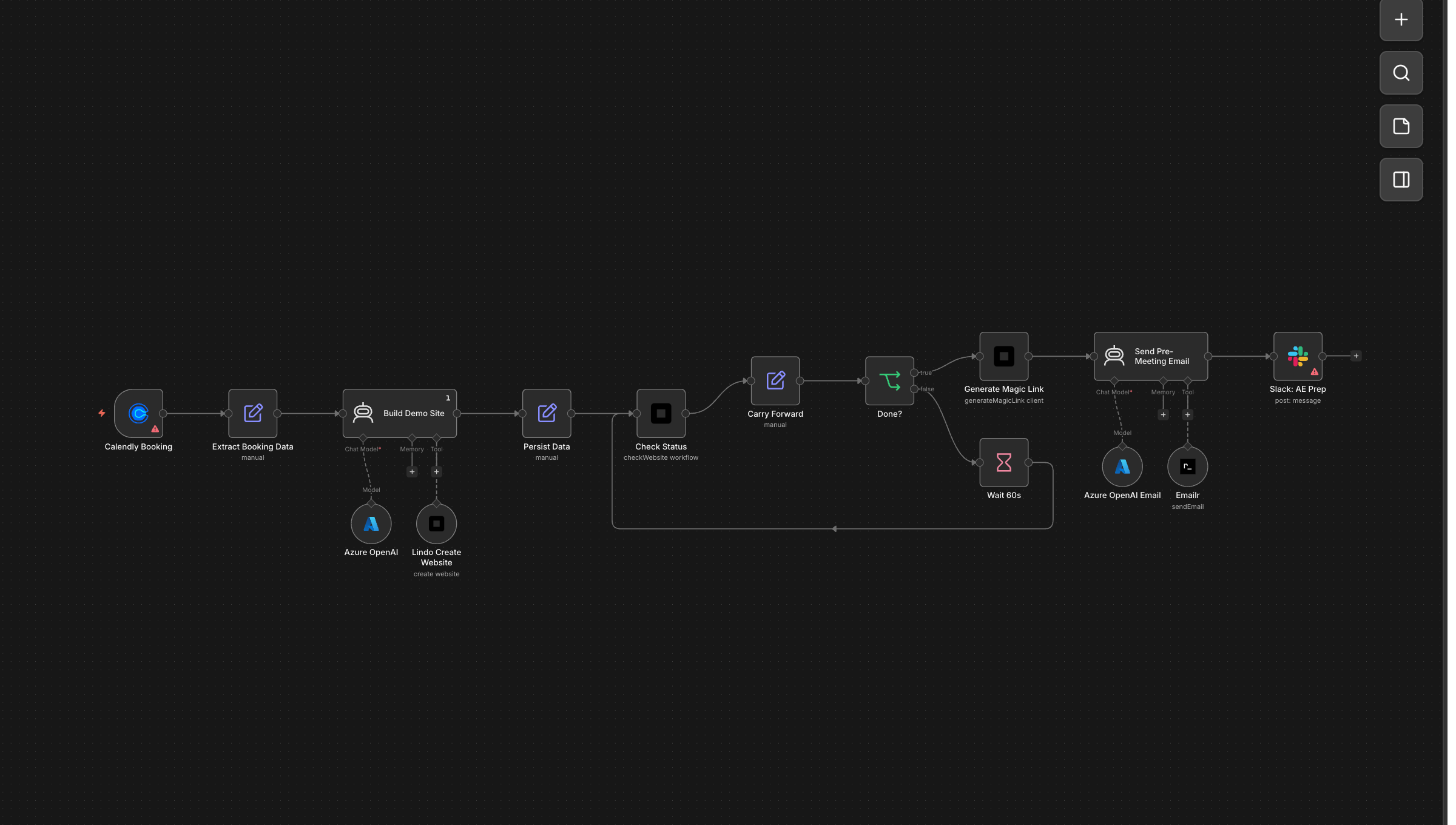
Calendly Booking → Pre-Built Demo Site
A prospect books a discovery call. Before the meeting even starts, they receive an email with a fully built demo website tailored to their business. The AE walks into the call with a live example to show — closing rates go up because the prospect can see the product, not just hear about it.
Prospect books a call → AI builds a tailored demo website → polls status → generates magic link → sends pre-meeting preview email → alerts AE in Slack.
Download template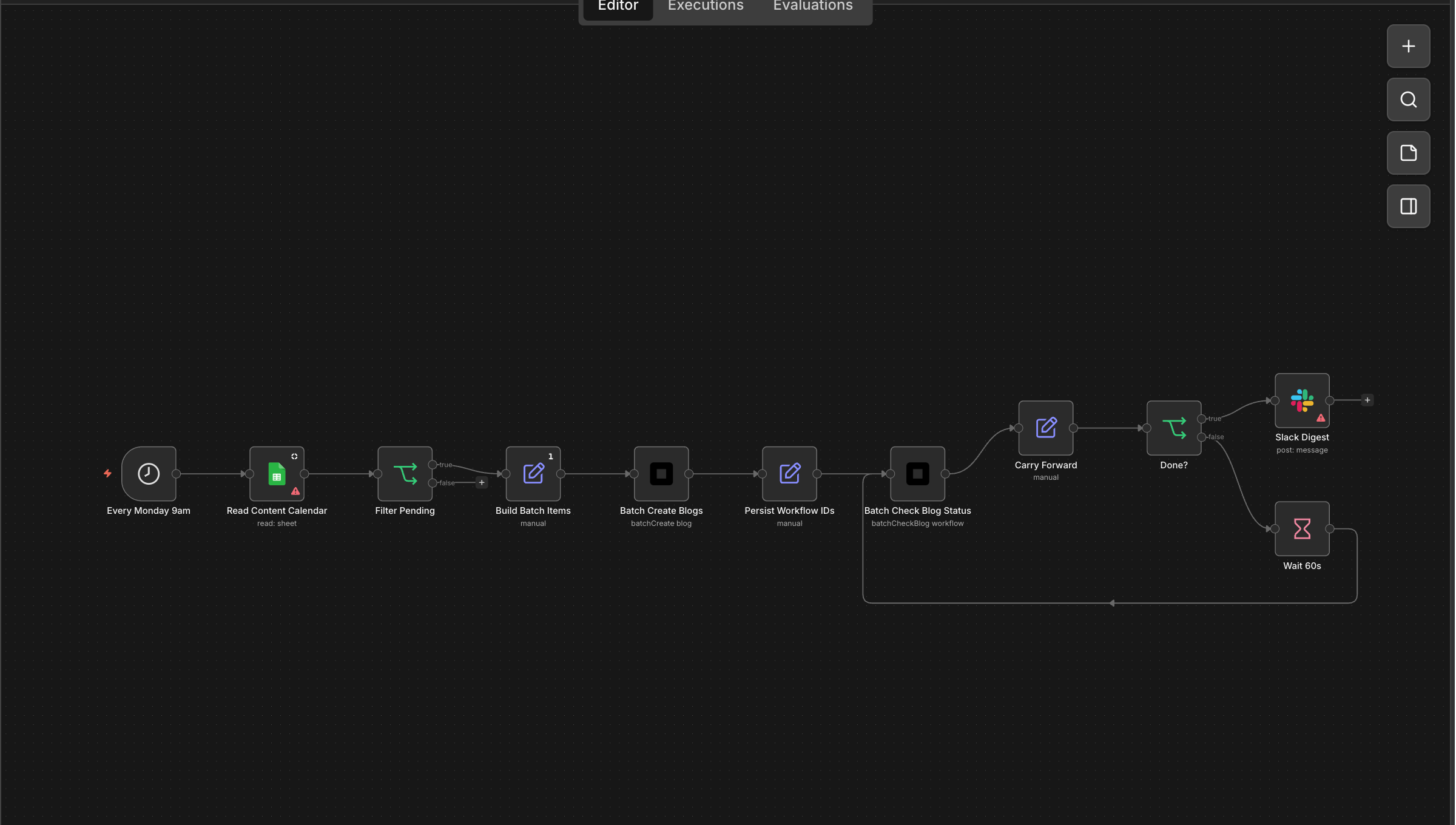
Weekly Blog Publisher from Content Calendar
Your content team adds topics to a Google Sheet throughout the week. Every Monday morning, the AI picks up all pending entries, writes and publishes each blog post, updates the sheet with live URLs, and posts a digest to Slack. Consistent publishing without anyone manually writing or scheduling.
Every Monday → reads Google Sheet content calendar → batch-creates blog posts via Lindo → polls status → updates sheet with published URLs → posts Slack digest.
Download template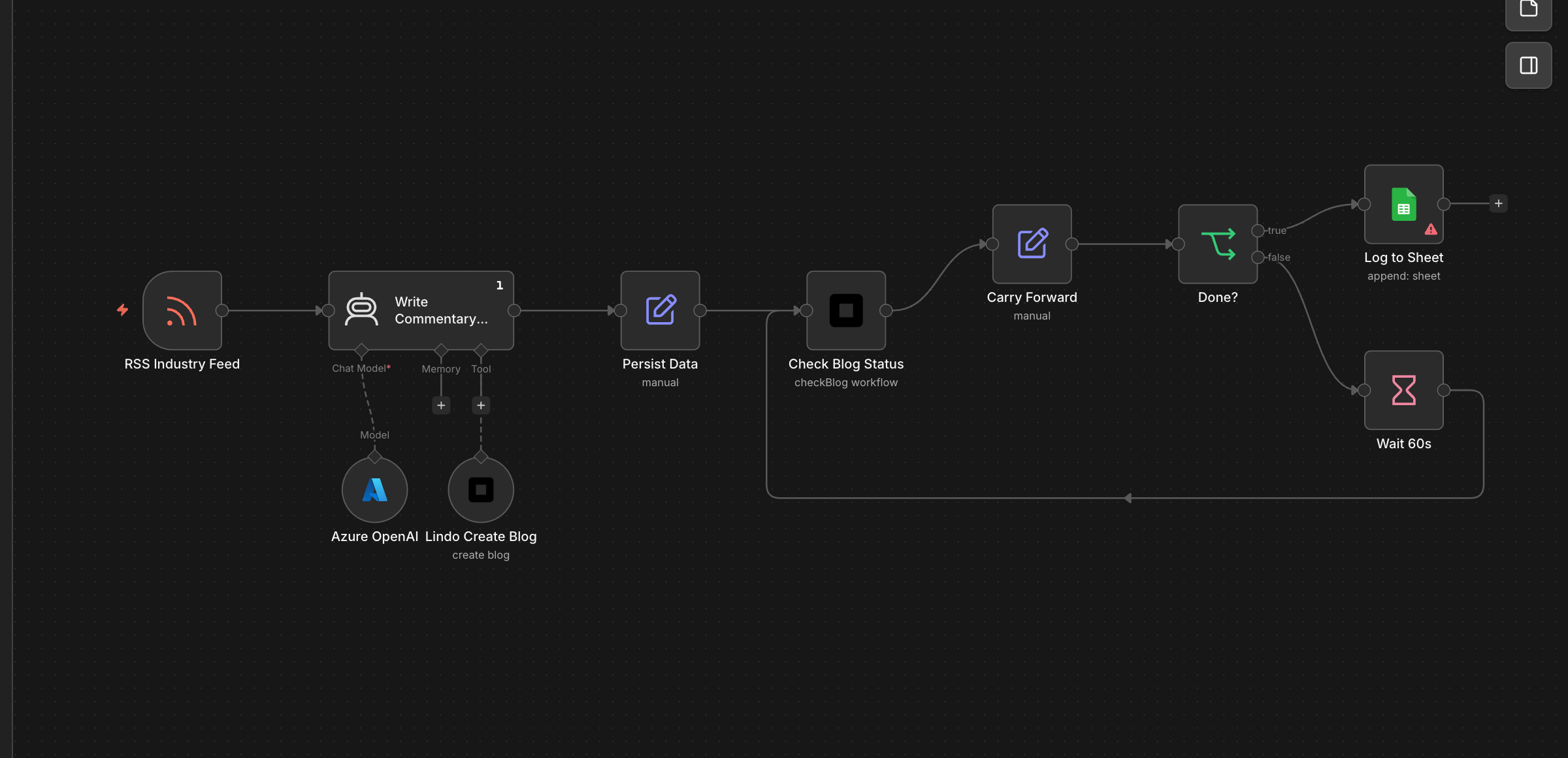
RSS Feed → Auto Blog Posts
Subscribe to an industry news feed and let the AI write commentary posts on your behalf. Every time a relevant article drops, your blog gets a fresh take within the hour — positioning you as a thought leader without lifting a finger.
Industry RSS feed new article → AI writes commentary blog post via Lindo → polls status → logs published URL to Google Sheet audit trail.
Download template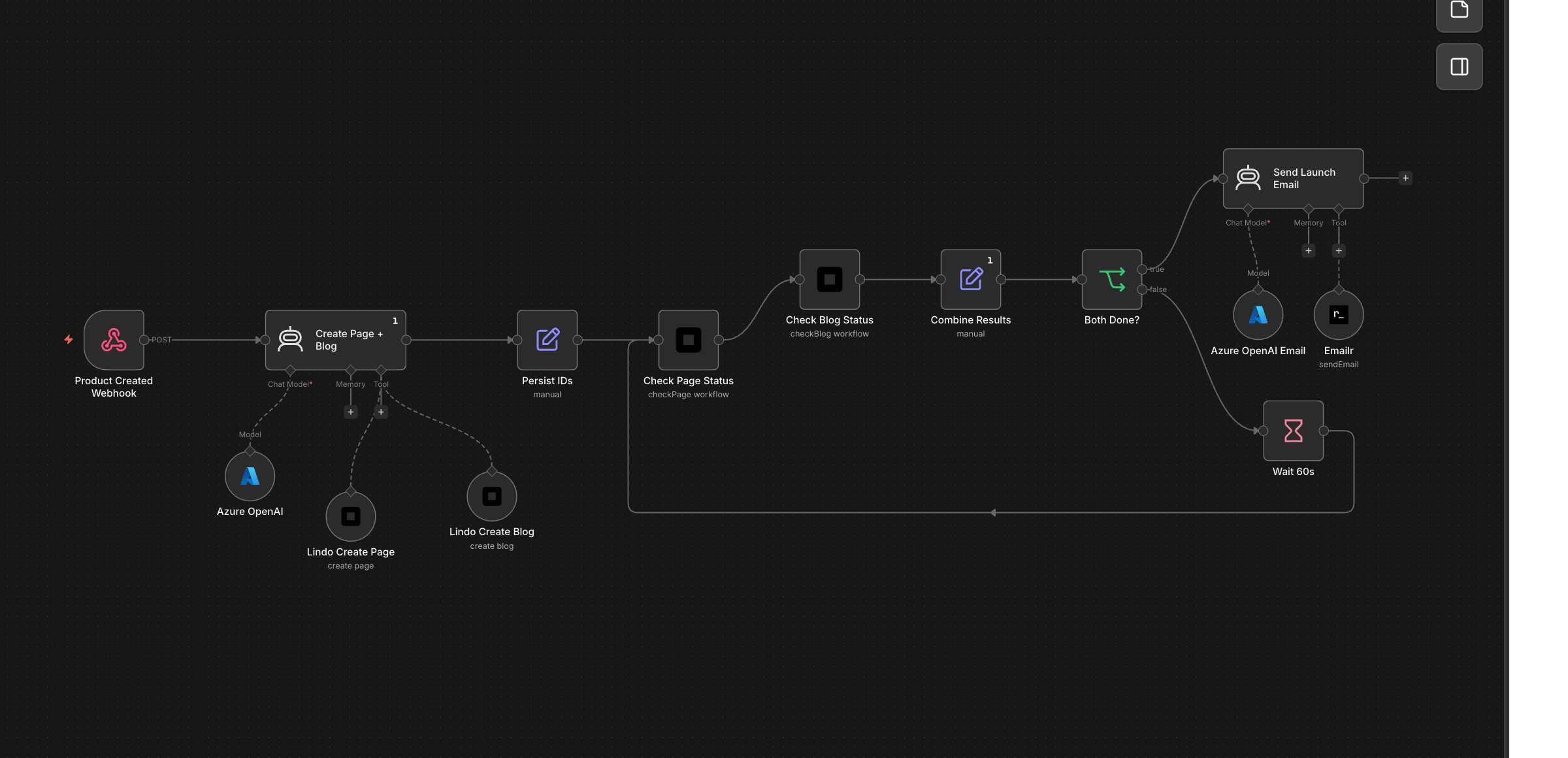
Product Launch → Landing Page + Blog + Email
You add a new product to your store. Automatically, a dedicated landing page goes live, an announcement blog post gets published, and a launch email goes out to your list — all coordinated, all on-brand, all without your marketing team context-switching.
Product webhook → AI creates both a landing page and announcement blog post → polls both statuses → sends launch email with both URLs.
Download template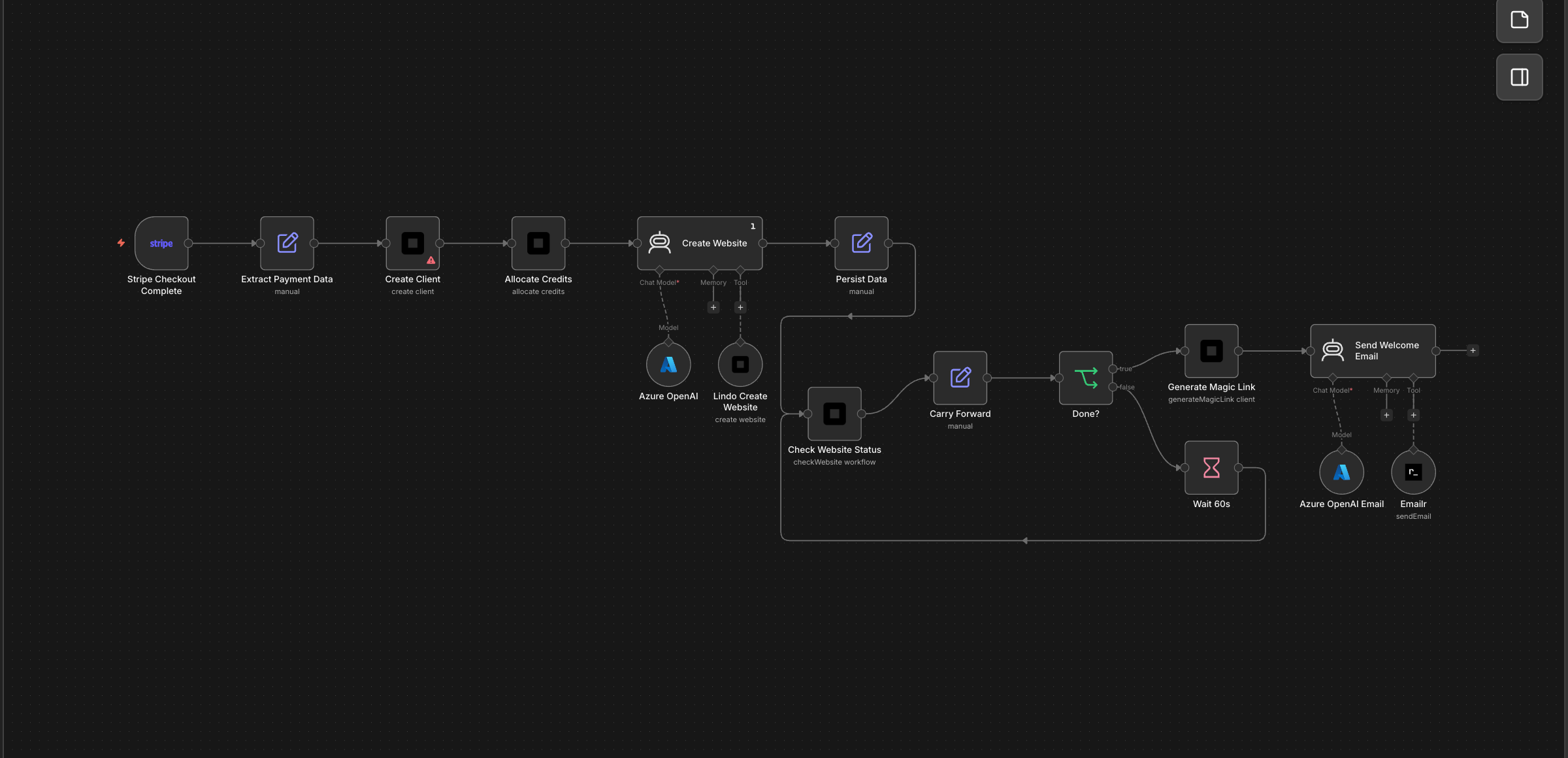
Stripe Payment → Full Client Setup
A customer completes checkout. Within minutes they have a client account, credits loaded based on their plan, a starter website built by AI, and a welcome email with their portal login. The entire onboarding happens while they're still on the thank-you page.
Checkout completed → creates client → allocates credits by plan tier → AI builds website → polls status → generates magic link → sends welcome email.
Download template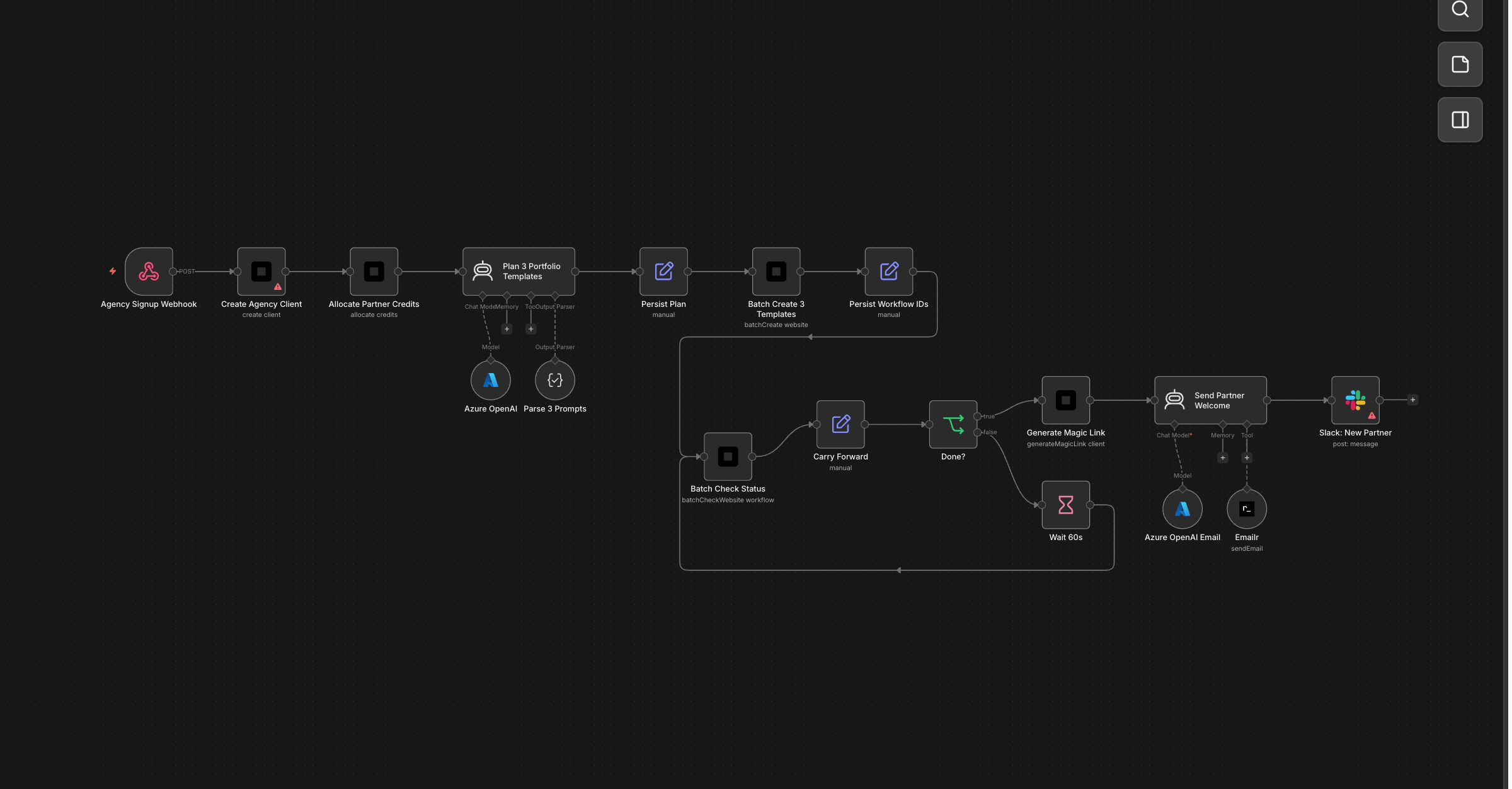
White-Label Agency Onboarding
A new agency partner signs up for your reseller program. They instantly get a client account, 500 monthly credits, and three portfolio template websites tailored to their industry focus — ready to show their own clients on day one. No manual setup, no waiting.
Agency signup → creates client → allocates 500 monthly credits → AI plans 3 industry templates → batch-creates → polls → magic link + welcome email + Slack alert.
Download template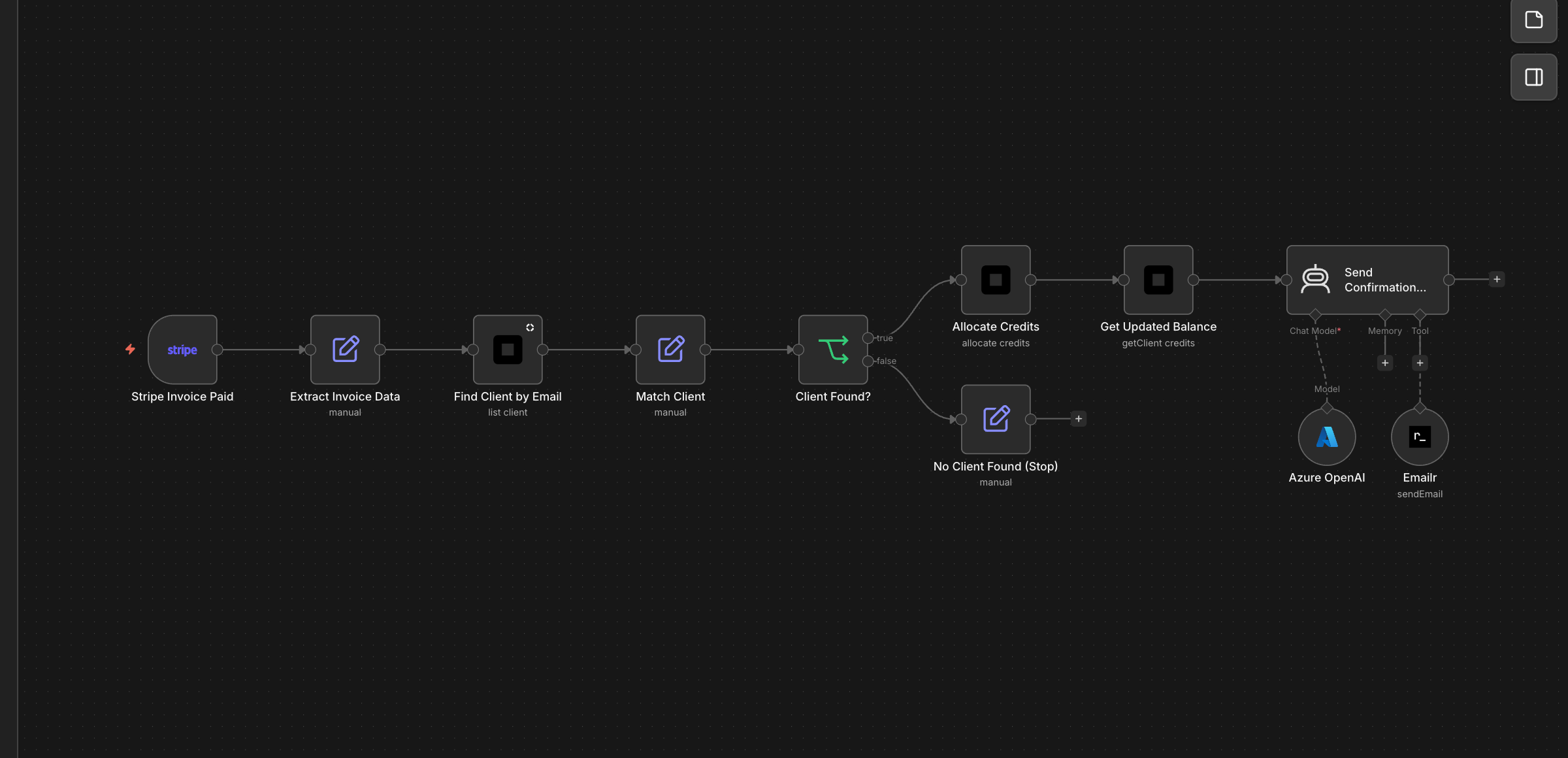
Stripe Invoice Paid → Credit Top-Up
When a client pays their monthly invoice, their credit balance tops up automatically. They get a confirmation email with their new balance. No manual spreadsheet tracking, no forgotten top-ups, no support tickets asking 'where are my credits?'
Invoice paid → finds client by email → allocates purchased credits ($1 = 10 credits) → fetches updated balance → sends confirmation email.
Download template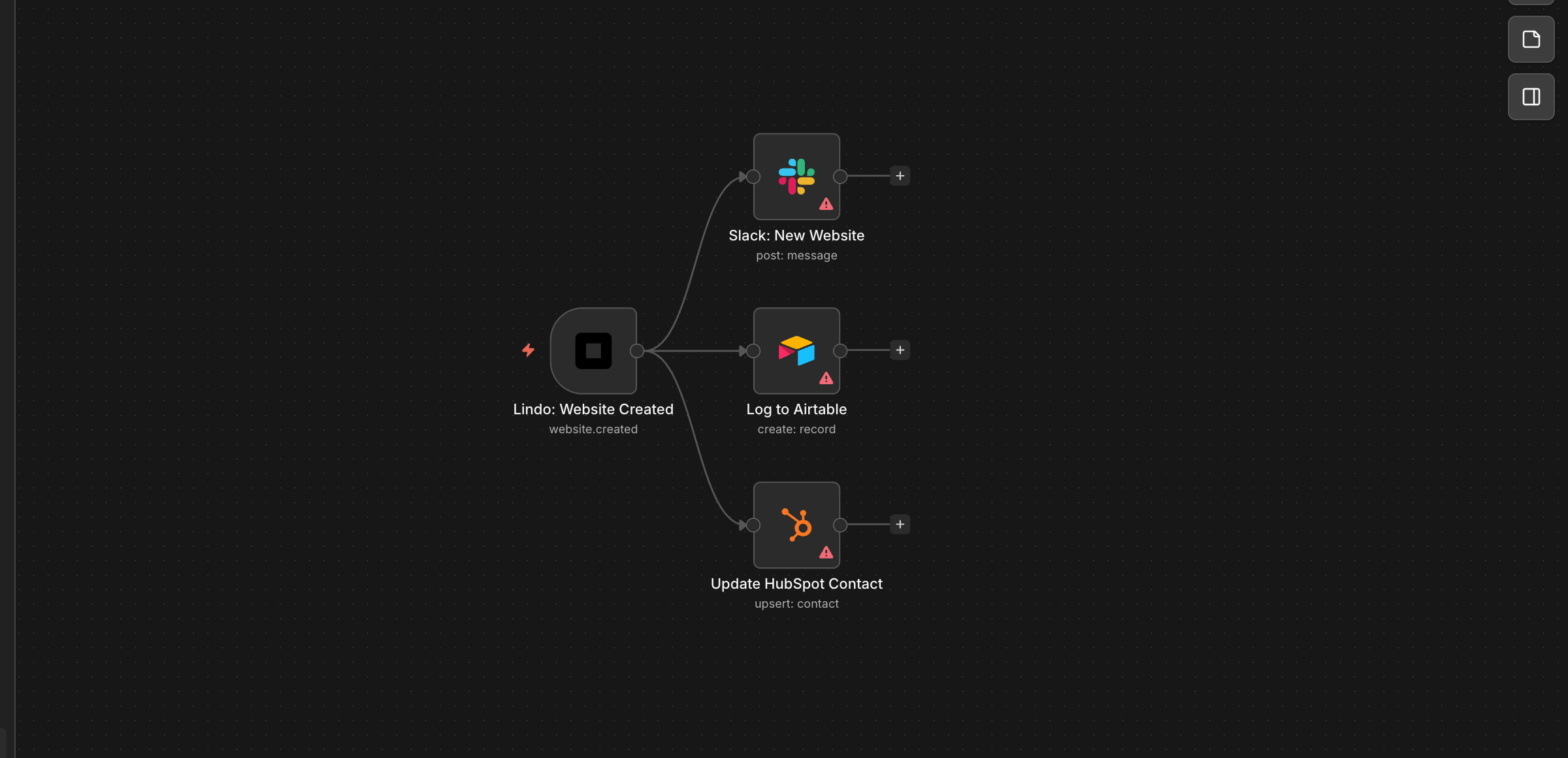
Website Created → Slack + Airtable + CRM
Every time a website goes live — whether created by you, a team member, or an automation — your Slack channel gets a notification, Airtable logs it for project tracking, and HubSpot updates the contact record. Everyone stays in sync without anyone copying URLs around.
Lindo website.created webhook → posts to Slack → creates Airtable record → updates HubSpot contact with new site URL. Fan-out to 3 systems.
Download templateWorkflow Errored → PagerDuty/Slack Alert
If a website build fails at 3am, you'll know about it before your client does. Critical failures page your on-call engineer via PagerDuty; lower-severity issues get logged to a sheet for the weekly review. No silent failures, no angry client emails.
Lindo workflow.errored event → classifies severity → posts Slack alert → if high severity creates PagerDuty incident, otherwise logs to Google Sheet.
Download template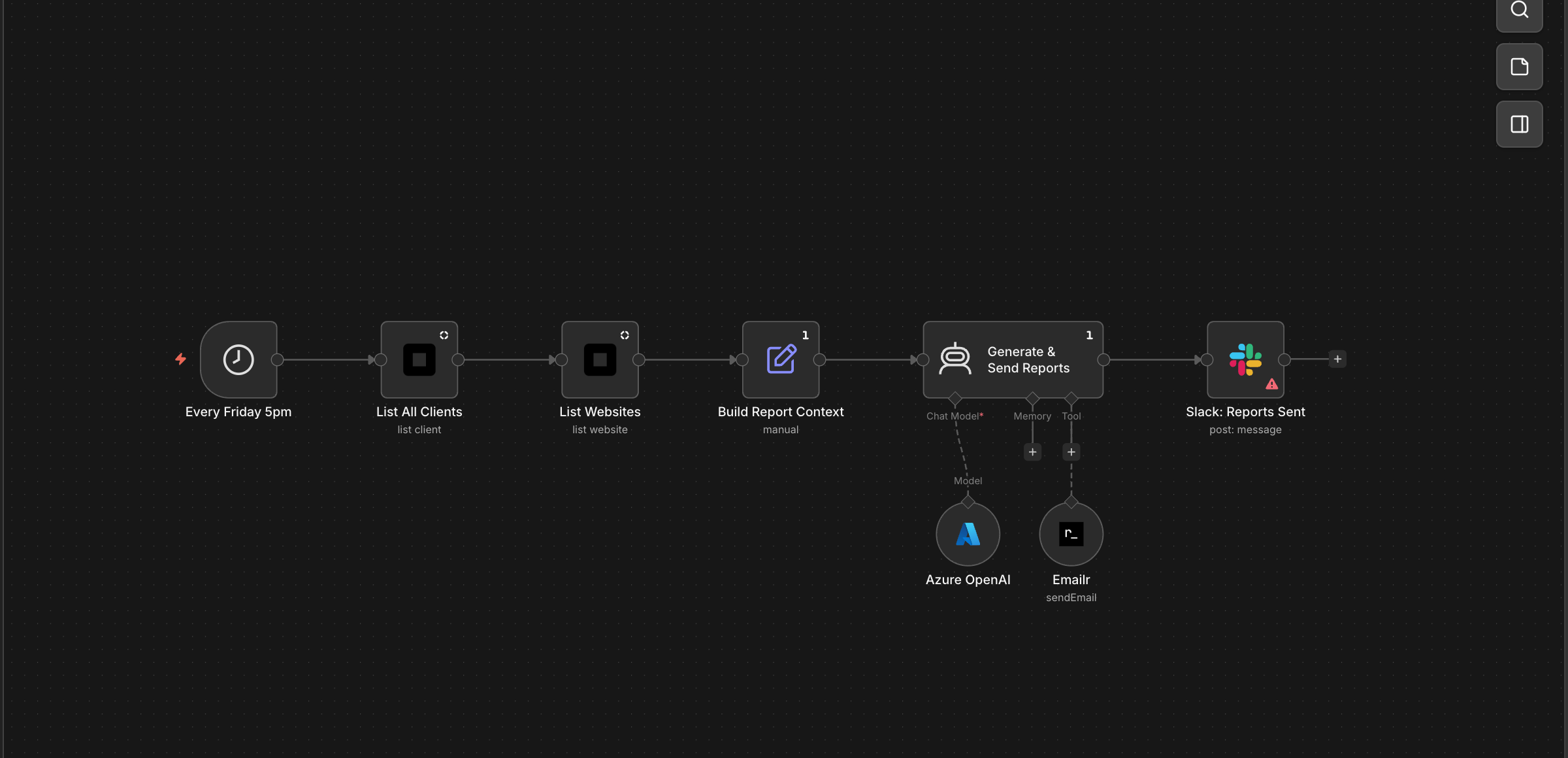
Weekly Client Report Email
Every Friday, each of your clients receives a personalised performance email — their site visits, top pages, and a note from your agency. It takes zero time from your team because the AI writes each report based on real analytics data and sends it automatically.
Every Friday → lists all clients and websites → AI composes personalised performance report emails → sends via Emailr → posts Slack summary.
Download template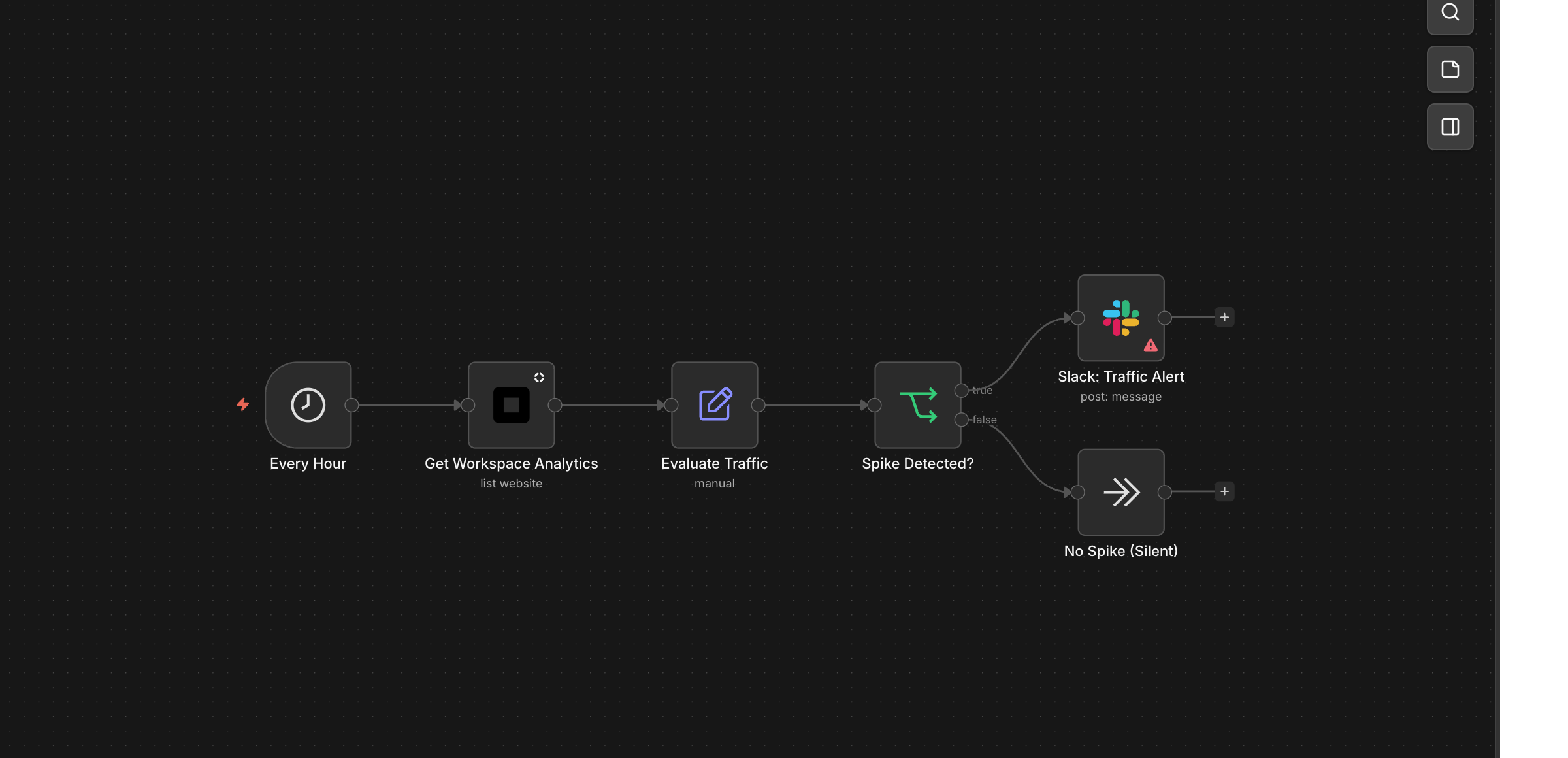
Traffic Spike Alert
Your client's site suddenly gets 5x normal traffic — maybe they went viral, maybe it's a bot attack. Either way, you know within the hour. A Slack alert tells you which pages are driving the spike so you can act fast: scale up, capitalise on the moment, or block the bots.
Hourly schedule → checks workspace traffic → if visits exceed threshold posts Slack alert with top pages and visit count. Silent pass otherwise.
Download templateAI Agent workflows
The workflow decides. The agent creates.
Context-aware creation
The agent reads trigger data (business name, industry, booking details) and creates content tailored to the specific client.
Multi-step autonomy
Agent calls Create Website, then Create Page 5 times, then Generate Magic Link — all in one execution, no human in the loop.
Runs 24/7
Prospect books at 2am? Demo site is ready by 2:01am. Monthly reports run at 9am on the 1st. No one needs to be awake.
Setup
Running in under 2 minutes
Install the community node.
Settings → Community Nodes → Install → enter n8n-nodes-lindo. Works on Cloud and self-hosted.
Add your API key.
Create a Lindo API credential. Paste your key from Settings → API in your Lindo workspace.
Import a template or build from scratch.
Start with a ready-made workflow or drag in trigger + action nodes and connect them to your stack.
How to Connect & Authorize the Lindo.ai n8n Node
Watch the full walkthrough: install the community node, create your API credential, and authorize the connection — everything you need before importing templates.
Frequently Asked Questions
What's the difference between Lindo actions and Lindo tools?
Can the AI agent really build a full website autonomously?
How do I handle errors in autonomous workflows?
Is there a limit on how many websites I can create via n8n?
Can I use this with n8n Cloud or only self-hosted?
What triggers are available?
Build workflows that run your agency on autopilot.
Install the n8n node, import a template, and watch your first autonomous website get built.