The short answer
Choose the service model first, then run a representative client through the entire workflow. Verify the platform’s boundaries and write down which responsibilities stay with your agency.
- A good fit
- An agency that wants a consistent client-facing brand while using another provider’s website infrastructure or fulfillment.
- Pause if
- You need capabilities, ownership terms, or service commitments that the provider cannot demonstrate or document.
1. Separate software resale from outsourced fulfillment
White-label software lets you present some or all of a provider’s experience under your brand. Outsourced fulfillment means another team does delivery work that you sell to a client. They can be combined, but the costs, quality checks, and responsibilities are different.
Decide whether you are selling a managed website service, access to a branded builder, or a finished project with optional support. A client who expects your team to make every edit is buying something different from a client who expects self-service. Put that expectation into the offer before evaluating logos and custom domains.
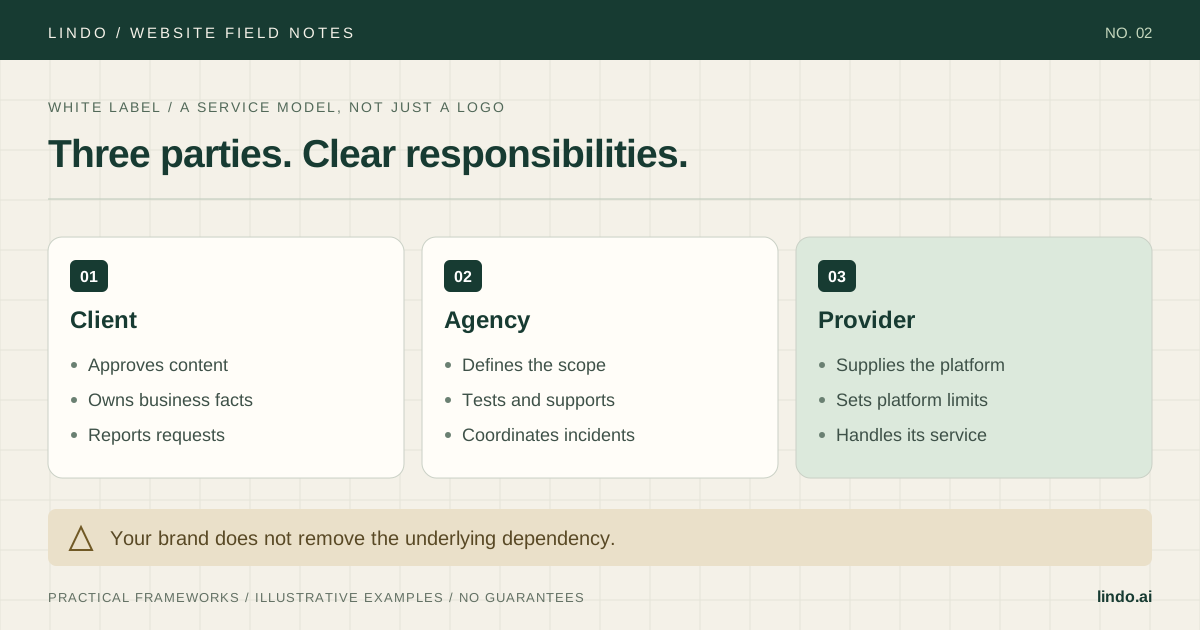
| Task | Possible owner | Evidence to request |
|---|---|---|
| Website editing | Agency or client | Test using the intended role |
| Infrastructure incident | Provider, coordinated by agency | Escalation path and service terms |
| Content accuracy | Client with agency review | Named approver and record |
| Billing and cancellation | Depends on service model | Example invoice and exit workflow |
2. Test the client experience, including awkward edges
Create a test workspace and use a separate client-role login. Walk through invitation, sign-in, editing, publishing, support, password recovery, and offboarding. Inspect the emails and screens that actually appear. A branded home screen does not prove that every communication is white-labeled.
Record what the client can see and change. Can they access another client’s workspace? Can they change billing? Can they publish without approval? Confirm the product’s supported permissions rather than assuming a role name means the same thing across platforms.
Use a representative site: shared navigation, several service pages, a form, a custom domain if available for testing, and the actual integrations you intend to sell. Ask the provider to clarify any behavior you cannot verify. Save the date and plan tested because capabilities and limits can change.
Workflow: invite a client editor to the pilot site.
Role and plan tested: [record].
Expected: only the intended site and editing controls are visible.
Test: sign in separately; inspect navigation, billing, publishing and support.
Observed result: [record with evidence].
Brand surfaces: invitation, sign-in, recovery, editor, notifications.
Unresolved limitation: [record].
Decision: accept / change the offer / reject.
3. Model the real cost per active client
List platform subscription costs, per-site charges, domains, paid integrations, fulfillment, and the time your team spends supporting clients. Separate fixed commitments from charges that grow with usage. Use current provider pricing and the actual plan you tested; do not build your offer around a temporary discount.
For an illustrative monthly model, suppose an agency allocates $300 of platform cost across 10 active clients, spends $10 per client on other direct tools, and budgets one support hour at $40. That is $80 per client before unallocated overhead, acquisition, tax, or incident spikes. At a hypothetical $150 fee, the contribution is $70, not $150 of profit. If only five clients share the same fixed platform cost, the allocation rises to $60 each and contribution falls to $40.
This arithmetic does not establish a selling price. It shows which assumptions you must validate: active client count, actual support usage, and whether the plan allows the intended service model.
4. Sell the service you will actually provide
Describe the client outcome and your continuing work: initial build, content changes, a tested enquiry flow, and a named support contact. Be clear about third-party dependencies and material limits. Branding the service does not justify misleading the client about ownership or capabilities.
Use your pilot as a demonstration, not as a customer success story. Show an edit, a submission, and a handoff task live. Ask who will maintain the website and who approves changes. If a client needs a custom application or an unsupported commerce workflow, do not promise that the provider will add it later.
5. Write the escalation and exit paths before launch
For each dependency, record an owner, account access location, support route, and what the agency can do during an outage. A provider’s response target is not automatically your client-facing resolution promise. You can own communication without claiming you can fix infrastructure you do not control.
Test the available handoff or export path. List what can be transferred, what needs rebuilding, and what requires the provider’s help. Keep domain ownership, content ownership, platform access, and billing as separate questions. Never promise universal portability because an export button exists.
Use a service agreement reviewed for your situation to cover responsibilities, cancellation, payment, data handling, and the practical handover process. Your operational worksheet is not a replacement for that agreement.
6. Add clients only after the pilot survives support
The first useful milestone is not a completed branded dashboard. It is a site that has gone through content approval, launch, a real edit request, billing, and a handoff rehearsal. Track which steps needed manual intervention and which assumptions were wrong.
Standardize site setup, role checks, content review, and incident communication. Keep a provider-change log so a new limit or workflow does not silently invalidate your offer. If support time grows faster than client count, investigate the request patterns before selling more of the same plan.
Take it into the project
White-label platform acceptance worksheet
Copy this into your project brief, assign an owner to each item, and attach evidence before marking it complete. No email required.
- The offer distinguishes managed service, self-service, and fulfillment.
- Client-role access and brand surfaces have been tested.
- Critical website functions work on the intended plan.
- Costs include support time and low-client-count scenarios.
- Support, incident communication, and provider escalation have owners.
- Domain, content, billing, and exit responsibilities are documented.
- A complete pilot is reviewed before expansion.
Includes role tests, brand-surface checks, a responsibility map, cost assumptions, and an exit rehearsal.
Common questions
Is white-label web design passive income?
Not if you are responsible for service delivery. Even a provider-managed platform leaves client communication, content requests, billing, quality checks, and escalations. Budget those responsibilities explicitly.
Can clients manage their own websites?
Only to the extent the chosen platform, plan, permissions, and your service agreement allow. Test the actual client role and give a task-based handoff instead of assuming the editor is self-explanatory.
Should I choose the cheapest platform?
Compare the full service cost and the critical workflows. A lower subscription does not help if it requires unsupported workarounds, more support labor, or an exit path your clients cannot accept.