

Latest Updates
September 2026 - Latest Release
September 2026
Built-in Forms, Shared Webhooks & n8n
New forms created by the website agent use the built-in inbox by default. Publish the page to register the form, then open Website → Forms to review submissions, filter unread, spam or test entries, and export CSV. Under Website Settings → Integrations → Form webhooks, set a default HTTPS webhook URL for all forms and copy the website signing secret. A form’s Webhook URL override sends its submissions to a different destination; leaving it blank uses the website default. Every form on the website uses the same signing secret. Submissions are saved before delivery, and failed webhooks can be retried manually from the inbox. For an older website, click Migrate existing forms in the Forms tab. The agent inspects pages and shared sections, preserves forms already connected, and converts unconnected or Formbnb forms while keeping their design and fields. Review the draft and publish when ready. Existing Formbnb submission history stays in Formbnb; unsupported embeds are reported for review. Visitors see Form submitted and your custom success message in a light/dark confirmation modal, anchored to the form on the original page. It stays open until they click Close. The n8n integration adds a Form Submission trigger. Add the website signing secret to its credentials and paste its production webhook URL into the website default or a form override. It verifies signatures and timestamps before starting your workflow. Read the n8n setup guide. Form labels in the website dashboard use neutral wording, so the feature fits your white-label service. Forms do not require website activation. Email notifications and automatic webhook retries are not included.August 2026
🔎 Google Search Console, Bing Webmaster Tools & IndexNow
Once your website has a connected custom domain, you can connect Google Search Console and Bing Webmaster Tools directly from Website Settings. Lindo verifies the property when needed and submits its sitemap, so search engine setup stays attached to the website you manage. IndexNow is automatic and requires no user account or setup. When published site URLs change, Lindo notifies supported search engines in the background. There is no manual sync step to remember.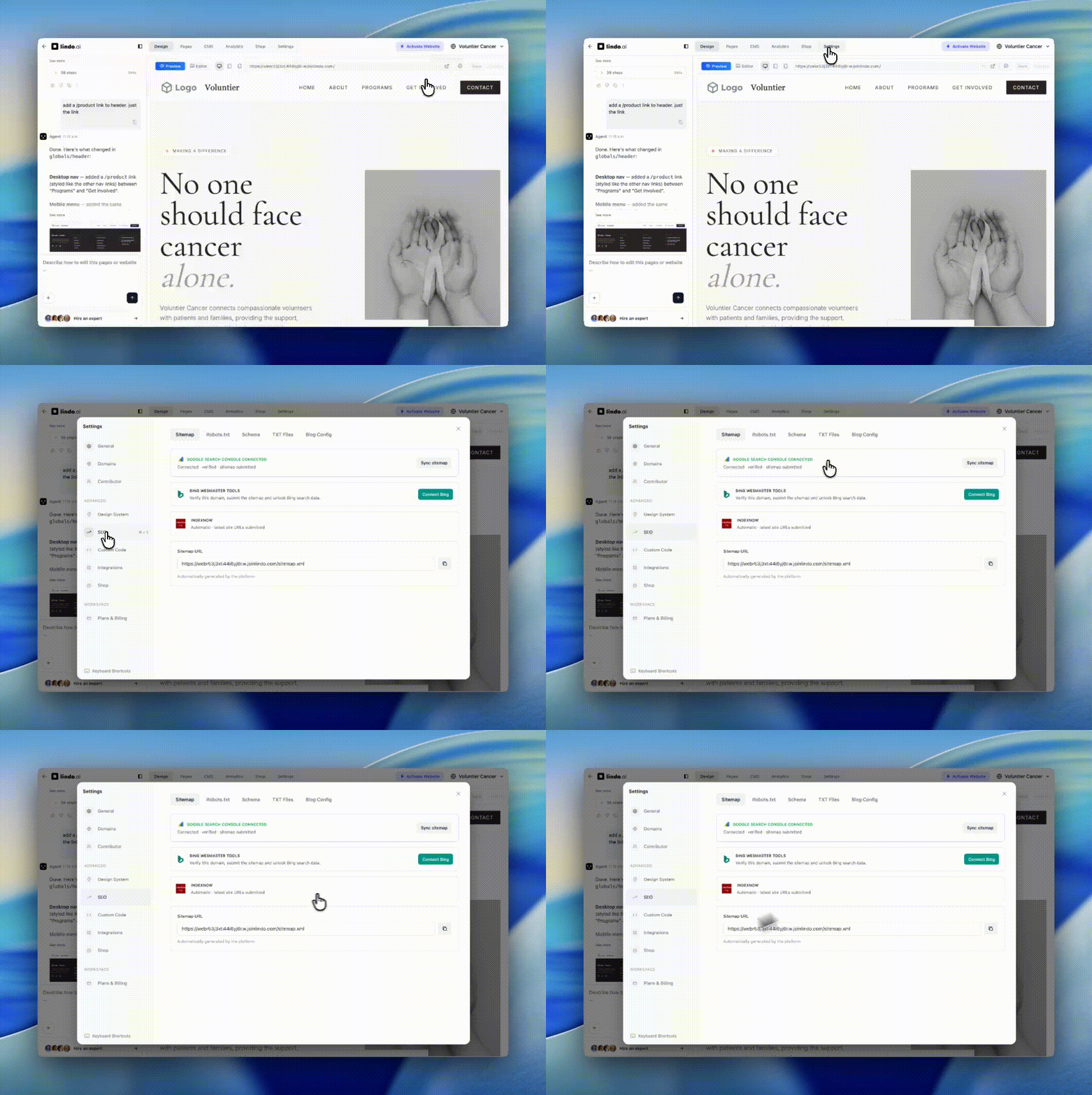
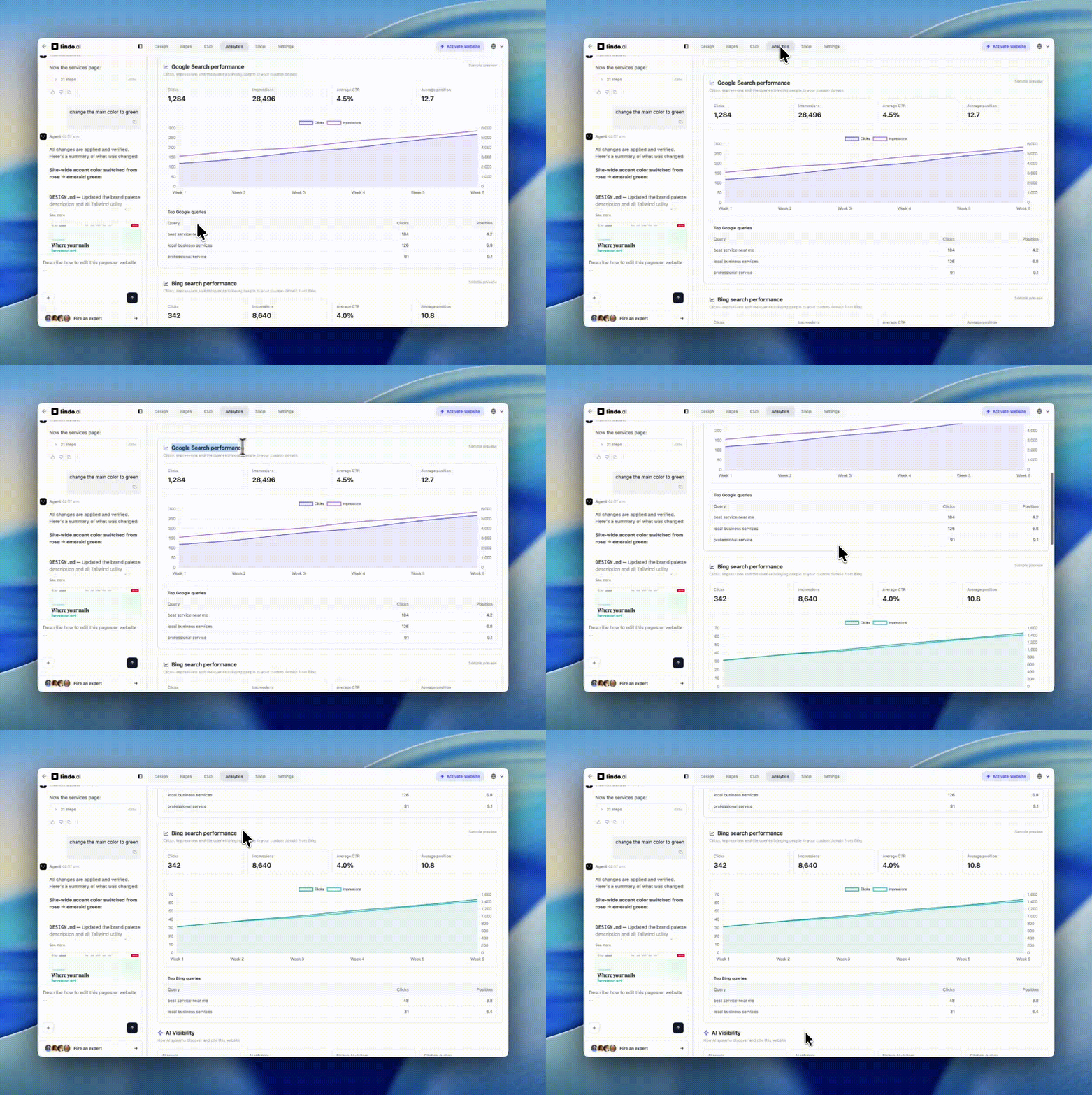
📊 Search Performance in Website Analytics
Website Analytics now brings your search data into Lindo. After connecting Google Search Console or Bing Webmaster Tools, you can see clicks, impressions, click-through rate, average position, performance over time, and top search queries for the website’s custom domain. You can also see the domain’s Ahrefs Domain Rating. Lindo checks the apex domain, so a custom domain such aswww.example.com uses the authority score for example.com.
📥 Downloadable Files for Links and Buttons
You can now upload files to the Media Library and make them available from any website link or button. Open Link Action, choose the new Download tab, and select a file from Files. Lindo stores the file on its public CDN so the download remains available on your published website. File uploads support PDFs, ZIP archives, documents, spreadsheets, presentations, images, and videos up to 20MB. File assets are available for download actions without appearing as replacement options for image or video elements.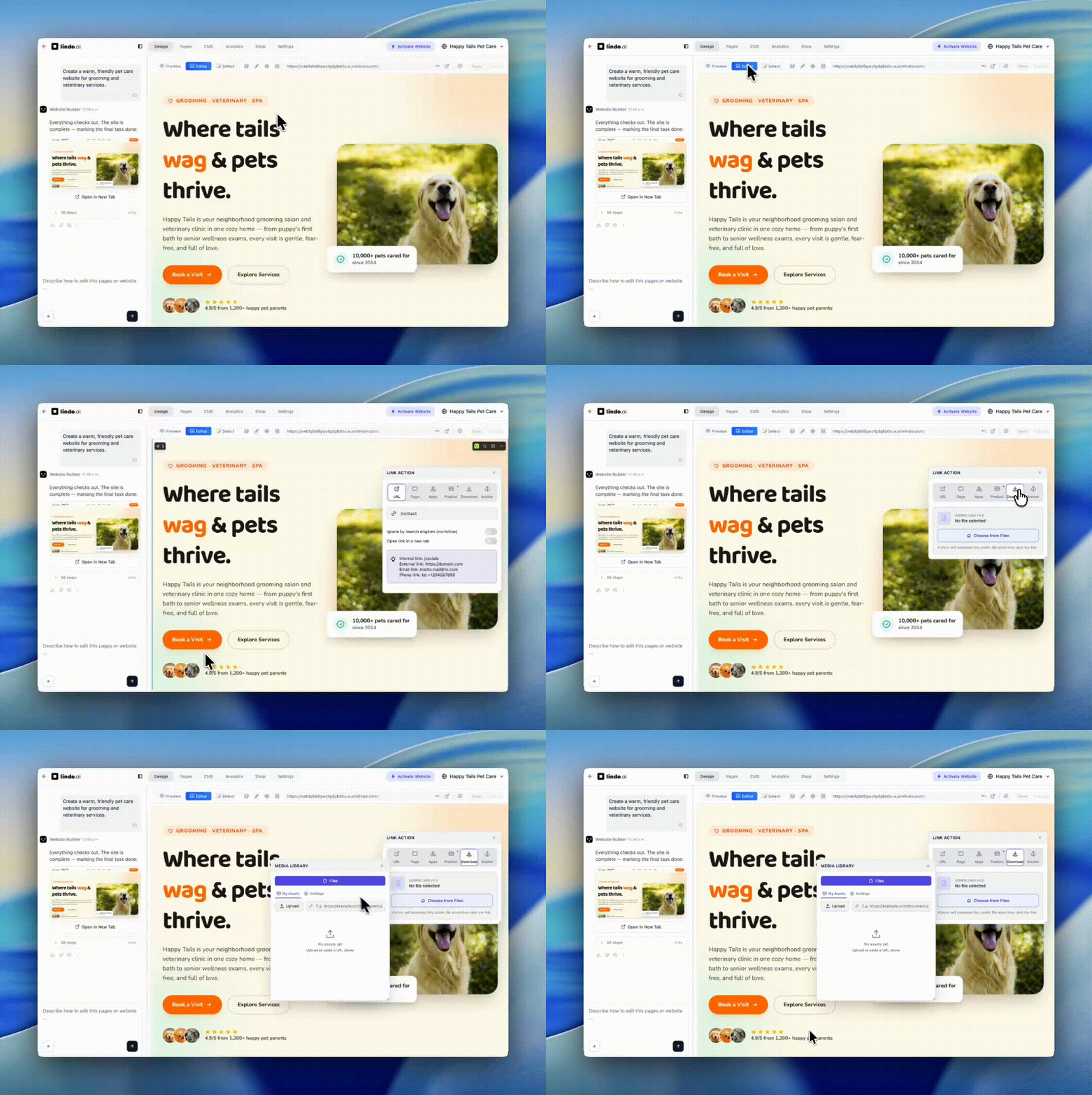
🔗 Media Library References in Agent Chat
The website agent can now receive a reference link from your Media Library. Choose Add reference in the agent chat, then select an image, video, or file. The public URL is added to your message so you can ask the agent to use that asset on the website — for example, “Use this video in the hero” or “Add this PDF as a download.” A reference is a link only: the agent receives the asset’s public URL, not the file as an attachment or model input.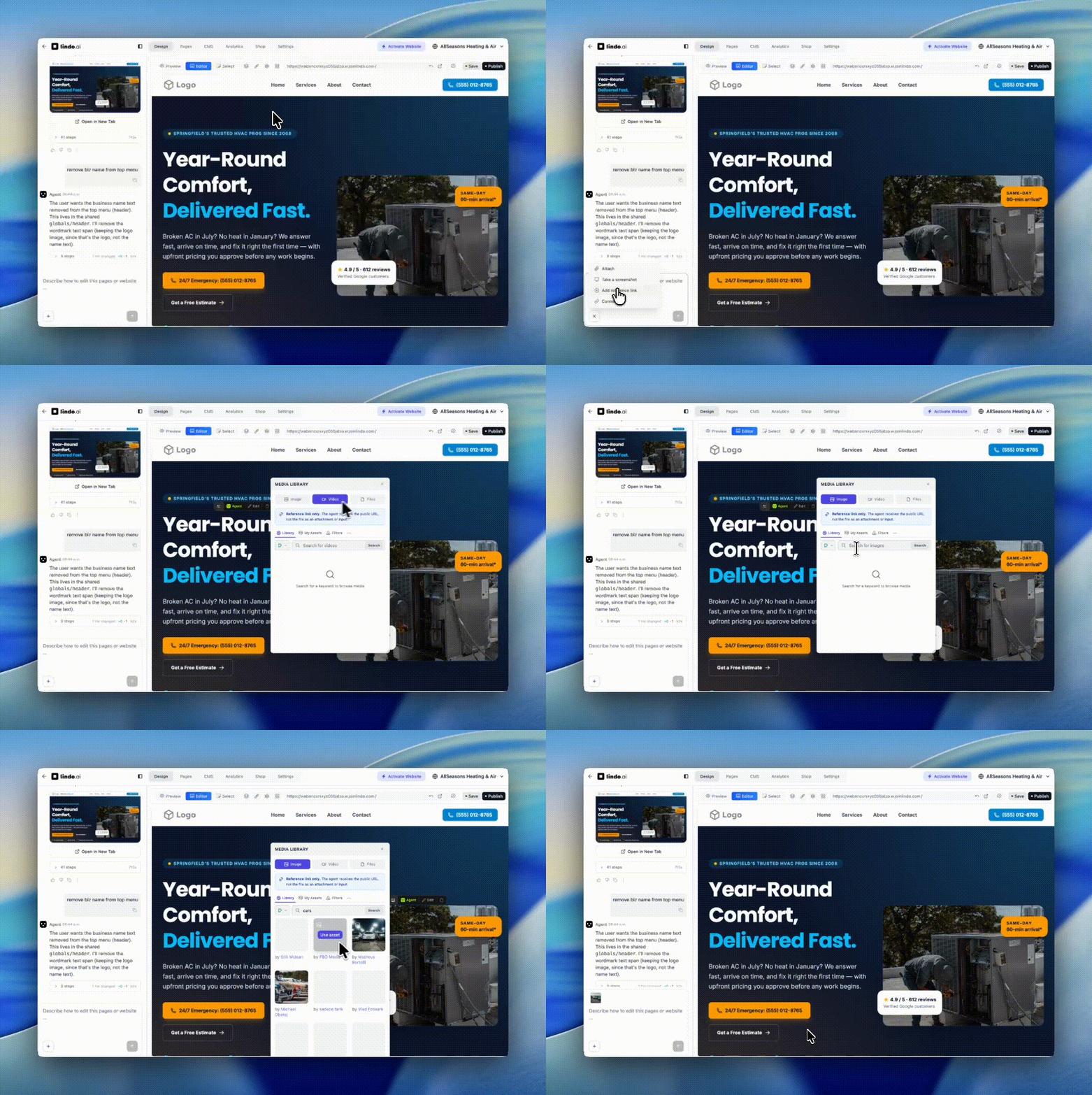
July 2026
🗺️ Build a Website from a Google Business Profile
You can now turn a Google Business Profile into a full website. In the create box, choose Import from Google, paste your Google Maps link (a full URL or amaps.app.goo.gl short link), and the agent builds your site from real business data pulled straight from Google — business name, address, phone number, opening hours, and rating, along with up to 10 photos and 10 recent reviews.
No more invented placeholder details: the agent uses your actual Google listing, so the first draft already reflects your real business. It’s the fastest way for local businesses and agencies to launch an accurate site from information that’s already public.
🧾 Native Forms with FormBnB
Lindo now supports native website forms that can be connected directly to FormBnB. Add FormBnB as an MCP connector in the website editor, then use one prompt — “Connect all of my website forms to my FormBnB account.” — and the agent will wire native, agent-designed forms to your FormBnB account. This gives agencies a simple form workflow without embeds or custom backend code: the agent designs the forms, FormBnB handles submissions, spam protection, email alerts, and downstream workflows.June 2026
✨ Lindo V3 Vibe Coding
A completely new Lindo experience. Open a website and just tell the agent what you want — it understands your whole site and makes the change. Preview-first editing, MCP data connectors, one-click website cloning, and simple credit-based pricing while we roll it out.🤖 Website-Aware Agent
Our agent now understands your entire website — every page, yourDESIGN.md, and all website settings. You can ask it to update the current page, make changes across all pages, change branding colors, or even redesign the full website, all in a single conversation.
👁️ Preview-First Editor
When you open a website in the editor, it now starts in Preview mode. You can navigate between pages just like a published website and check every change naturally. You don’t even need to activate the editor anymore — just ask the agent what you want changed, mention the section or area, and it’s smart enough to find it. You can still use Editor mode, Select mode, and element/block selection when you want more control.🔌 MCP Data Connectors
You can now connect Supabase, Airtable, Stripe, and Shopify as MCP connectors when creating a website or inside the editor. This means you can ask the agent to build or update websites based on connected data — create client dashboards with Supabase, build storefronts from your Shopify products, and much more.📑 Website Cloning
You can now clone any website, including Lindo Core/Legacy websites. It’s a great way to move your existing projects into the new Agentic experience — you can import all your client websites from other platforms into Lindo in a few hours.🪙 Credit-Based Pricing
Lindo is credit-based: instead of fixed per-action prices, credits are consumed according to how much work the agent does and how complex the task is. A small edit uses far fewer credits than building a full page or an entire multi-page website. Our goal is to make Lindo credits cheaper over time, not more expensive — so this is a great time to migrate your Legacy or client websites to Agentic.🧠 Lindo MCP Server, CLI & Automations
We’ve added the Lindo MCP server and CLI, and you can now build agency automations with n8n and Zapier. Connect your lead forms to your workspace and automatically create websites for clients when they submit a form. The MCP server exposes Lindo’s tools to Claude, ChatGPT, Perplexity, Cursor, and any MCP-compatible client.May 2026
🤖 AI Visibility Analytics
Don’t waste $200/month on AI visibility tools. It’s now built into Lindo for free. A new dashboard section that shows you exactly how AI systems are interacting with your websites. Track AI crawls, AI referral clicks, citation-to-click ratio, top cited pages, and a purpose breakdown that separates real-time citations from search-index crawls and bulk training. Available at both Workspace level (across all your sites) and Website level (per individual site).🧰 20 Free SEO Tools
We launched a full toolkit of free SEO tools for agencies. Use them as sales collateral on discovery calls, as client reports, or as pre-flight checks before you ship a site. All free, all browser-based, no signup required. Browse all tools → Five highlights worth knowing:- Landing Page Scorecard — Paste any URL and get a one-page report with performance, SEO, accessibility, and conversion scores. Great for prospecting: send a prospect a scorecard of their current site before a sales call.
- Website Audit — Full technical SEO audit for any URL. Crawlability, indexability, meta tags, structured data, and performance issues in a single run.
- SERP Snippet & Open Graph Preview — See exactly how a page will look in Google search results and on social shares. Edit title, description, and OG tags live until it looks right.
- Heading Structure Audit — Visualize the H1–H6 hierarchy of any page. Spot missing H1s, skipped heading levels, and structural SEO issues instantly.
- Broken Link Checker — Crawl any URL and surface broken internal and external links. Export as CSV for client handoff or fix directly in the editor.
📮 Form Connector in Editor
The editor now detects form blocks on any page and lets you connect or replace the form destination in one click.April 2026
📅 Scheduled Workflows
Workflows now support scheduling. Set a future date and time when creating a website, page, or blog workflow — it will run automatically at the scheduled time. Edit or cancel scheduled workflows anytime before execution. Batch CSV imports also support aschedule_at column for bulk scheduling. Learn more →
🔍 Website SEO
- Workflow table improvements — Workflow list now shows Created date, Schedule date, and Duration columns.
- Edit scheduled workflows — Change the prompt or reschedule date for pending workflows.
Store-level Shop Activation
You can now enable Shop directly from each website’s Settings modal. This makes ecommerce activation website-specific instead of workspace-wide, which is much better for agencies managing mixed portfolios.Shop Documentation & Navigation
The docs now include a dedicated Shop section in Website Editor documentation. Products now live under Shop so the full commerce flow is easier to follow from activation to checkout configuration.Stripe Coupons Guide
Shop settings now guide you to Stripe coupons, making it easier to create discounts and then activate discount-code collection on the right products.Stripe Inventory Workflow
Inventory guidance now points merchants to Stockify on the Stripe Marketplace for stock management and operational workflows.Stripe Shipping Rates in Checkout
If a checkout includes at least one product that requires shipping, Lindo now passes all active shipping rates from the connected Stripe account into Stripe Checkout.🌐 Global Theme & Blog Header/Footer
- Global fonts & dark/light mode — Set your website’s font and color mode once, and all published pages follow it automatically. No need to republish — changes take effect instantly at the edge.
- Website header/footer for blogs — Blog posts and the blog list page can now use your website’s global header and footer instead of the default blog navigation. Enable it from Blog Config in website settings, or leave the blog menu links empty to use the website header/footer by default. Already-published blogs update automatically.
📊 Analytics Improvements
- Bot traffic filtering — A new “Hide bots” toggle in both workspace and website analytics filters out bot/crawler traffic so you only see real human visitors. Enabled by default.
- Website filter in workspace analytics — Search and select a specific website from the workspace analytics modal to view its individual traffic, top pages, countries, browsers, and more without leaving the overview.
- Horizontal scroll on data tables — Analytics tables with long domain names or referrer URLs now scroll horizontally instead of clipping content.
✏️ Editor Improvements
- Font name labels — Font options in the editor theme panel now display the font name below each preview, so you can identify fonts at a glance.
- SEO character guidance — Page title and meta description fields in page settings now show a live character counter with recommended ranges (15–70 for titles, 120–170 for descriptions). Fields are capped at the max to prevent over-length entries.
🔄 Page Persistence on Refresh
Refreshing the website editor no longer resets you to the first page. The currently selected page is now persisted in the URL, so you stay on the same page after a browser refresh.🤖 Semi-Agentic Support
Our support system is now powered by AI agents. When you submit a feature request, bug report, or need guidance, our agents immediately start preparing answers and update our internal technical logs so the team is notified. Once we verify the response, the agents send the reply and begin preparing any related product updates. This cuts our response workflow by roughly 90%. We’re just getting started.🌐 Domain Connect for Domains
Domains now support Domain Connect for one-click connection. Cloudflare is currently supported, so you can connect and configure DNS without manually copying records.🏷️ Simpler White Label Domain Setup
White label domain configuration now needs only 5 DNS records instead of 9, making branded client portals faster to launch and easier to maintain.🔗 Leaner Website Domain Configuration
Website domain setup now needs only 2 DNS records instead of 3, so pointing live sites is simpler and less error-prone.March 2026
🌗 Light Mode for Workspace
Your workspace and white label setup now support light mode. Switch between light and dark themes from the Appearance tab. Your clients get the same option too. Learn more →🛒 Shopping Cart (Beta)
Websites now support a built-in shopping cart. When activated, visitors can add multiple products to their cart and pay for everything in a single checkout. This feature is currently in beta — send a support ticket to enable it on your account.🔄 Global Header & Footer
Changes to your header or footer now instantly apply across all published pages — no need to republish or take any additional action.🎁 Gift & Daily Credits
Agentic users can now collect 30 free credits per day and earn up to 2,000 credits by activating and testing features across the platform.✨ Enhanced Select Mode
Select mode in the editor is now more powerful with detailed property controls. Fine-tune individual element properties directly from the selection panel. Learn more →💅 UX & Product Polish
- Redesigned onboarding flow
- Improved sign-in experience
- Skeleton loading states throughout the app
- Smoother preview transitions
- New user account popover
- Workspace and sidebar popover improvements
February 2026
🤖 Agentic Experience
Lindo is now fully agentic. Our AI doesn’t just follow commands—it understands your goals and works autonomously to achieve them. Create entire websites, pages, and content with natural conversations.AI Agent at Your Service
Our website-aware AI agent handles every kind of task from one conversation. Learn more about the AI agent →- Build websites - Create complete websites from a single prompt
- Build pages - Professional pages with layouts and sections
- Create sections - Generate new content blocks from scratch
- Edit content - Modify existing blocks and fine-tune individual elements
- Headers & footers - Navigation headers and comprehensive footers
- Write blog posts - Generate engaging blog content
✨ New Editor Features
Select Mode
A new selection mode that makes it easier to pick and edit elements precisely. Learn more →Float Settings
Floating settings panel for quick access to element properties without leaving your workflow.Media Support
Not just images anymore—add videos, audio, and other media types directly in the editor.Layer Control
Figma-style layer panel to manage element hierarchy, visibility, and organization. Learn more →Undo/Redo
Full undo and redo support. Never lose your work again. Learn more →Page History
View and restore previous versions of any page. Track changes over time. Learn more →Asset Library Panel
Browse all images and background images used across your pages and blocks in one place. Click any asset to swap it via the Media Library. Learn more →Page Meta Image
Set your page’s SEO meta image directly from the Media Library instead of pasting URLs manually. Learn more →Batch Media Upload
Upload multiple files at once in the Media Library — up to 20MB total, all in parallel. Learn more →📚 600+ New Templates
We’ve added over 600 professionally designed templates across all industries. Browse Templates →- Technology & SaaS
- Agency & Consulting
- Healthcare & Medical
- Real Estate
- E-commerce
- Restaurants & Food
- And many more…
🧱 500+ New Blocks
Expand your designs with 500+ new pre-built blocks:- Hero sections
- Feature grids
- Testimonials
- Pricing tables
- Contact forms
- Team sections
- And much more…
🚀 Full Website in One Shot
Create a complete multi-page website with a single prompt. Our AI generates:- Home page
- About page
- Services page
- Contact page
- And more based on your needs
🔌 New APIs
Programmatic access to Lindo’s capabilities. API Documentation →- Website creation API
- Page management API
- Content generation API
- Asset management API
🔗 Webhooks
Get notified when things happen in your workspace. Webhook Guide →- Website created
- Page published
- Form submitted
- And more events
📊 Analytics
Workspace Analytics
Track performance across all your websites. Learn more →- Total visitors
- Page views
- Traffic sources
- Device breakdown
- Geographic distribution
Website Analytics
Detailed insights for individual websites. Learn more →- Traffic charts
- Top pages
- Referrers
- UTM campaigns
⚡ Workflows
Automate your agency operations. Workflow Guide →- Batch website creation
- Bulk page generation
- Scheduled publishing
- CSV imports
📄 TXT Files
Manage robots.txt, ads.txt, and other TXT files directly from settings. Learn more →🤖 Auto-Generated llm.txt
Every new website automatically gets an llm.txt file following the llm.txt standard. This helps AI assistants understand your website better, improving how AI tools interact with and describe your business.📋 JSON Schema
Structured data support for better SEO with JSON-LD schema markup. Learn more →↪️ 301/302 Redirects
Set up URL redirects for:- Old page migrations
- Marketing campaigns
- A/B testing
📰 Dynamic Blog List
Automatic blog list page handling with:- Pagination
- Categories
- Search
- Custom layouts
🏢 For Agencies
Lindo’s agentic version is built for agencies. White Label Setup →- White-label everything - Your brand, your domain
- Client management (CRM) - Manage all your clients
- Team collaboration - Invite team members
- Billing & invoicing - Send invoices to clients
- Reseller program - Build your own SaaS
- Workspace embedding - Embed in your platform
- Trial websites (Elite) - Set up trial periods for your customers
Reseller Tiers
Create subscription plans for your clients with custom pricing. Define up to 4 tiers, each with website limits, monthly AI credits, and pricing in USD, EUR, GBP, AUD, or CAD. Clients subscribe through Stripe Checkout and can upgrade, downgrade, or cancel anytime. Learn more →Credit Packages
Sell one-time credit bundles to your clients. Define up to 4 packages with custom credit amounts and pricing. Clients purchase through Stripe Checkout and credits are added to their balance instantly. Learn more →🌍 15 New Languages
The webapp is now available in:- 🇨🇳 Mandarin Chinese (中文)
- 🇨🇿 Czech (Čeština)
- 🇳🇱 Dutch (Nederlands)
- 🇪🇸 Spanish (Español)
- 🇫🇷 French (Français)
- 🇩🇪 German (Deutsch)
- 🇮🇹 Italian (Italiano)
- 🇯🇵 Japanese (日本語)
- 🇵🇱 Polish (Polski)
- 🇵🇹 Portuguese (Português)
- 🇷🇺 Russian (Русский)
- 🇷🇴 Romanian (Română)
- And more…
🔮 Coming Soon
We’re building the future of agency management. Soon, Lindo won’t just be agentic—AI agents will control your entire agency through natural conversations. Imagine managing your agency from your phone:“Create a website for the new client we discussed yesterday”
“Send the invoice to John’s company”
“Show me this week’s analytics”
“Publish all draft pages for the restaurant project”The future is conversational. Stay tuned.
Have feedback or feature requests? Contact our support team.